Google Play conversion rate is what happens after the tap: the user found your app, landed on the page, and now it's time to decide — install or leave. According to ASOMobile Store Benchmarks, the average CR on Google Play is 36.53%, but Strategy games sit at 16.59% while Auto & Vehicles reaches 49.87%. If your numbers are below the category benchmark, your listing is losing users the algorithm already sent you — and your paid budget is working at half capacity.
Google Play conversion rate optimization is the systematic work of improving what users see at the moment of decision: icon, screenshots, description, rating, localization. This guide covers which elements drive conversion on Google Play, how to run experiments, how to read results, and how to build a process that produces real growth.
What Is Google Play Conversion Rate and Why It Matters
Google Play conversion rate is the percentage of users who visited an app's listing in the Play Store and installed it. The formula is simple: installs divided by store listing views, multiplied by 100.
According to ASOMobile Store Benchmarks, the average CR on Google Play is 36.53% — but that number means nothing without category context. The gap is enormous: Auto & Vehicles at 49.87%, Strategy games at 16.59%. Compare yourself to direct competitors in your niche, not a store-wide average.
Why does CR matter so much for growth? It works on two fronts at once.
Organic traffic: the Google Play algorithm factors in conversion rate when ranking apps. An app with a high CR gets a ranking boost in search, all else being equal. A well-optimized listing doesn't just convert the traffic that's already there — it helps attract more of it.
Paid traffic: every dollar spent on UAC or other campaigns performs better when your store listing converts well. A low CR means your ad budget is essentially funding page views that go nowhere.
Google Play CRO vs App Store CRO: Key Differences
Copying your App Store approach directly is a mistake. The mechanics are different. If your team has worked on App Store conversion before, some of the logic carries over — but the core tools and opportunities are fundamentally different.
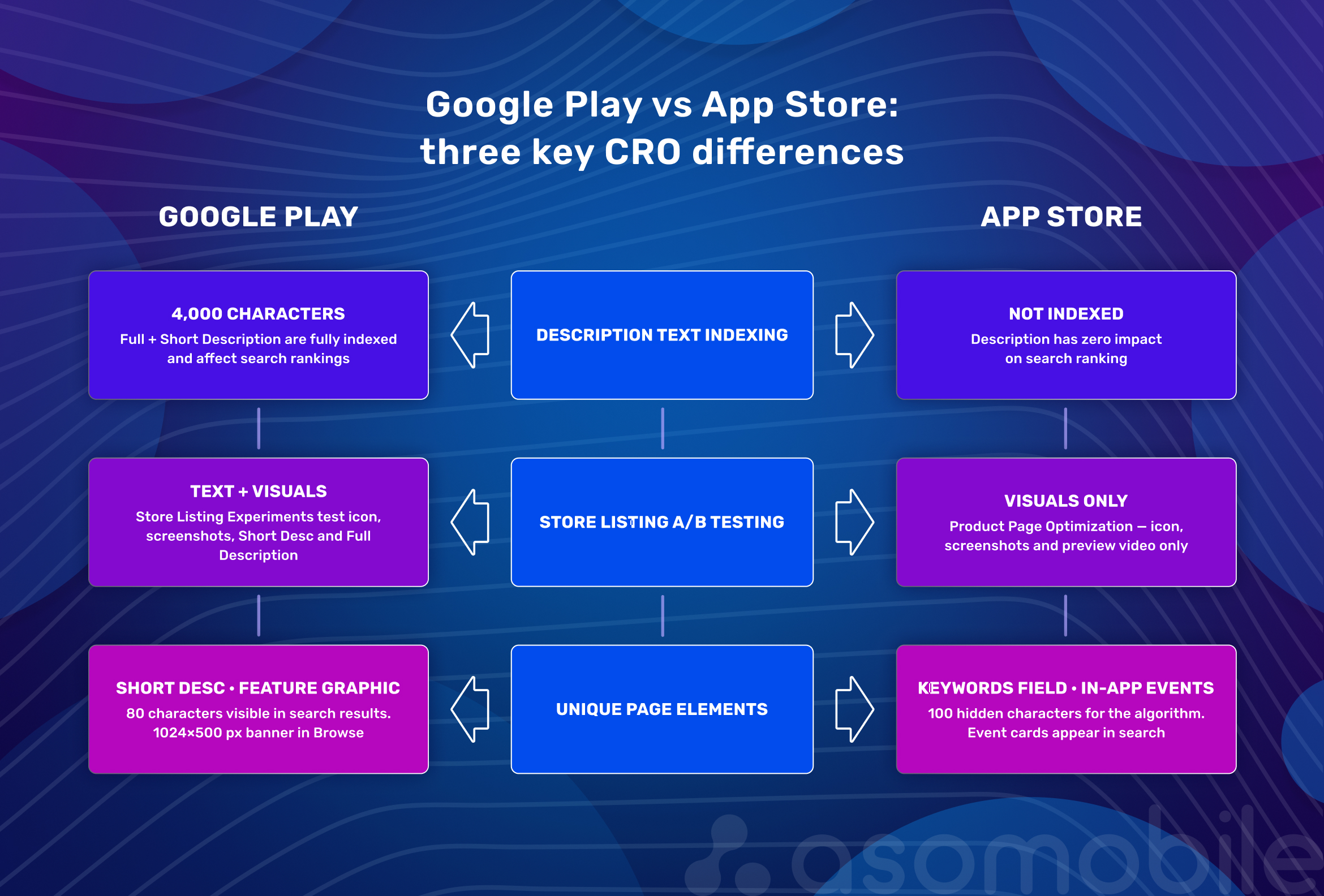
The biggest difference is indexation: Google Play fully indexes your description text — both the Short Description and Full Description. On the App Store, the full description has zero impact on rankings. This means on Google Play, your description text does double duty: it drives both visibility and conversion. You can't write it purely for users or purely for the algorithm — it has to work for both.
The second difference is page structure. Google Play has a Short Description (80 characters) visible directly in search results. The App Store has no equivalent — the subtitle there belongs to the title field. The Feature Graphic — a horizontal 1024×500 banner — is also unique to Google Play with no iOS counterpart.
The third difference is A/B testing capabilities. Google Play Store Listing Experiments let you test not just visuals but also text: Short Description and Full Description. App Store Product Page Optimization only works with the icon, screenshots, and video. This makes Google Play experimentally richer — as long as your team is actually using it.
Finally, the audience. Android users are on average more geographically and economically diverse. Many of Google Play's largest markets by installs are non-English-speaking countries, where cultural context and localization impact conversion more heavily than on the App Store in the US.
Key Google Play Listing Elements That Affect Conversion
App Title
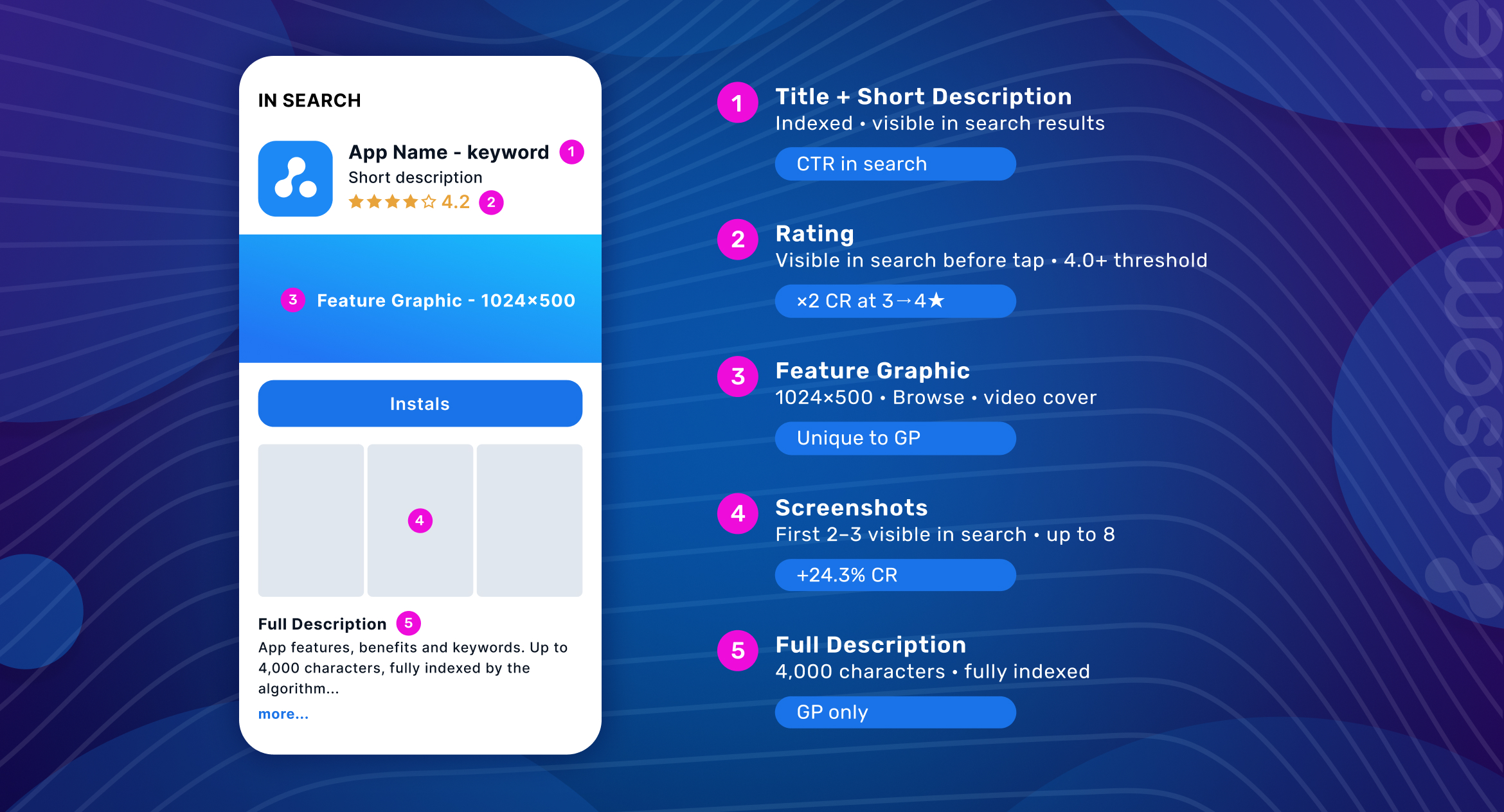
The title is the heaviest text signal. It affects both search visibility and CTR. The Google Play algorithm assigns the title field the highest ranking weight among metadata elements. 30 characters — use every one of them: brand + keyword that describes the core value. "Duolingo — Learn Languages" outperforms just "Duolingo." For a deeper look at how a Google Play listing is structured and which elements affect ranking, see the dedicated guide.
Short Description
80 characters visible in search results before the user ever taps through to the page. This is a Google Play-exclusive opportunity: one text block that influences both CTR and conversion. Short Description is indexed by the algorithm, so keywords belong here — but the primary job is to tell the user why they should tap "more" or go straight to "install." The first few words carry everything: they're visible in search before the text cuts off. For a practical breakdown of how this field performs, see the article on Short Description and its impact on conversion.
Full Description
Up to 4,000 characters of fully indexed text — a unique advantage Google Play gives you that the App Store doesn't. A strong description is structured like this: the first two lines present a specific problem and its solution (visible without tapping "more"), followed by details and benefits. Keywords are woven in naturally, not listed. A keyword-stuffed description reads like spam and works against conversion.
| Listing Element | CRO Role | What to Optimize | Metric to Track |
| Title (30 characters) | Primary visibility and search CTR factor | Brand + keyword, readability, intent match | Search CTR, keyword rankings |
| Short Description (80 characters) | Visible in search results, drives CTR and indexation | Lead benefit in the first words, keywords | CTR, listing CR |
| Full Description (4,000 characters) | Fully indexed, affects visibility and read-through | First 2 lines = problem/solution, organic keywords, no keyword stuffing | Scroll depth, CR |
| Icon | Search and Browse CTR, first impression | Simplicity, contrast, relevance to function, A/B test | CTR, TTR |
| Screenshots (up to 8) | Communicate value, critical for CR | First 2–3 are decisive, bold captions, storytelling, portrait/landscape | CR, screenshot scroll depth |
| Feature Graphic (1024×500) | Top-of-page banner, visible in Browse | Core message + visual, don't duplicate the icon | CR, Browse CTR |
| Video (Promo Video) | Shows the app in action, builds trust | First 5 seconds without audio, show outcomes not UI, large on-screen text | CR, watch time |
| Rating & Reviews | Visible in search before the tap | 4.0+ threshold, ask for review after a success moment, respond to negatives | Average rating, CR |
Icon, Screenshots, Feature Graphic, and Video: What Actually Drives Installs
Icon. According to SplitMetrics, icon A/B tests deliver up to 24% CR lift — more than any other listing element. The icon is the first thing users see in search and Browse. Three requirements: readable at small size, distinct from competitors in the same results, and instantly clear what the app does. Intricate detail, text, and cluttered compositions work against conversion.
Screenshots. The most powerful conversion tool on the page after the icon. The first two or three screenshots decide everything — they're what users see in search results on most devices. Key rules: captions are large and legible without zooming, every screenshot makes a claim rather than just showing UI, order goes from most to least important. Google Play displays screenshots in portrait or landscape — make sure the orientation you chose is optimal for your category. For a detailed breakdown with examples, see the complete guide to screenshots for App Store and Google Play.
Feature Graphic. A 1024×500 horizontal banner visible in Browse and at the top of the listing page. It's consistently underestimated — teams leave a template image or duplicate the icon. A strong Feature Graphic communicates the core message at a glance: who you are, what you do, why it's worth attention. If the listing has a video, the Feature Graphic becomes its cover thumbnail — one more reason to make it compelling.
Video (Promo Video). Unlike App Store previews, Google Play video doesn't autoplay in search — users have to tap Play. This reduces its role at first contact but increases it for users who are already interested and want to see the app in action. The first 5 seconds: no logo, no black screen, straight into a meaningful action. On-screen text is non-negotiable — video is often watched without sound. Show outcomes, not a list of features.
Ratings, Reviews, and Trust Signals
Rating is visible in search results before the user ever opens the listing page. It's the only element that influences conversion at the very first touch.
The data is clear: 48% of users avoid apps with a rating below 4 stars. For a systematic approach to improving your app's rating without shortcuts, there's a dedicated guide — but here's the key point. Moving from 3 to 4 stars delivers up to an 89% increase in conversion, according to AppsFlyer. Apps rated 4.0 and above are significantly more likely to appear in Featured sections — which generates additional organic lift.
How do you manage ratings without changing the product? The right moment to ask for a review is immediately after the user completes a meaningful action inside the app. Not on launch, not after 10 minutes of use, not at a random moment — that's irritating and lowers the odds of a positive response. A user who just achieved their goal — finished a workout, sent a transfer, passed a level — is in the best emotional state to leave a review.
Responding to negative reviews isn't just courtesy. Potential users read not only the review itself but also the developer's reply. A professional, non-defensive response signals that the team is listening. Research shows apps that reply to reviews improve their average rating by 0.7 stars.
Another trust signal worth tracking: update history. Regular releases with clear release notes show users that the product is alive and evolving. "Last updated 2 years ago" kills conversion even for high-quality apps.
Google Play Store Listing Experiments: What to Test and How to Avoid False Conclusions
Store Listing Experiments is Google Play's built-in A/B tool. The key difference from the App Store PPO is that you can test both text and visuals. For a full practical breakdown with examples, see the article on A/B testing in Google Play and App Store. Elements you can test: icon, Feature Graphic, screenshots (up to 8), Short Description, and Full Description.
Powerful — but only when used correctly.
One hypothesis at a time. Testing the icon and screenshots simultaneously will give you results you can't interpret. What worked? The icon? The first screenshot? Both together? Unknown. Test one element, get clean data.
Hypothesis before launch. Not "let's see what performs better," but "I predict the icon with a human face will convert better than the abstract version, because in our category users make decisions based on social triggers." The hypothesis is formed before the test, not explained after.
Minimum 7 days. Anything less is unreliable — user behavior differs between weekdays and weekends. Fourteen days is often optimal. Google Play Console shows its own confidence level for results — wait for at least 90–95% before making a decision.
Stable external conditions. If you launch an ad campaign, push an update, or a competitor goes viral during the test — the results are contaminated by external factors. Plan experiments for periods without major traffic changes.
What to test first. Icon — it affects CTR before users even reach the listing. The first 2–3 screenshots and their order — those are visible in search without tapping through. Short Description — produces results quickly even on lower traffic volumes. Test Full Description later: the effect takes longer to show and requires a larger sample.
False conclusions. The most common mistake is stopping a test early when one variant is "obviously" winning. Statistical significance in the first few days is an illusion — small sample sizes produce high variance. The second type of mistake: implement the winner and move on. Markets change. What worked in March may not work in September.
Localization and CRO by Country
Localization isn't translation. Translation is the process of taking English text and rendering it word-for-word into Russian or Japanese. Localization is adapting content to cultural context, visual expectations, and local behavior patterns.
Most of Google Play's largest markets by installs are non-English-speaking countries. Yet most teams publish a single English listing and call it done.
The data say otherwise: localized listings consistently show higher CTR and conversion rates than English-language alternatives in non-English markets. The reason is simple: a user who sees a listing in their own language — with cultural context intact — makes their decision with greater confidence.
What to localize for Google Play CRO:
Screenshots — not just the text on them, but the visual context. Japanese users respond to different triggers than Brazilian users. Japanese audiences often respond to anime-influenced aesthetics, precise detail, and social proof in the form of numbers. Brazilian audiences respond to emotion, vibrancy, and social connection.
Short Description — the first thing a user sees in their language. The goal isn't a word-for-word translation but conveying the right intent. "Save time on budgeting" and "Planeja seu orçamento com facilidade" aren't just translations — they're different emotional promises for different audiences.
The Full Description is indexed separately by Google Play for each language. This means a localized description with the right local-language keywords is a genuine competitive advantage in that market's search.
Localization priority: start with the top 3 countries by organic traffic. Review CR broken down by geography in Google Play Console — you'll often find that one market converts at half the rate of others, and that's exactly where the growth opportunity is waiting.
Google Play CRO Workflow
Consistent conversion growth isn't a one-time screenshot update. It's a cycle that repeats.
1. Audit. Review CR in Google Play Console broken down by traffic source (search, Browse, direct), by country, and by device. Record current numbers — without a baseline, you can't measure change. Compare your listing against competitors appearing for your main keywords.
2. Hypothesis. Based on the audit, form one specific hypothesis. Not "let's improve the screenshots," but "we predict a screenshot showing a concrete outcome (a savings number) will convert better than a UI screenshot, because our audience makes decisions based on ROI."
3. Asset preparation. Create variants to test the hypothesis. For visuals — new screenshots or icons. For text — a new Short Description or a revised opening of the Full Description.
4. Experiment. Launch through Store Listing Experiments. Set a duration of at least 7–14 days. Don't interfere with the test or alter traffic.
5. Analysis. Review results at no less than 90% confidence. Look beyond overall CR — examine the breakdown by traffic source. The winner in organic search and the winner in paid traffic can be different variants.
6. Implementation. Apply the winning variant as the default. Document: what was tested, when, what the result was.
7. Monitoring. After implementation, track CR for 2–4 weeks. Seasonality, algorithm updates, and competitor changes can all affect the outcome. Don't consider the task permanently closed.
Then — back to the next audit and new hypothesis.
How ASOMobile Helps Analyze Visibility, Competitors, and Growth Signals
Google Play Console gives you baseline conversion data — installs, views, traffic sources. That's the necessary minimum. But effective CRO work requires an additional layer: understanding which keywords drive traffic, how your listing stacks up against competitors, and where the real growth opportunities lie.
This is where ASOMobile covers several tasks at once.
Keyword analysis: Keyword Finder and Keyword Suggest help you find queries with real search volume in the right country and category. This matters for Short Description and Full Description — you're writing text around keywords people actually search for, not the ones that seem obvious.
Position monitoring: Keyword Monitor and Rank History show how visibility changes before and after a metadata update. If CR increases but rankings drop, you need to find the balance between conversion-focused text and indexation.
Competitor analysis: Spy Competitors and Spy Keywords reveal which keywords competitors rank for, how their listings look, and which visual approaches they use. This is especially valuable when forming hypotheses for experiments. For more on visual ASO optimization and its impact on conversion — with practical case studies — see the blog.
Store Benchmarks: helps you understand what CR is considered normal in your category and country. Compare your numbers to the market, not to an abstract "good" or "bad."
Timeline: the history of changes on a competitor's listing — icons, screenshots, descriptions. You can see what they tested, when, and what they kept. Ready-made data for building your own hypotheses.
Final Google Play CRO Checklist
Before every listing update — a quick review:
- Title includes brand + keyword, reads without context, doesn't get cut off on small screens.
- Short Description communicates value in the first 3–4 words, includes a priority keyword.
- Full Description opens with the problem/solution rather than an introduction. Keywords are woven in naturally.
- Icon reads clearly in search results next to competitors, stands out, matches the app's function.
- Feature Graphic communicates the core message at a glance.
- The first 2–3 screenshots make a specific value claim — not interface for interface's sake.
- Video opens with action, not a logo, and works without sound.
- Rating is above 4.0. If it's not — that's priority number one before any other optimization.
- Update history is no more than 3 months old.
- CR is recorded before any changes. There's a baseline for comparison.
- Listing is localized for the top 3 countries by traffic, including visual assets.
Keep in mind: conversion rate is shaped by category, traffic source, country, seasonality, and user intent. There's no universal benchmark — and no guaranteed lift from any single change. What works in March may not work in September; what converts in the US may underperform in Japan. CRO is a process, not a formula.
CRO isn't a one-time task. It's a process: audit, hypothesis, experiment, analysis, next step. Every percentage point of conversion is the result of a specific, data-driven decision.
Analyze smarter, grow faster — try ASOMobile.
FAQ
Google Play CRO is the work of increasing the percentage of users who land on an app’s store listing and install it. It covers metadata optimization (title, Short/Full Description), visual assets (icon, screenshots, Feature Graphic, video), ratings, reviews, and localization for specific markets.
Start with an audit: record your current CR, broken down by traffic source and country, in the Google Play Console. Compare your listing against competitors for your main keywords. Pick one weak element — an icon with low CTR, screenshots without a clear message, a rating below 4.0 — and form a hypothesis. Then run a Store Listing Experiment and measure the result.
In order of priority: icon (affects CTR before users even reach the listing), the first 2–3 screenshots and their order, Short Description (80 characters visible in search), Feature Graphic. Test Full Description once you have sufficient traffic volume — the effect takes longer to show. Test one element at a time.
Yes — they’re one of the most critical factors. The first two or three screenshots are visible in search results without tapping through to the listing, and they often determine whether a user installs at all. Weak screenshots are the leading cause of conversion loss for apps with strong rankings.
Three key differences. First: Google Play indexes the Full Description and Short Description — on the App Store, description has no impact on rankings. Second: Store Listing Experiments in Google Play let you test text (Short and Full Descriptions), while App Store PPO only supports visuals. Third: Google Play has a unique element — the Feature Graphic — that needs to be optimized separately.
Specialized tools provide data that the Google Play Console doesn’t: keyword search volume, competitor rankings, listing change history, and category-specific conversion benchmarks. ASOMobile lets you find keywords for Short and Full Description, track how visibility shifts after a metadata update, and analyze what competitors are testing.