Screenshots decide whether a user installs your app — before they even read the description. In App Store search results, the first three frames are visible without any tap, forming the first impression and carrying around 70% of the conversion weight of the entire listing page. They're also one of the few ASO elements you can change in a day and measure in a week.
In 2026, both platforms updated their supported device lineups, and screenshot size requirements changed again. This guide covers current technical specifications for App Store and Google Play, the logic behind building a conversion-driven sequence, and practical decisions — from format choice to localization and A/B testing.
App Store and Google Play Screenshots in 2026: Their Role in the Listing
Screenshots aren't just illustrations. They work on two levels simultaneously: a visual pitch in search results (before the user taps through to the app page) and the evidence base on the listing page itself.
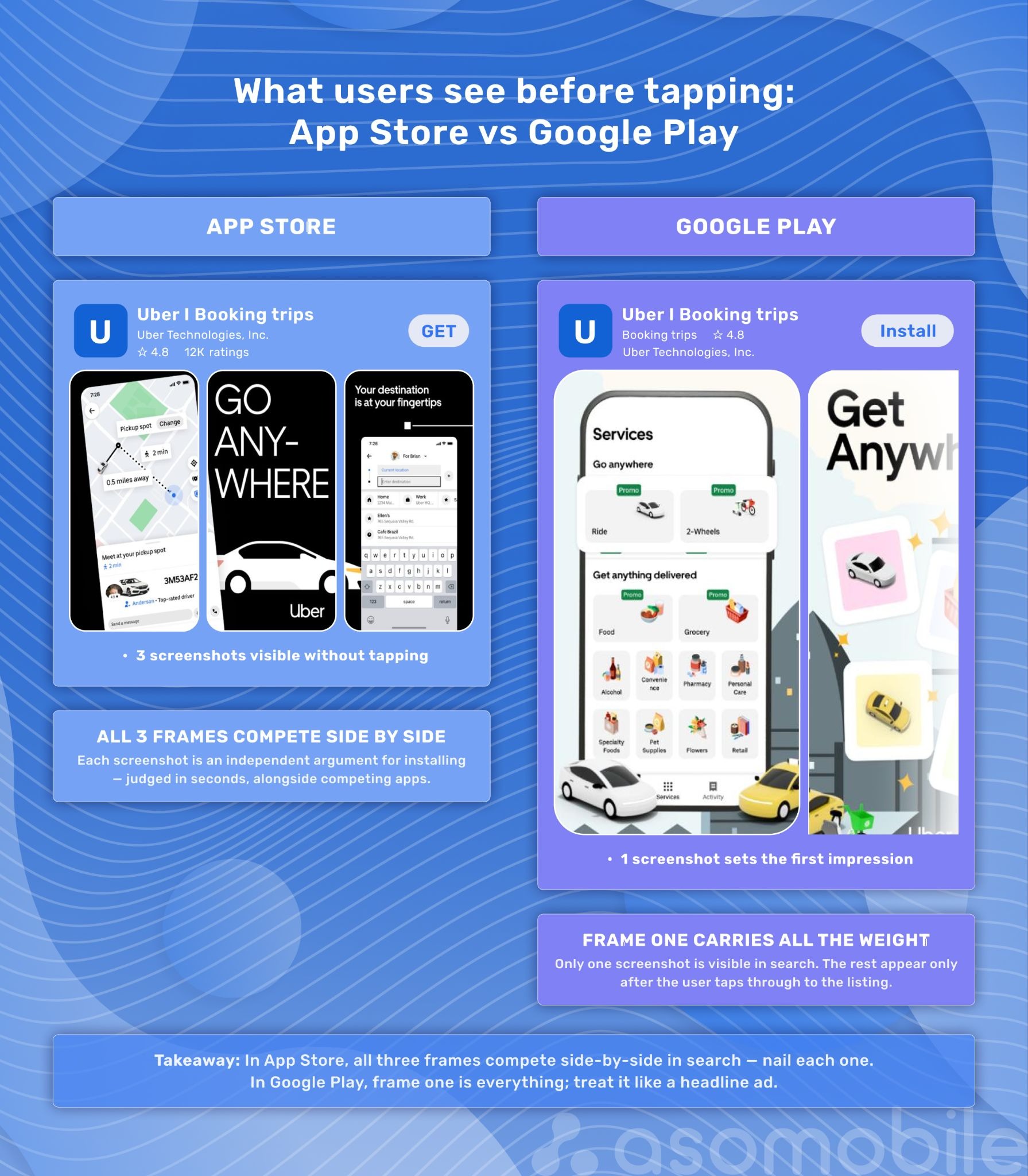
In the App Store, the first three screenshots are visible directly in search results without scrolling. Users see them alongside the app name and rating without visiting the page. In Google Play, a promo video appears first (if available), followed by screenshots. This display difference affects strategy: in the App Store, each of the first three frames must work as a standalone argument for installation; in Google Play, they should reinforce the video's message — or take on its role entirely when there's no video.
Screenshots aren't a direct ranking factor in store algorithms — algorithms don't read images directly. But they affect the conversion rate from view to install (CVR), and CVR is one of the signals algorithms use to evaluate app relevance. The logic is straightforward: better screenshots lead to higher conversion, higher conversion indirectly leads to better search rankings. Not a guaranteed direct effect, but a measurable lever.
Screenshots are one of the few listing elements with a short feedback loop: update, run a test, get data in a week. That's why the work starts with technical requirements — they update alongside devices, and getting them wrong undermines everything else.
App Store Screenshot Requirements 2026
Apple updates specifications as new devices launch. Below are current figures from the official App Store Connect documentation.
Technical Rules
- Formats: JPEG (.jpeg / .jpg) or PNG
- Transparency (alpha channel): not allowed
- Maximum screenshots: 1 to 10 per device type
- Orientation: portrait or landscape — depending on app orientation
iPhone Sizes
| Display | Orientation | Size (px) |
| 6.9" (iPhone Duo/Air, 18/17/16 Pro Max, 15/16 Plus, 14 Pro Max) | Portrait | 1320 × 2868 / 1290 × 2796 / 1260 × 2736 px |
| 6.9" | Landscape | 2868 × 1320 / 2796 × 1290 / 2736 × 1260 px |
| 6.5" (iPhone 14 Plus, 13/12/11 Pro Max, XS Max, XR, 11) | Portrait | 1284 × 2778 |
| 6.5" | Landscape | 2778 × 1284 |
| 6.3" (iPhone 18/17/16/15 Pro, 14 Pro, 16, 15) | Portrait | 1179 × 2556 or 1206 × 2622 |
| 6.3" | Landscape | 2556 × 1179 or 2622 × 1206 |
| 6.1" (iPhone 17e, 16e, 14, 13, 12, 11 Pro, etc.) | Portrait | 1170 × 2532 / 1125 × 2436 / 1080 × 2340 |
| 5.5" (iPhone 8/7/6S Plus) | Portrait | 1242 × 2208 |
| 4.7" (iPhone SE 3/2, 8, 7, 6S, 6) | Portrait | 750 × 1334 |
| 4" (iPhone SE 1st gen) | Portrait | 640 × 1136 |
Apple's key scaling rule: if screenshots aren't uploaded for a specific screen size, Apple automatically scales down from the next larger format. In practice: uploading screenshots for 6.9" (or 6.5" if 6.9" isn't available) covers all iPhones. But auto-scaling doesn't guarantee perfect results — especially for landscape screenshots and apps with precise layouts. If a screenshot contains small text or complex graphics, upload a separate set for 6.3" and 6.1".
What's required: if the app supports iPhone, at least one screenshot set is needed. If 6.9" sizes aren't provided, 6.5" is mandatory. Full details in the App Store Connect specifications.
iPad Sizes
| Display | Orientation | Size (px) |
| 13" (iPad Pro M4/M5, Air M2/M3/M4, 6th–1st gen) | Portrait | 2064 × 2752 or 2048 × 2732 |
| 13" | Landscape | 2752 × 2064 or 2732 × 2048 |
| 12.9" (iPad Pro 2nd gen) | Portrait | 2048 × 2732 |
| 11" (iPad Pro, Air, mini A17 Pro, etc.) | Portrait | 1488 × 2266 / 1668 × 2420 / 1668 × 2388 / 1640 × 2360 |
| 10.5" (iPad Pro, Air 3rd gen, iPad 7–9th gen) | Portrait | 1668 × 2224 |
| 9.7" (iPad Pro, Air, Air 2, mini 2–5th gen) | Portrait | 1536 × 2048 |
What's required: if the app runs on iPad, at least one iPad screenshot set is needed. The 13" screenshot is the base — all others scale from it.
Other Apple Platforms
| Platform | Size (px) |
| Mac | 1280×800, 1440×900, 2560×1600 or 2880×1800 |
| Apple TV | 1920×1080 or 3840×2160 |
| Apple Vision Pro | 3840×2160 |
| Apple Watch (Ultra 4/3) | 422×514 |
| Apple Watch (Series 12/11/10) | 416×496 |
| Apple Watch (Series 9–7) | 396×484 |
Google Play Screenshot Requirements 2026
Unlike the App Store, Google Play doesn't auto-scale screenshots — each device type needs its own set. Content restrictions are also stricter, and the Feature Graphic is a mandatory element that Apple has no equivalent of. Current requirements are in the official Google Play Console help.
General Technical Requirements
- Formats: JPEG or 24-bit PNG (no alpha channel)
- File size: 8 MB max per screenshot
- Side dimensions: minimum 320 px, maximum 3840 px; the long side can't exceed the short side by more than 2x (ratio between 1:2 and 2:1)
- Minimum for publishing: 2 screenshots (for phones)
Requirements by Device Type
| Device | Recommended Size | Orientation | Count | Notes |
| Phone | 1080 × 1920 px | Portrait (9:16) | Up to 8 | Minimum 2 to publish |
| Phone | 1920 × 1080 px | Landscape (16:9) | Up to 8 | Per app orientation |
| 7" Tablet | 1080 × 1920 px | Portrait | Up to 8 | Optional, recommended |
| 10" Tablet | 1200 × 1920 px | Portrait | Up to 8 | Optional, recommended |
| Large Screen (tablets 1080+ px, Chromebook) | 1080–7680 px | 16:9 or 9:16 | Min 4 | Required for Large Screen |
| Wear OS | 384 × 384 px | 1:1 | Min 1 | No borders or transparent backgrounds |
| Android TV | Standard TV format | 16:9 | Min 1 | Required for TV apps |
| Android XR | 3840 × 2400 px (min. 1920×1200) | 8:5 | 4–8 | For XR apps |
| Android Automotive | 800 × 1280 (portrait) / 1024 × 768 (landscape) | Both | 2+ each | System images only |
Feature Graphic
Feature Graphic is a mandatory banner on the listing page: 1024 × 500 px, JPEG or PNG without transparency. It appears at the top of the page and is used when Google features an app in editorial collections. It's not a screenshot — it's a separate element. When a promo video is present, the Feature Graphic becomes its thumbnail. If it's not uploaded or is outdated, the promo video won't display correctly.
Google Play Content Restrictions
Google Play explicitly prohibits in screenshots: calls to action (CTAs), discount or promotional language, images of real devices (device frames are at the developer's discretion), and text occupying more than 20% of the image area. This is stricter than Apple — keep this in mind when developing creatives.
App Store vs. Google Play: Key Differences
| Parameter | App Store | Google Play |
| Required base size | 6.5" or 6.9" iPhone | Phone (min. 2 screenshots) |
| Max screenshots | 10 per device | 8 per device |
| Video | App Preview up to 30 sec (visible in search) | YouTube link (visible on page) |
| Search display | First 3 screenshots | Video or first screenshot |
| Text on screenshots | No strict limits | Max 20% of image area |
| Scaling | Auto-scales from largest size | No auto-scaling |
| Feature Graphic | No equivalent | 1024 × 500 px (required) |
| Transparency | Not allowed | Not allowed |
| Device frames | Developer's choice | Developer's choice (no real device photos) |
The key difference is what users see before tapping through. The App Store shows three screenshots horizontally in search results — they compete for attention among other results. Google Play shows only the first screenshot (or video preview). This shifts the logic: in the App Store, all three positions need to land simultaneously; in Google Play, the first frame needs to be as precise as possible.
What This Looks Like in Practice: App Store vs. Google Play Examples
The platform difference becomes clearer with specific examples.
Uber
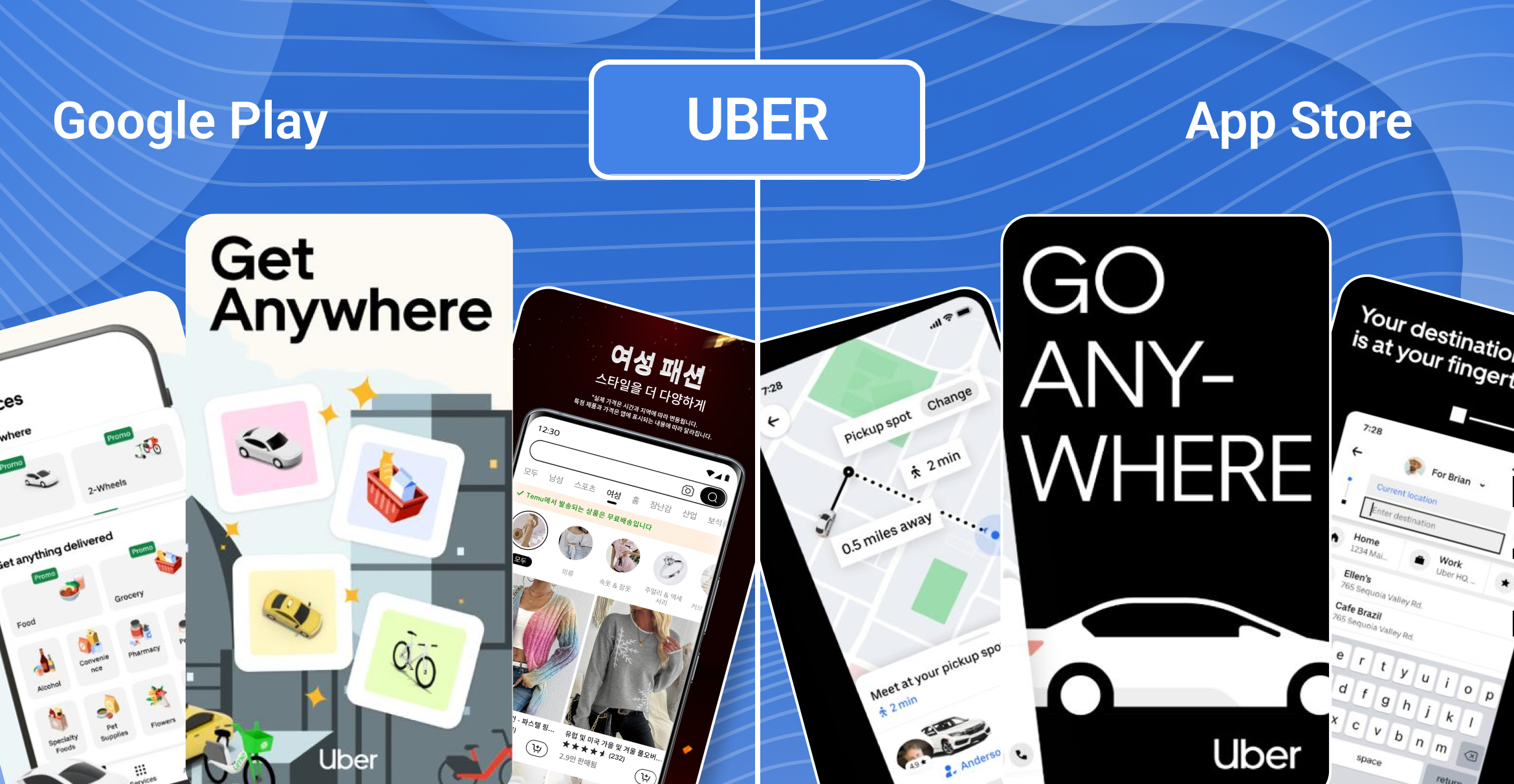
In the App Store — dark background, bold minimal typography: "GO ANYWHERE" full-width in uppercase on black. The first frame is real UI with a map and driver details, no illustrations. Dramatic delivery, minimal words, maximum confidence. The app doesn't explain — it asserts.
In Google Play — illustrative style on a light cream background. The first frame is the full service grid (Ride, Food, Grocery, Pharmacy, and more), immediately showing ecosystem breadth. Then "Get Anywhere" with colorful graphics and "Rides in a few taps" with a real route screen. The logic: first establish the scale of the offer, then the simplicity of the action. Where the App Store speaks to users in the language of action and confidence, the Google Play version speaks the language of lifestyle and reach.
Camera360
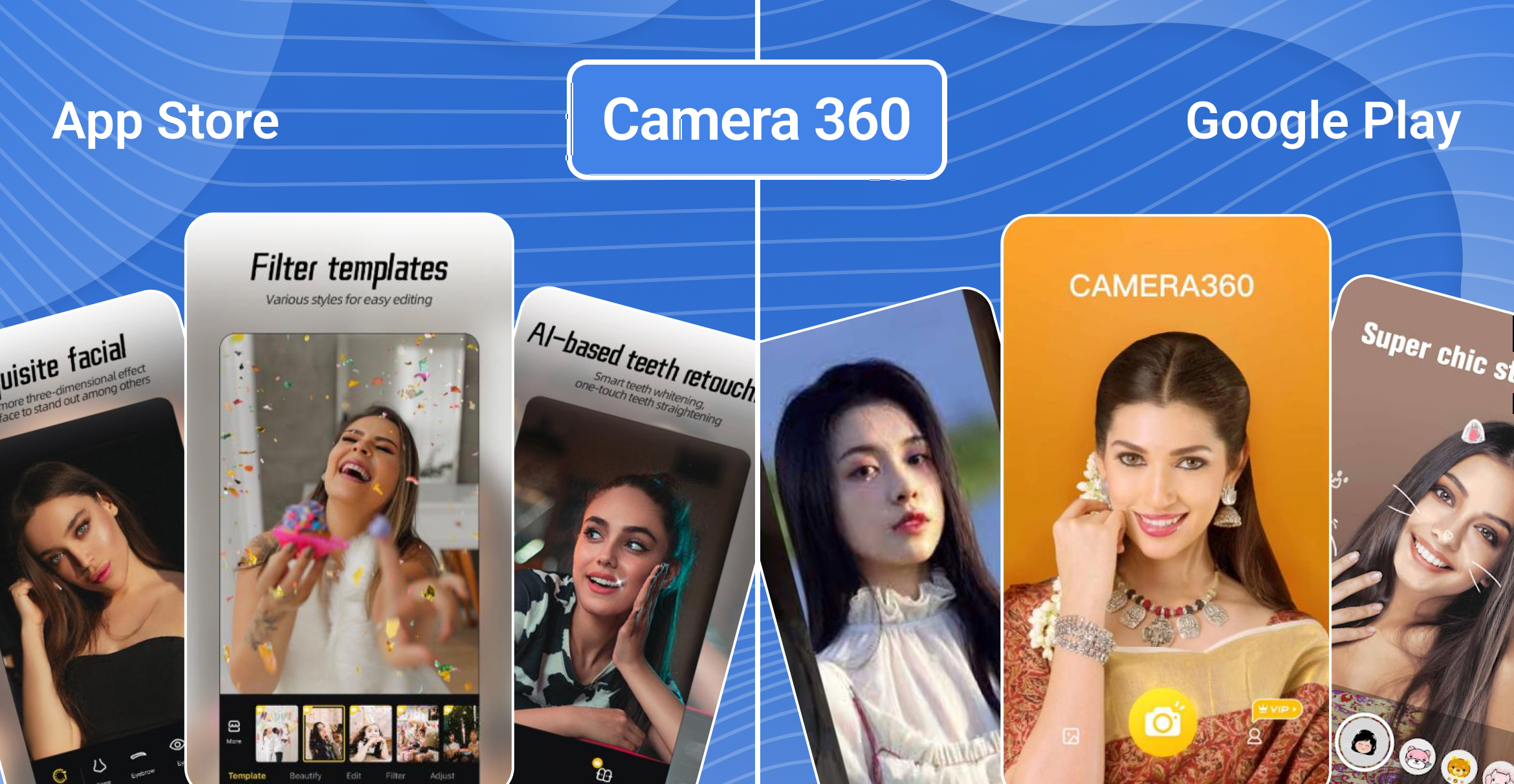
In the App Store — dark editorial style echoing a glossy magazine: large portraits with beautiful lighting, dark backgrounds. But it's not purely emotional: each frame shows specific tools (Contour & Highlight, AI Dental Beauty). The result is sold, the tool backs it up.
In Google Play — festive lifestyle format with a warm golden palette. Content is built around seasonal AR filters: Party Hat, Party Glasses, New Year's Bunny — portraits with stickers on a warm background. No utilitarian UI — just atmosphere and emotion. This is a deliberate seasonal strategy: instead of showing tools, the platform sells the occasion.
What This Means in Practice
Don't copy screenshots between platforms — adapt them. In the App Store, emotion and the strength of the first three frames are critical. In Google Play, the priority is explaining the scenario and addressing objections. Same app, two completely different conversations with the user.
How Many Screenshots to Upload?
Technical limits set a ceiling; conversion logic determines the right number.
In the App Store, the maximum is 10 screenshots per device. Most successful apps use 5–8. Fewer than five can mean a missed opportunity to demonstrate value or address user doubts. More than eight is justified only with rich functionality or in highly competitive niches where more questions need to be answered before install.
In Google Play, the limit is 8 screenshots per device type. Using all 8 slots for phones correlates with better search visibility. Filling tablet and large screen slots is especially important — fewer competitors make it there, making it a genuine edge in tablet search.
Practical rule: don't pad the screenshot count. Each frame should add an argument that wasn't in the previous ones. If it doesn't — leave the slot empty.
Once the count is decided, the next question is the order in which those frames should persuade the user.
How to Build a Conversion Screenshot Sequence
Most teams think about screenshots as a set of images — and that's the wrong model. Screenshots are a sequential narrative where each frame builds on the previous one and moves the user toward a decision.
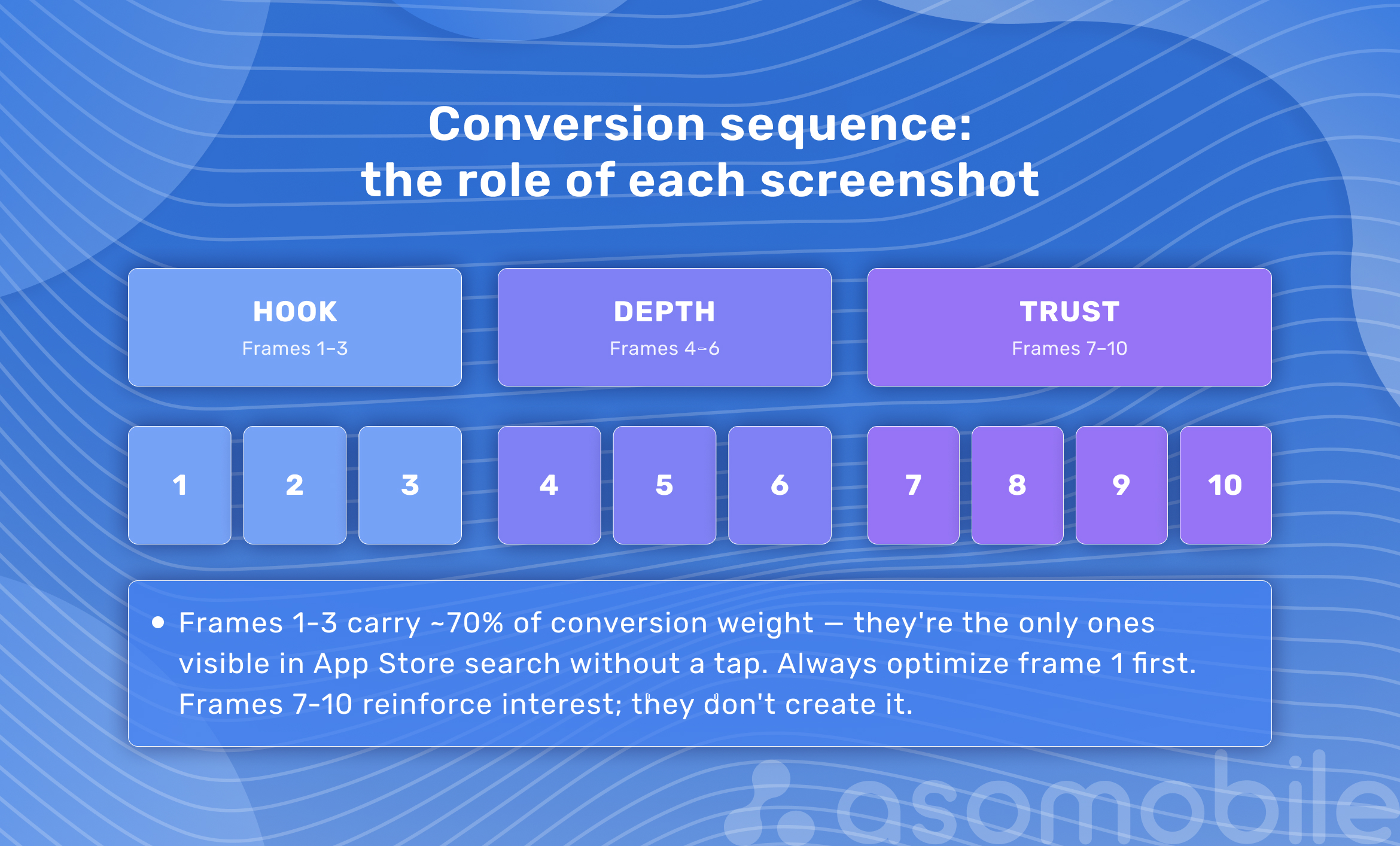
Frame 1 — Value Promise
States the primary outcome the user will get. Not a description of the app — a promise of a result. For a habit tracker: not "A habit tracking app," but "21 days to make it stick for good." The first frame should be readable in one second without zooming and work even in the smallest preview size in App Store search. It needs to be understood without context — without the app name alongside it.
A good benchmark is Notion: first frame "Your life, beautifully organized" and one clean screen. No explanations, no UI tour — just the outcome.
Frames 2–3 — Usage Scenario and Differentiator
Frame 2 shows how the app works: the core function in action, a specific interface. CapCut's second frame doesn't explain it's a video editor — it shows one action (AutoCut) that's understandable without text.
Frame 3 is what competitors don't have: a unique feature, speed, a concrete result. These are the three frames visible in App Store search without scrolling, and they carry around 70% of the conversion weight according to industry research.
Frames 4–6 — Extended Argumentation
Additional use cases, secondary features, integrations with other services. This is where you can get more detailed and address objections: "does it work offline?", "does it support multiple devices?" Each frame answers one objection.
Frames 7–10 — Trust and Social Proof
Ratings, press mentions, user counts, industry awards. These work as a final argument for users who are interested but haven't committed yet. Don't lead with trust signals — they amplify existing interest but don't create it from scratch.
Screenshot Design Best Practices for ASO
Sequence structure sets the logic — design details determine how convincingly it lands. Typography, contrast, color, and brand consistency add or subtract conversion at every frame.
Typography and Text
Captions: five words maximum, font size 60 pt or larger in the source layout. A simple test: shrink the screenshot to App Store search tile size — if the text stops being readable, it's not working. One screenshot, one message. No small text, footnotes, or wordy explanations.
Captions should be active, not descriptive. "Plan your day in 2 minutes" outperforms "Day planning feature." Active voice, action verb, specific result. Avoid abstractions — "convenient," "powerful," "intuitive" carry no information and don't persuade.
Hierarchy and Contrast
One screenshot, one idea. No need to show the entire UI — one key element with emphasis is enough. High contrast between background and text is necessary not just for aesthetics but for accessibility (aim for WCAG AA as a minimum). Visual overload kills conversion: three UI elements, two captions, and an icon on one screen create cognitive noise — and users just leave.
Color Scheme and Dark Mode
Design screenshots in both light and dark versions. Dark mode is now a standard expectation among mobile audiences. If the app supports both modes, screenshots should reflect that. Bright light backgrounds on phones in dark mode look dated — and users feel it before they even install.
Brand Consistency
All screenshots — one visual system: fonts, colors, illustration style. Inconsistency between frames reads as carelessness. Use one master file with shared components for the entire series — this reduces update time and eliminates accidental mismatches.
Authenticity Over Gloss
Users are getting better at spotting staged shots — and responding to them less. Screenshots showing a real interface and real scenarios often convert better than perfectly polished ones. Studio sterility creates distance where trust is needed.
That doesn't mean being sloppy. It means showing the app in real context: actual UI, a recognizable scenario, no decoration for decoration's sake. Users should see themselves in the frame — not an ad mockup.
Keep Source Files
Every screenshot should have an original layered file: background, UI, text caption, device frame. This cuts update time during a redesign or an A/B test with a single variable from days to hours.
Device Frames, UI Screenshots, and Lifestyle Images
Beyond frame design, there's a fundamental choice: how to present the app itself. Three main approaches serve different purposes.
UI-focused screenshots — direct interface display with minimal decorative elements. Work for utility apps where functionality is the primary argument: financial tools, productivity, B2B solutions. Users see exactly what they'll be working with and make a decision based on the real interface.
Device frames — a screenshot set inside a phone or tablet model. Help users visualize the app on their own device. Note: Google Play doesn't allow real device images (manufacturer photos) — only stylized or abstract frames. The App Store has no restrictions, but using Apple's branded iPhone graphics without permission is legally sensitive.
Lifestyle images — combining UI with real-world usage context: someone with a phone in a cafe, working out with a fitness app, a workspace with a business tool. Strengthen emotional resonance for consumer apps and games. Balance is key: if the context is so heavy that the interface is barely visible, value is lost. The user sees a beautiful photo but doesn't understand what the app actually does.
Composite creatives — a combination of UI elements, device frames, and background scenes. The most flexible format. Common in gaming and lifestyle apps where the product being sold isn't a tool but an experience and atmosphere. Requires the most production resources but gives maximum creative control over the narrative.
The right choice depends on category, audience, and competitive context. Analyzing top apps in the category helps identify which approach converts better in a specific niche — without spending budget on blind experiments.
Screenshot Localization
Once the visual format is set, the next variable is the market. Localization isn't about translating captions — it's adapting the entire visual narrative to a cultural context.
Different markets respond to different visual languages. In Asia, saturated colors and dynamic compositions work; in Europe, minimalism and clean lines; in Arab countries, text direction and symbol choice are critical.
Temu uses different color palettes and imagery for Korea and Portugal — while keeping the core message the same. Instagram adapts typography and emphasis for the US and Germany without changing the global brand concept. The point of localization isn't translated captions — it's making users in the target region see familiar visual context.
Japanese audiences expect information-dense layouts and detailed UI — minimalism reads as a lack of functionality. The American market responds to clean design and a clear value promise. Latin America is sensitive to emotional imagery and social proof. Germany expects precision and technical specifics.
Practical steps:
- Translate text accounting for line length — German and Finnish are significantly longer than English and won't fit the same layout without recomposing.
- Adapt reference imagery: character names, transaction examples, localized UI (date format, currency, addresses).
- Check visual imagery for cultural neutrality — gestures, colors, and symbols mean different things in different regions.
- Check Cyrillic and Arabic fonts — they require separate layout work due to different writing systems (RTL for Arabic).
- Upload localized screenshots to the corresponding locales in App Store / Google Play, not just the default listing.
Both the App Store and Google Play allow uploading separate screenshot sets for each localization. With limited resources, start localization with screenshots for markets with the highest conversion potential — high traffic and low competition combined, not just absolute search volume.
Screenshot Testing and Conversion Measurement
Creating good screenshots is half the work. The other half is figuring out which version converts better. Both platforms provide built-in tools for this.
App Store Product Page Optimization (PPO) — the A/B testing tool in App Store Connect. Lets you test alternative icons, screenshots, and short descriptions. Traffic is split 50/50 between control and test versions. Statistically significant results take time — don't end a test before collecting a sufficient sample. The minimum detectable effect is around 5–8% difference in CVR.
Google Play Store Listing Experiments — the equivalent in Google Play Console. Tests icon, screenshots, Feature Graphic, and short and full descriptions. You can set the percentage of traffic going to the test (5% to 50%) and track results in real time.
Test one element at a time. Changing a caption, frame order, and color scheme simultaneously means you won't know what actually worked.
The main rule is to test hypotheses, not change everything at once. Formulate a specific assumption before launching: "adding a person to the first frame will increase CTR" or "a dark background will convert better in our category." This way you understand why something worked and can scale the insight — not just note the result.
Start with the first frame — it carries the most conversion weight, and any improvement there delivers the highest ROI. Once it's optimized, move to the third frame, then the second.
Metrics to track:
- Impressions → Tap-Through Rate (CTR) — screenshots primarily affect this, in search results, before the user taps through
- Store Listing Visits → Installs (page CVR) — overall listing conversion
- CVR by traffic source — search, browsing, and editorial sections respond to screenshots differently
- Early retention rate — an indirect indicator of how well screenshots match the real experience. If screenshots promise more than the app delivers, retention drops regardless of CVR
If a test doesn't accumulate sufficient volume, results are statistically unreliable. Don't draw conclusions from 200–300 installs.
Pre-Upload Screenshot Checklist
Use before every screenshot update in the stores.
Technical Parameters
- Dimensions match current platform requirements (App Store Connect / Google Play Console)
- Format is JPEG or PNG without alpha channel
- No transparent areas
- File size within limits (Google Play — up to 8 MB)
Safe Zones and Readability
- Key text and UI elements outside cropping zones (rounded corners on iPhone, Dynamic Island)
- Text is readable when shrunk to search result preview size
- Background-to-text contrast sufficient for accessibility (check WCAG AA)
Sequence and Content
- First screenshot states the value proposition, not a description of the app
- Each subsequent frame adds a new argument
- No repeating the same message across different frames
- Captions are short (up to 5 words), in active voice
Localization
- Localized versions uploaded for key markets
- Text in local languages fits the layout
- Cultural context checked for non-standard markets
Platform Compliance
- For Google Play: text doesn't exceed 20% of image area
- For Google Play: no real device photos
- No temporary promotions, discounts, or CTA language in Google Play screenshots
- No mentions that violate platform guidelines
Export
- Final export at correct resolution without compression artifacts
- Source file with original layers saved for future edits
- Previous screenshot version archived — in case of rollback
Common Screenshot Mistakes
Even with the right dimensions and a strong concept, it's easy to miss details that undermine the whole effect. Here are the mistakes that come up most often.
Overloaded first frame. Three UI elements, two captions, and an icon — the user understands nothing in one second of viewing. The first frame should be simpler, not more informative, than all the others.
Screenshots not updated after a redesign. Old UI in screenshots with a current app destroys trust before the user even taps install. The mismatch between what they saw in the screenshot and what opened after installing is one of the main causes of early uninstalls.
Descriptive screenshots instead of arguments. "A smart expense tracker" is a description. "Find out where 30% of your budget actually goes" is an argument. The first informs, the second persuades. The CVR difference on this switch is often 10–20%.
Ignoring tablet screenshots. In both Google Play and App Store, most developers don't upload optimized screenshots for iPad and Android tablets. Auto-scaling produces mediocre results: a vertical iPhone screenshot stretched to iPad looks unprofessional. Meanwhile, tablet search has lower competition — this is a low-effort way to gain visibility in a high-purchasing-power segment.
Missing dark mode. Screenshots only in light mode when the app supports dark mode is a missed argument. Users who live in dark mode see a mismatch between screenshots and their real experience.
Text that's too small. Text that's readable in Figma at 100% often becomes illegible in an App Store search tile (roughly 300–400 px wide on a phone screen). Check layouts on real devices, not just in the editor.
Same screenshots for every country. English as default for a global launch is acceptable at the start but not optimal. Even minimal localization — translated captions and replaced UI examples with local context — delivers measurable CVR lift in non-primary markets.
How ASOMobile Helps Analyze Competitors and Manage Visibility
Mistakes are easier to spot in others' examples — and more useful to fix based on data, not intuition. Understanding what works in a category means analyzing competitor screenshots: which first frames they choose, how they structure the sequence, where they test the value proposition. Doing this manually takes hours and gives only a snapshot with no change history.
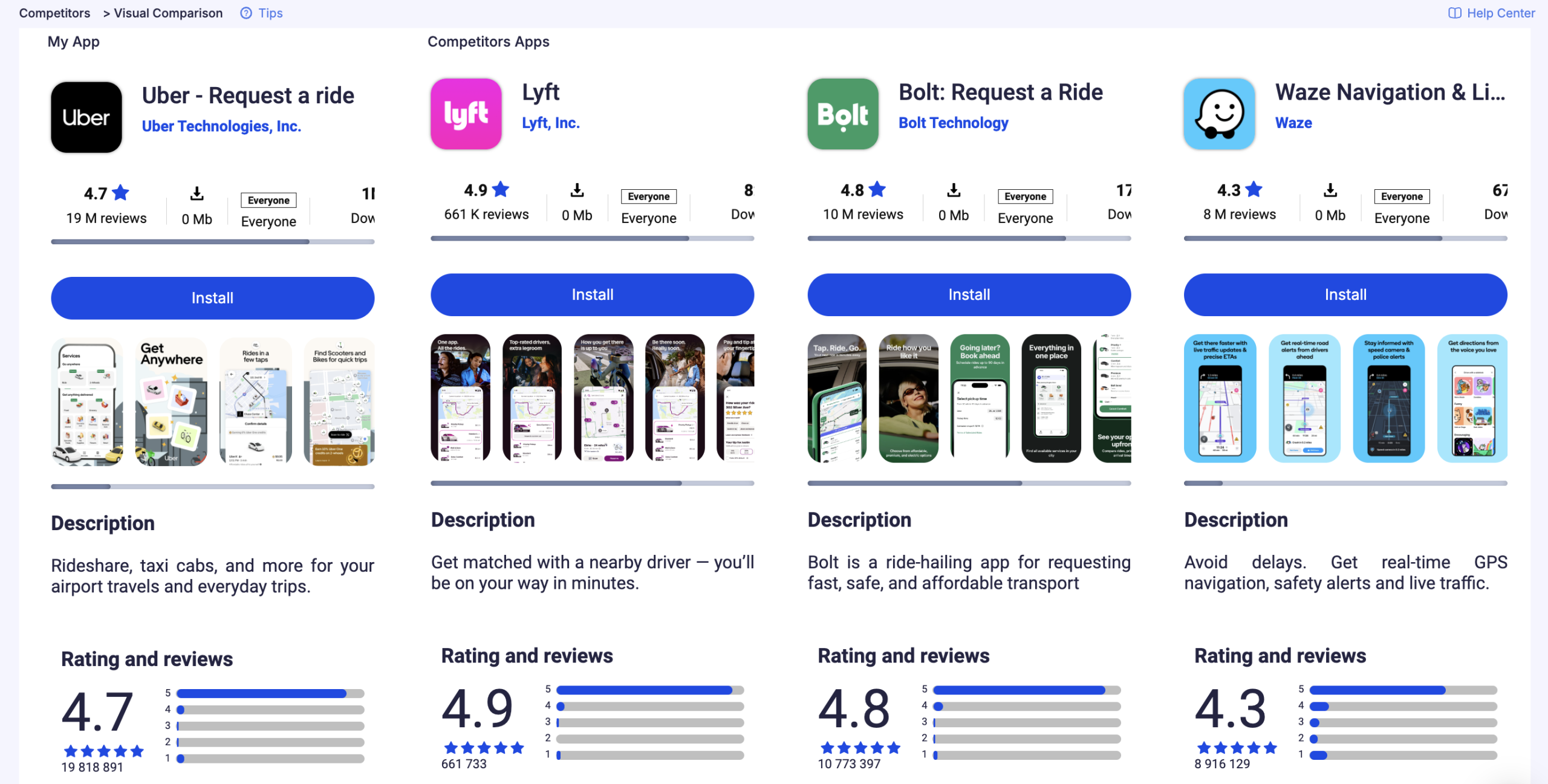
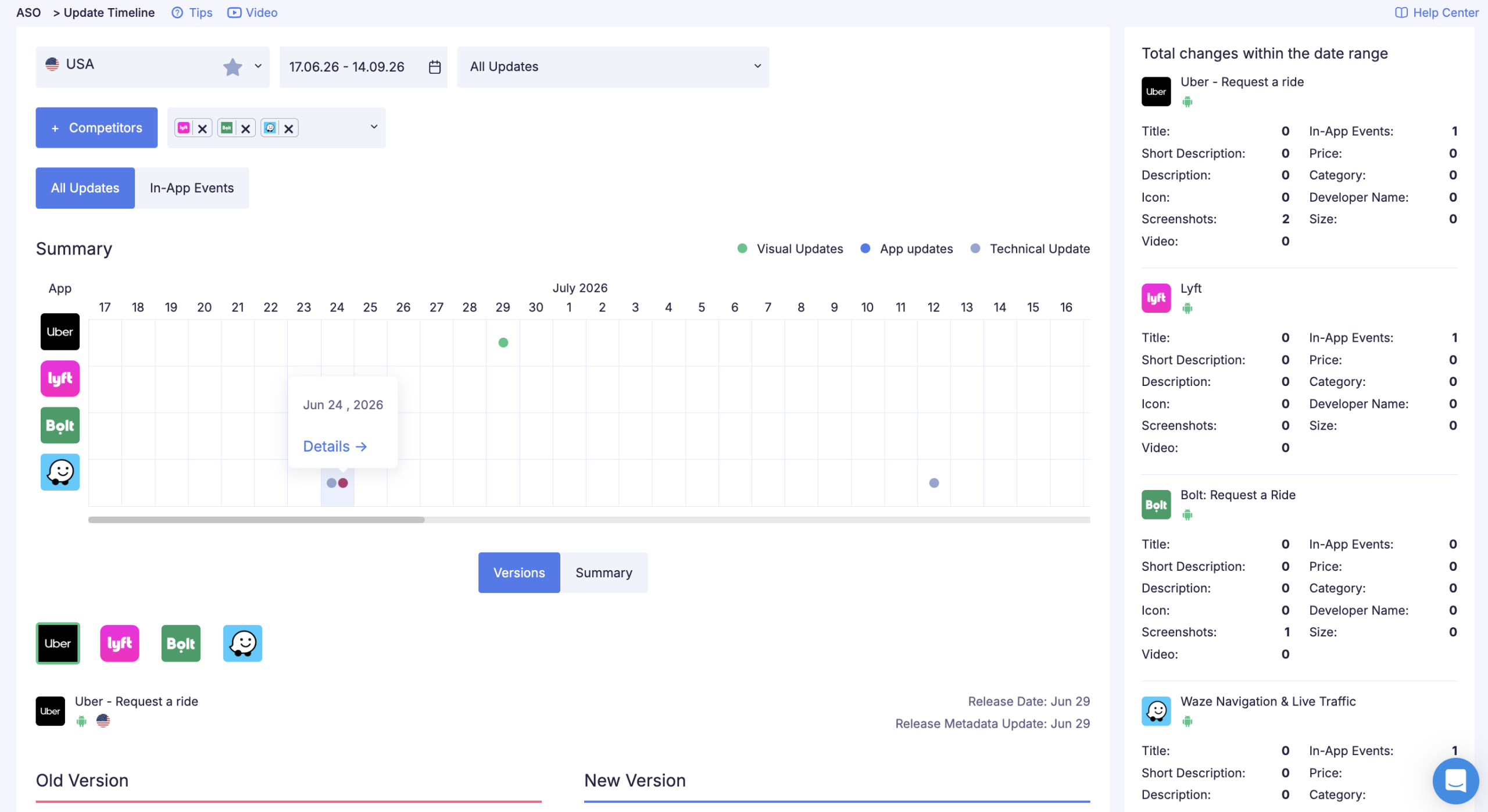
ASOMobile tracks changes in competitor listings: when they updated screenshots, what they changed in metadata, how rankings shifted after the update. The "screenshot change → ranking and rating dynamics" connection generates hypotheses for your own tests without blind copying. We don't copy the solution — we understand why it worked and adapt it to our context.
Keyword monitoring tools show which queries competitors have optimized their screenshots for through in-frame text, and where there are unclaimed topical niches for differentiation. This lets us build a visual strategy around owning those niches rather than chasing category leaders.
Conclusion
Screenshots are the most controllable element of a listing. Unlike ratings or review counts, they can be changed in a day and measured in a week. That makes them one of the few ASO tools with a short feedback loop — update, test, scale.
The 2026 technical baseline: for the App Store, the core set is 6.9" or 6.5" for iPhone, 13" for iPad; for Google Play — the phone set with 1080 × 1920 px recommended and a mandatory Feature Graphic at 1024 × 500 px. Everything else scales, but auto-scaling doesn't replace a set optimized for each form factor.
The conversion mechanics don't change: the first three frames — value proposition, use case, differentiator. Everything else works on retaining the already-interested user. Analyze competitors, test hypotheses through PPO and Store Listing Experiments, localize for key markets.
Optimize effortlessly and achieve success 💙
FAQ: Frequently Asked Questions
Base iPhone formats: 6.9″ — 1320 × 2868 / 1290 × 2796 / 1260 × 2736 px (portrait), 6.5″ — 1284 × 2778 px. If 6.9″ screenshots are uploaded, Apple auto-scales all other sizes. Base iPad: 13″ — 2064 × 2752 px or 2048 × 2732 px. Full current list in the official App Store Connect documentation.
For phones: recommended 1080 × 1920 px (portrait) or 1920 × 1080 px (landscape). Minimum 2 screenshots to publish, maximum 8 per device type. Format — JPEG or PNG without transparency, file up to 8 MB. Text must not exceed 20% of the image area. Feature Graphic — 1024 × 500 px — is required.
Up to 10 screenshots per supported device type (iPhone and iPad are counted separately). The optimal range for most apps is 5–8 frames.
Up to 8 screenshots per device type (phone, 7″ tablet, 10″ tablet — counted separately). Using all 8 phone slots correlates with better visibility. Separate tablet sets provide an advantage in tablet search.
There’s no direct ranking impact — algorithms don’t read images directly. But screenshots affect CVR (conversion from view to install), and CVR is an indirect quality signal for algorithms. Improving CVR through screenshot optimization is one of the fastest growth levers in ASO.
Yes, if the app operates in multiple markets. Both App Store and Google Play allow uploading different sets for each localization. Even minimal adaptation — translated captions and replaced UI examples with local context — delivers measurable CVR lift in non-primary markets.
In the App Store — through Product Page Optimization (PPO) in App Store Connect. In Google Play — through Store Listing Experiments in Google Play Console. Key metrics: Tap-Through Rate from search and listing page CVR. A test is statistically significant at a difference of 5–8% or more with sufficient traffic volume (several thousand views).