App Store and Google Play featuring is one of the few channels where an app can gain +1,700% in downloads in 24 hours without spending a dollar on ads. Today Tab, Editor's Choice, seasonal collections — these are free placements with massive organic reach: the App Store alone sees around 850 million visitors per week.
As paid traffic costs keep rising, editorial placements become an increasingly valuable growth channel. Yet many teams treat featuring as a matter of luck — when in reality, every placement is the result of deliberate work: on the product, the store page, and the submission. Here's how featuring works on both platforms, what sets the two processes apart, and how to prepare for each.
Comparison Table: App Store vs Google Play
| Criteria | App Store | Google Play |
| Who decides | Apple's editorial team | Hybrid: editors + algorithms |
| How to apply | Featuring Nominations in App Store Connect | No direct form; Promotional Content replaces a pitch |
| Lead time | 2 weeks minimum, ideally 3 months | 4–6 weeks |
| Key criteria | Design, HIG, innovation, localization | Android Vitals, UX, device support |
| Platform technologies | Dynamic Island, Live Activities, Apple Intelligence | Material You, Gemini, Firebase |
| What they evaluate | Product, store page, cultural fit | Performance, stability, store page, reviews |
| Tracking tools | App Store Connect, ASOMobile Featuring | Google Play Console, ASOMobile Featuring |
App Store featuring comes down to people and design. Google Play is driven by algorithms and technical metrics. Each platform calls for a different approach.
Part 1. App Store Featuring
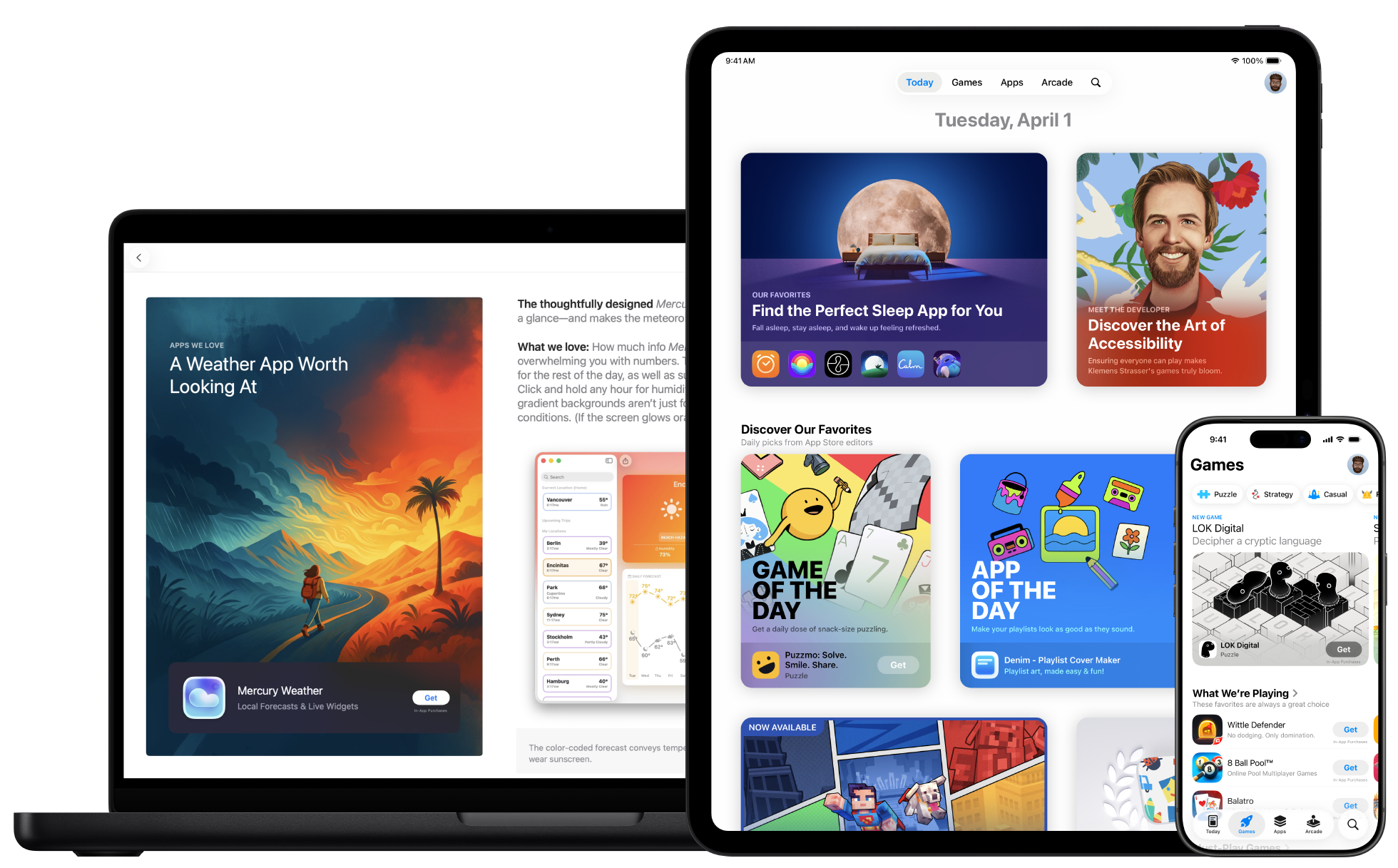
Types of Placements
The App Store editorial team operates in two modes: Apple discovers the app on its own, or the developer gets on their radar by submitting through Featuring Nominations in App Store Connect.
Today Tab is the App Store's home page — featuring stories, interviews, and curated collections. It's the most visible real estate on the platform. App of the Day and Game of the Day are 24-hour spotlights with explosive download spikes: apps average 1,700% growth during the placement window, games 800%. Editor's Choice works differently — it's a long-term quality badge that stays with the app and keeps influencing user trust for months after it's awarded. Beyond these, collections and seasonal roundups are thematic features the editorial team assembles around specific events and trends, refreshed on a regular cadence.
Worth noting separately: In-App Events surface event cards in search results and on the app's product page even for users who already have it installed. This makes it a re-engagement channel, not just acquisition. App Store Awards are granted without a separate application — editorial picks at the end of the year.
How to Submit Through Featuring Nominations
The form is available to accounts with Account Holder, Admin, App Manager, or Marketing roles. In App Store Connect, open Featuring → Nominations and create a nomination, choosing one of three types:
- App Launch — for a new app release or pre-order.
- App Enhancements — for a major update with new features or significant UX improvements.
- New Content — for new in-app content, a seasonal campaign, an event, or a special offer.
In the description, explain what's changing, why it matters, and what problem it solves. You can add the development backstory or talk about accessibility work — editors value the human side. Set your preferred publication date and attach an In-App Event if relevant. Nominations can be submitted individually or in bulk via CSV.
One important detail on timing: the minimum lead time is two weeks, but Apple recommends submitting three months out for serious consideration. The editorial team plans collections 8–12 weeks in advance, and a last-minute submission is unlikely to make the cut.
Apple's Criteria: Seven Selection Factors
Apple doesn't publish a requirements checklist. But based on documentation, editorial team talks, and patterns across featured apps, seven factors consistently shape the decision.
1. Quality and user experience. The app must be stable, fast, and intuitive. Editors look for cohesive functionality that's genuinely useful and easy to use.
2. UI design and HIG compliance. Following the Human Interface Guidelines isn't a formality — it's the foundation. A clean interface that feels at home on Apple platforms, with thoughtful gestures and navigation, is what editors notice first.
3. Innovation and platform technology adoption. SwiftUI, WidgetKit, Live Activities, Dynamic Island, App Intents, Apple Intelligence — each of these signals to editors that the developer is keeping pace with the platform. Apps built on Apple's latest frameworks have a real advantage.
4. Uniqueness. A fresh angle in a familiar category, or an app that defines an entirely new one.
5. Story and timeliness. The app needs a compelling story — who built it and what problem it solves. Tying the pitch to a cultural moment or season strengthens the case: back-to-school, World Mental Health Day, a new Apple device launch.
6. Accessibility. Strong VoiceOver, Dynamic Type, and color contrast support is a signal many developers underestimate — but editors notice it.
7. Store page quality. Screenshots, video preview, description, and rating. A 4.5+ rating is a meaningful advantage when everything else is equal.
Special Considerations for Games
Games follow their own featuring logic. Editors evaluate gameplay design, artistic and technical quality (visuals, animation, sound), controls, narrative and characters, replayability, and overall value — what players actually get for their time.
Game of the Day is a daily Today Tab spotlight with the biggest installation spike. Apple Arcade is a separate tier for exclusive subscription games, where the bar is even higher. There are also genre-specific collections and seasonal themed roundups.
Measuring the Impact of App Store Featuring
Featuring is worth not just celebrating but measuring — otherwise it's hard to know what worked and how to repeat it.
The first thing to watch is download growth: installs can jump 3–20x during a featuring window, with the peak in the first 24–48 hours. Right behind that are keyword ranking shifts: featuring often lifts rankings for branded and category-level terms, and a spike in branded search volume means the editorial story made an impression. The longer-term effect shows up in organic traffic — visibility in recommendations and related apps sections stays elevated for some time after the placement ends.
App Store Connect gives you baseline data on installs, impressions, and conversion. ASOMobile Featuring fills in the rest: it tracks whether the app appeared in a collection and shows keyword ranking changes over time with competitive benchmarking.
Part 2. Google Play Featuring
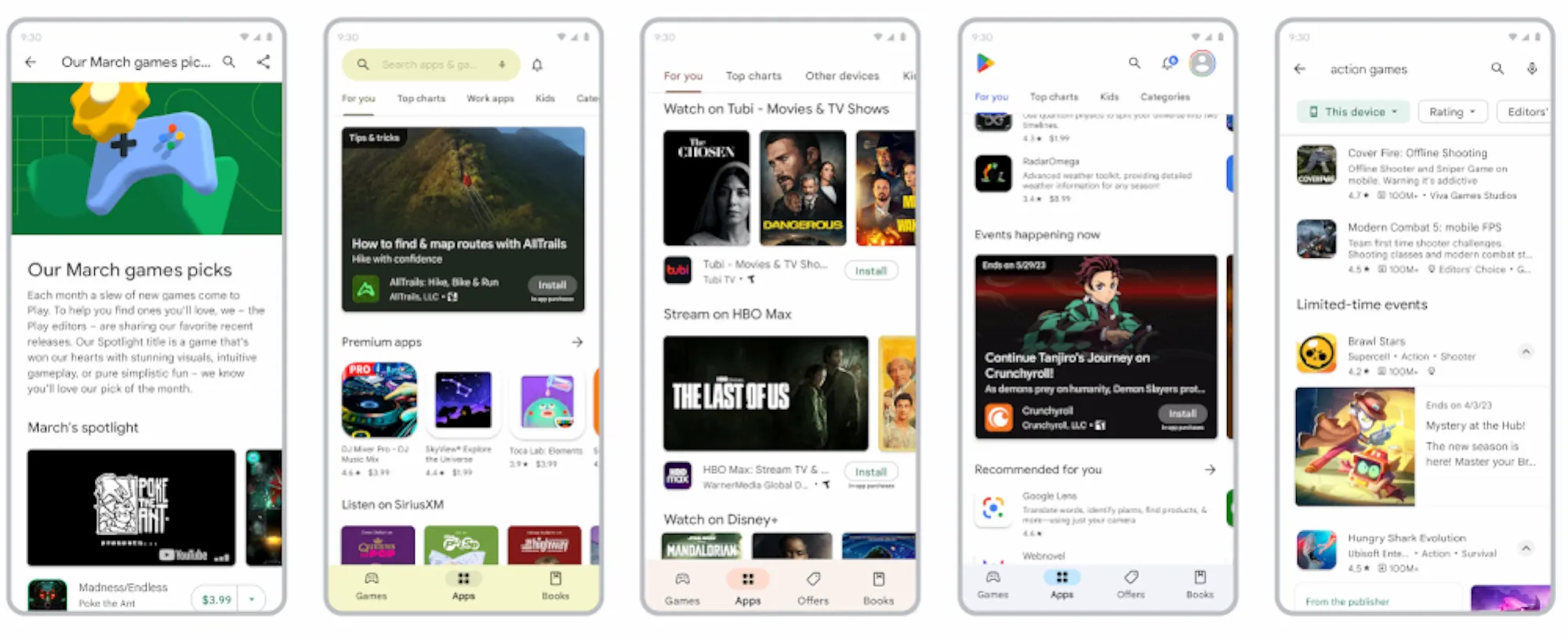
Types of Placements
On Google Play, editorial collections sit alongside algorithmic ones — and that fundamentally changes the approach.
Among editorial placements, the main one is Editor's Choice: a hand-curated selection of apps with outstanding design, usability, and value. There are also thematic collections: seasonal roundups, category collections, kids' picks (Teacher Approved), and top-rated paid apps.
Algorithmic placements run automatically: Recommended for You is built on individual user behavior; Top Charts ranks apps by category based on popularity and retention; New releases surfaces apps uploaded or updated within the last 30 days.
How to Get on the Editorial Radar
There is no direct application form for Google Play featuring. Google doesn't accept pitches through Play Console and doesn't publish editorial contact details. Instead, the platform describes what makes an app eligible for collections — and you can influence that through three channels.
Promotional Content (formerly LiveOps). Through Play Console → Grow → Store presence → Promotional content, upload event cards, update announcements, promotions, and seasonal campaigns. According to Google, apps with active promotional content get more impressions from the Discovery section — the algorithm favors apps with regular storefront activity.
Technical quality metrics. Google algorithmically monitors app health, and when it's strong, the recommendation system surfaces the app automatically — no application required.
Direct contact. Developers with an assigned Google Play account manager can discuss featuring potential directly. This is available to larger studios, not everyone.
In 2026, a featuring request counter was added to the LiveOps section — developers can now see how many times they've submitted events for storefront placement. The process got noticeably more transparent.
Google's Criteria: Technical Quality First
On Google Play, technical quality isn't a recommendation — it's a direct visibility factor. No amount of store page optimization will fix poor metrics. Google evaluates across four dimensions: Core Value (product usefulness), User Experience (interface and design), Technical Quality (stability and performance), and Privacy & Security (policy compliance).
The key instrument is Core Vitals — three metrics Google tracks over a rolling 28-day window:
- User-perceived crash rate — the share of users experiencing crashes. Threshold: 1.09%.
- User-perceived ANR rate — the share of Application Not Responding incidents. Threshold: 0.47%.
- Excessive partial wake locks — a new metric since March 1, 2026. Threshold: 5% of sessions where the app holds a wake lock for more than 2 hours per day.
Exceeding any threshold reduces visibility in recommendations, search, and collections. In some cases, a warning appears on the app's store page for users.
Device and form factor support:
- Tablets and foldables are a fast-growing segment. A per-device threshold applies: 8% for crash rate and ANR on specific device models.
- Wear OS — same crash rate and ANR thresholds as phones, with additional tracking for excessive battery usage.
- Android TV and automotive devices — an additional signal for editorial teams.
Material You, Firebase, Gemini — not hard requirements, but using them shows editors the developer is growing with the ecosystem.
LiveOps, Events, and Promotional Content
Promotional Content is Google Play's equivalent of In-App Events. It's used to promote time-limited events, discounts and special offers, and major update announcements. The content appears on the app's product page, in search results, on the home screen, and in themed sections — creating additional touchpoints exactly where users already are.
You can set up Promotional Content in Play Console: Grow → Store presence → Promotional content. Google recommends doing this regularly, timed to seasonal events or significant updates. An active event builds user trust and positively affects conversion for both organic and paid traffic.
Google Play Awards
The annual Google Play Awards (Best of Play) require no application — Google selects winners based on data across quality, performance, innovation, and user experience. In 2025, the Best App winner was Focus Friend; the Best Game winner was Pokémon TCG Pocket. A nomination or win is a long-term quality signal that keeps building trust with users and partners.
Measuring the Impact of Google Play Featuring
Google Play featuring works differently from the App Store: the effect is less explosive but more sustained.
Download growth here spreads over a week or longer rather than spiking in the first 48 hours. Keyword ranking shifts are less sharp but more durable — the platform's hybrid nature produces steadier, longer-lasting movement. Organic traffic is especially noticeable after landing in Editor's Choice, a long-term status that keeps driving visibility for months.
For tracking, Google Play Console → Statistics → Traffic sources shows how many installs came from editorial collections. ASOMobile Featuring lets you select a country, date range, collection type, and category to see average position over the featuring period, ranking dynamics, duration, and total time in the collection.
Part 3. General Featuring Preparation
On both platforms, editors evaluate the same things: app quality, store page, and fit with the platform ecosystem. The difference is in emphasis. Featuring preparation starts long before any submission.
ASO Store Page
The store page is the first thing editors see, and it needs to make an immediate impression. The icon should be readable at small sizes and reflect both the brand and the app's core function. Screenshots should show real workflows in action, not just static UI. The description needs to be structured so the answer to the user's main question appears in the first few lines — not after three paragraphs about the company.
Ratings and Reviews
The baseline threshold is 4.5 stars on both platforms. The rating matters, but editors go further — they read reviews. If users have been raising the same complaints month after month, it shows. Fix visible bugs and respond to negative feedback before submitting, not after.
Localization
Editors in each country look for apps that feel organic to their market. Translation alone isn't enough — metadata, screenshots, videos, currencies, and units of measurement all need cultural adaptation. Apps that look genuinely local get featured noticeably more often.
Update Cadence and Seasonal Updates
Editors want to see a living product. An app that hasn't been updated in months isn't a strong candidate. Seasonal updates align the app with the user's calendar: fitness apps in January, travel in summer, education in September. For the App Store, hitting the 8–12 week editorial planning window is especially important — seasonal releases need to be scheduled well in advance.
Competitor Monitoring
To understand where editorial focus is right now, track which apps in your category are getting featured. ASOMobile Featuring shows who appears in collections, how often, in which countries, and during which periods — helping you spot trends and time your next submission to the editorial cycle.
Summary Comparison Table
| App Store | Google Play | |
| Who decides | Apple's editorial team | Hybrid: editors + algorithms |
| How to apply | Featuring Nominations in App Store Connect | No direct form; Promotional Content + technical quality |
| Lead time | 2 weeks minimum, ideally 3 months | 4–6 weeks |
| Key criteria | Design, HIG, innovation, localization | Android Vitals, UX, device support |
| Platform technologies | Dynamic Island, Live Activities, Apple Intelligence | Material You, Gemini, Firebase |
| What they evaluate | Product, store page, cultural fit | Performance, stability, store page, reviews |
| Effect | Sharp peak in the first 24–48 hours | Sustained, spread over 1–2 weeks |
| Tracking tools | App Store Connect, ASOMobile Featuring | Google Play Console, ASOMobile Featuring |
App Store Featuring Preparation Checklist
- Rating ≥ 4.5, no recurring negative patterns in reviews.
- Icon, screenshots, and video preview are up to date and comply with Human Interface Guidelines.
- Metadata, screenshots, and video are culturally localized for target regions.
- The app uses native Apple technologies: Live Activities, Dynamic Island, WidgetKit, or Apple Intelligence.
- Nomination submitted through Featuring Nominations in App Store Connect at least 3 months before the target date.
- An active In-App Event is created and linked to the nomination.
- Seasonal release fits within Apple's 8–12 week editorial planning window.
- After getting featured — tracking keyword ranking dynamics through ASOMobile Featuring.
Google Play Featuring Preparation Checklist
- Android Vitals are healthy: crash rate < 1.09%, ANR < 0.47%, wake locks < 5% of sessions.
- Rating ≥ 4.5, no recurring negative patterns in reviews, bugs resolved.
- Banner, icon, screenshots, and description in Play Store are current.
- App is optimized for tablets and foldable devices (where applicable).
- Google technologies are in use: Material You, Firebase, Gemini (where feasible).
- Promotional Content uploaded through Play Console: Grow → Store presence → Promotional content.
- Major updates and events ship regularly, at least once every 4–6 weeks.
- After getting featured — tracking placements and collection rankings through ASOMobile Featuring.
Conclusion
Featuring doesn't happen on its own. Behind every placement is consistent work on the product, store page, localization, and update cadence. App Store editors look at design, innovation, and HIG compliance. Google Play focuses on technical metrics, stability, and device support. But the foundation is the same on both platforms: the app needs to be good, the page needs to be compelling, and the submission needs to be timely.
Start with one region, prepare a strong release, submit your nomination, and measure the results. Every attempt generates data for the next one.
FAQ
Get Your App Featured with ASOMobile💙
FAQ: Frequently Asked Questions
Featuring means your app appears in an editorial collection in the store: Today Tab, Editor’s Choice, seasonal roundups, or category collections. It’s a free promotional channel with a significant download spike — App of the Day delivers an average of +1,700% installs during the placement window.
Through Featuring → Nominations in App Store Connect. Available to accounts with Account Holder, Admin, App Manager, or Marketing roles. Choose the nomination type (App Launch, App Enhancements, or New Content), fill in the description, and set your preferred date. The optimal lead time is 3 months.
There’s no direct form. Publish Promotional Content regularly through Play Console, keep Android Vitals healthy, and ship major updates. Google’s algorithms automatically boost visibility for apps with strong technical metrics and active content.
4.5 stars on both platforms. A rating below 4.5 doesn’t automatically disqualify a submission, but editors read reviews — and recurring negative patterns significantly reduce the chances
On the App Store, the peak hits in the first 24–48 hours, after which metrics return to baseline. The long-term effect shows up as improved keyword rankings and brand recognition. On Google Play, the effect is more spread out: algorithmic recommendations keep working for 1–2 weeks after placement, and Editor’s Choice status continues driving visibility for months.
Through ASOMobile Featuring: the tool shows whether the app appeared in collections by country, the placement type, average position, featuring duration, and keyword ranking dynamics before and after.