A few years ago, Product Page Optimization was seen primarily as a supporting element of an ASO strategy. It was used selectively — as part of a page redesign, a positioning shift, or after significant product changes. Most often, it sat at the intersection of ASO and design responsibilities and was rarely perceived as an independent growth lever.
Over time, the situation changed. PPO has become one of the few tools in the App Store that allows teams to systematically increase the efficiency of existing traffic without increasing marketing budgets or interfering with product development. This shift did not happen because design suddenly became more important, nor because text stopped working. The reason is deeper — the logic of user decision-making has changed, as has the architecture of the App Store itself.
Today, the App Store is neither a simple app showcase nor a classic search engine. It is a recommendation-driven environment in which users rarely arrive with a fully formed intent. Much more often, they react to a visual signal: an icon in search results, the first screen of the product page, or a short video snippet. The decision to install is formed within seconds, even before the user consciously reads the app’s name or description.
In this context, PPO serves a clearly defined but critically important function. It does not create demand and does not control app visibility. Its role is different — it determines how effectively user interest is converted into an install. In competitive categories, a difference of just a few percentage points in conversion rate can have an impact on product economics comparable to traffic growth or expansion of advertising channels.
What Product Page Optimization really is
Simplified, PPO is a way to validate which visual presentation of an app’s product page actually helps users make a decision. This is not about subjective design opinions, but about native A/B testing of page elements within the real App Store context.
With PPO, Apple allows teams to test only visual components:
- the app icon,
- the set, order, and composition of screenshots,
- video previews.
This is an important and fundamental limitation. PPO does not test text — neither the app title, subtitle, nor description. It also does not influence rankings and does not allow manual audience segmentation. All variants receive traffic randomly within the selected region.
This is exactly why PPO is not an alternative to ASO. These tools solve different problems and work sequentially. ASO ensures that the user reaches the app’s product page. PPO determines what impression the user gets in the first seconds and what decision that impression leads to.
ASO creates intent. PPO completes the decision.
The role of ASO, PPO, and Custom Product Pages in a growth system
| Tool | Primary function | Funnel stage |
| ASO | Visibility and relevance | Before the click |
| PPO | Install conversion | After page visit |
| CPP | Personalization | For specific audiences and channels |
Why the visual layer of the page became decisive
When discussing the impact of icons, screenshots, and video, people often say “visuals matter more than text.” In practice, it is more accurate to talk not about priority, but about the order in which different types of information are processed.
Text begins to work when the user is already interested and ready to analyze. The visual presentation of the page — the icon, the first screenshot, the overall visual style — works earlier. It shapes the initial understanding and perception of the product.
The behavior of most users follows a similar pattern:
- they do not read long descriptions before installing,
- they do not dive into feature lists,
- they do not compare products rationally.
Instead, they try to quickly answer a few basic questions: is it clear what the app does, does it look like a solution to their problem, and does it inspire trust? These questions are almost always resolved through the page's visual elements.
PPO is valuable because it allows teams to test these hypotheses not at the level of intuition, but through measurable user behavior.
How users make decisions in the App Store

The majority of the decision is formed before reading the text or scrolling the page.
PPO as a controlled experiment, not a matter of taste
Before PPO existed, the visual part of the product page was often the subject of subjective discussions. Decisions were made based on experience, visual exposure, or competitor examples. This approach inevitably limited the scalability and repeatability of results.
PPO changes the very logic of working with visual presentation. Instead of debates, an experimental model emerges:
- the team formulates a hypothesis about user behavior,
- creates several visual variants,
- distributes traffic between them,
- and makes decisions based on data.
From a management perspective, this is a fundamental shift. Visual optimization stops being a one-off initiative and becomes a continuous improvement process embedded into the product’s growth system.
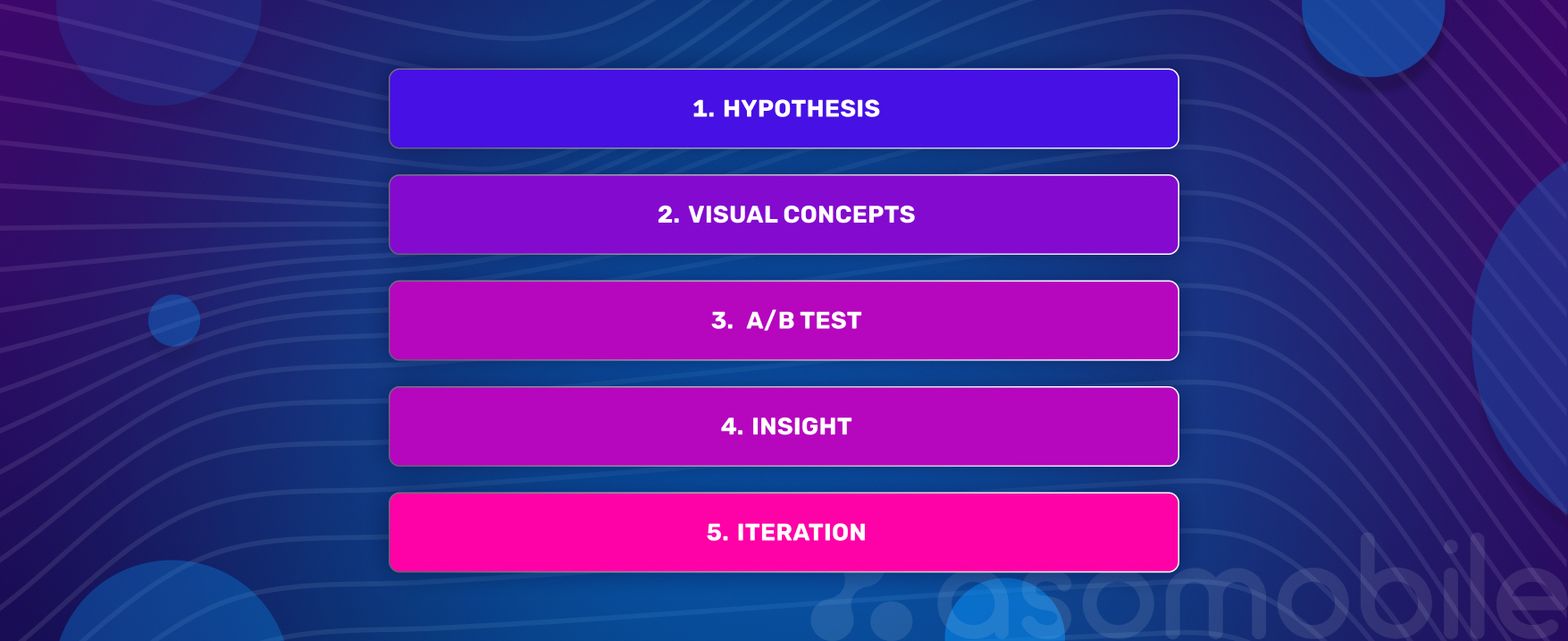
PPO as an iterative cycle
PPO and Custom Product Pages: a sequential logic
Product Page Optimization and Custom Product Pages are often seen as alternatives, although in practice, they solve different problems. PPO aims to identify the most effective visual logic for the main app page — the one that works best for the majority of users.
CPP, in turn, enables this logic to be adapted to specific segments, traffic sources, or advertising scenarios. That is why the most sustainable strategy is sequential: first, the team identifies a strong base version through PPO, and then scales and personalizes it using Custom Product Pages and Apple Search Ads.
PPO vs. CPP: differences in purpose
| Criterion | PPO | CPP |
| Main goal | Overall conversion growth | Personalization |
| Scale | Entire audience | Specific segments |
| Role | Strategic | Tactical |
Which page elements drive the biggest impact
In practice, different page elements influence user decisions in different ways. The app icon forms the first impression in search results. The first screenshot defines the core value proposition. The order of screens and the presence of video begin to matter when users spend more time on the page.
Priority of visual page elements
| Element | Impact potential | Comment |
| Icon | High | Influences decisions before page visit |
| First screenshot | Very high | Conveys the core value |
| Screenshot order | Medium | Shapes perception logic |
| Video preview | Mixed | Effective only with a strong opening |
PPO limitations to keep in mind
Despite its simple interface, PPO imposes several limitations. Only one test can be run at a time; it is time-bound, and it strongly depends on organic traffic volume. In addition, publishing a new build stops the experiment, which requires product stability during the testing period.
As a result, PPO is most effective in teams where hypotheses are clearly formulated and prioritized, and decisions are made with business context in mind rather than statistical significance alone.
Key PPO limitations
| Limitation | Practical implication |
| One active test | Requires focus and prioritization |
| Limited duration | Requires sufficient traffic |
| No segmentation | Increases the role of CPP |
How to interpret PPO results
The primary PPO metric remains install conversion rate. The absolute number of installs helps estimate the scale of the effect, but should always be evaluated together with CVR. At the same time, Apple does not disclose user demographics or exact traffic sources in PPO tests, which makes the context of the hypothesis especially important.
For management decisions, one principle remains unchanged: a statistically significant result is not always a business-significant one. Growth only matters when it affects the product’s economics.
Conclusion
Product Page Optimization has moved beyond being a “design” tool. Today, it is a way to turn the visual layer of an app’s product page — icons, screenshots, video, and overall presentation — into a controlled, measurable growth driver.
Together with ASO, Custom Product Pages, and Apple Search Ads, PPO forms a cohesive system that captures user attention, simplifies decision-making, and scales results. This represents a shift from intuitive choices to a systematic approach to growth.
Test and optimize 💙
No. Product Page Optimization and ASO address different problems and operate at different stages of the user journey. ASO is responsible for visibility and ensuring that a relevant user reaches the app’s product page. PPO comes into play after the click and influences the user's decision in the first few seconds of interacting with the page.
PPO in the App Store allows testing only the visual elements of the app’s product page. These include the app icon, the set and order of screenshots, and video previews.
Text elements — the app title, subtitle, and description — cannot be tested through PPO. PPO also does not affect ranking and does not provide manual audience segmentation. All variants receive traffic randomly within the selected region.
PPO delivers the strongest results when several conditions are met: the product is stable and not frequently updated with new builds, there is sufficient organic traffic volume, and hypotheses about user behavior are clearly defined.
In practice, the most noticeable gains often come from optimizing the app icon and the first screenshot, as these elements shape the first impression and strongly influence the decision to install.
The primary PPO metric is install conversion rate (CVR). However, statistical significance alone does not automatically translate into business impact.
A PPO result can be considered valuable if the conversion uplift is consistent and reproducible, leads to a meaningful increase in total installs, and, most importantly, improves the product’s economics given the current traffic volume.