How to choose keywords for App Store and Google Play is a question most guides never fully answer. Most ASO advice boils down to one tip: find high-volume words, add them to your metadata, wait for traffic. The logic makes sense, but it performs poorly — and doing it for two stores at once makes it worse because the rules differ.
Take a concrete example. A habit-tracking app adds "habit tracker" to its title — around 2,000 searches a day; sounds logical. The top spots for that query are held by Habit Tracker, HabitKit, and Onrise, and a new app's odds of cracking the top 10 are close to zero. Meanwhile, "routine planner," with around 450 searches a day, sits wide open: competition is far lower, and the intent matches exactly what the app does. That's the difference between chasing big numbers and choosing the right words.
This isn't to say traffic volume doesn't matter — it does. But it's one variable out of five, and looking at it alone produces a list of words you can't rank for, and the users who do find the app often don't convert because they were searching for something slightly different.
The same app falls into a similar trap on Google Play for a different reason. Picking the right word isn't enough there — how often it shows up in the description, and in what context, matters too, because Google Play's algorithm reads the full text rather than checking it against a separate keywords field, which simply doesn't exist on that store.
This guide covers the whole process for both stores: understanding what users actually want when they search, building and filtering a keyword list, prioritizing it, and — because the mechanics differ more than they appear to — exactly where to place keywords in App Store versus Google Play. No theory for its own sake.
How ASO Keyword Research Differs from Web SEO — and Why App Store and Google Play Differ from Each Other Too
This is worth understanding before you start, because many teams carry web logic into mobile and get surprised by the results — then carry App Store logic into Google Play and get surprised again.
In web SEO, rankings depend on backlinks, behavioral signals, domain authority, and a dozen other signals. App Store and Google Play are both mobile stores, but they read metadata in fundamentally different ways, and that difference shapes the entire strategy.
App Store runs on a lexical model. The algorithm indexes three text fields: the title, the subtitle, and the keywords field, which only the algorithm sees, not the user (more on that later). External links don't affect ranking, and the description isn't indexed at all — it exists purely for the person who has already opened the app page. The practical takeaway: every character in the title and subtitle works for both the algorithm and a human reader at once, while the keywords field works for the algorithm alone.
Google Play works differently and behaves more like full-text search with elements of semantic analysis. There's no separate keywords field at all. Instead, all three text fields are indexed — including the full description, up to 4,000 characters, which is the biggest difference from iOS. Google Play also factors in links to the app page and the text of user reviews, layering behavioral signals on top of the text ones: install conversion, retention, and install velocity. Here's the full picture of the differences; we'll unpack each point in its own section below.
| Factor | App Store | Google Play |
| Ranking model | Lexical: exact matches in title, subtitle, keywords field | Full-text, with semantic analysis and synonym clustering |
| Dedicated keywords field | Yes, up to 100 characters, hidden from users | None — all keywords go into visible text |
| Description indexing | Not indexed | Indexed, up to 4,000 characters; density matters |
| Repeating keywords across fields | Avoid — wastes characters | Reasonable repetition works in your favor — that's density |
| Reviews | Affect conversion, not indexing | Text is indexed; affects both conversion and semantics |
| External links | No effect on ranking | Taken into account |
| Localization | Multiple indexed locales per country — free bonus characters | One language, one listing; segmentation via Custom Store Listings |
| Behavioral factors | Indirect, mainly through conversion and rating | Direct: retention, uninstall rate, install velocity, Android Vitals |
| Native A/B testing | Product Page Optimization | Store Listing Experiments |
| Frequent metadata changes | Relatively predictable effect | Riskier — triggers a fresh evaluation of behavioral signals |
That difference also shapes how competition works. On both stores, competition comes down to install counts and ratings rather than domain authority — but on Google Play, behavioral metrics add extra weight: retention, engagement, install growth rate. For popular queries like "photo editor," both stores are dominated by apps with tens of millions of installs, and pure semantic optimization won't get you there: you either target less competitive queries or work on install volume in parallel.
Keyword Metrics That Actually Matter
Before jumping into tools, it helps to know what to look at and why — these metrics apply to both stores, though some carry different weight.
| Metric | Why it matters | How to use it |
| Traffic (search volume) | Shows the estimated number of daily searches | A guideline for selection, not the only criterion — high volume without relevance is useless |
| Relevance | Determines traffic quality and install likelihood | Filter out irrelevant words early, before the competitive analysis |
| Keyword Difficulty | Shows whether ranking in the top is realistic | Balance: target words with moderate competition where you have a real shot |
| Search intent | Determines whether the query matches what the app offers | Cut words with mismatched intent — they generate impressions, not installs |
| Conversion potential | Shows how likely an install is after the click | Prioritize words where the person is already close to deciding |
| Branded vs. non-branded queries | Different traffic temperature | Branded is warmer; non-branded reaches further |
A quick note on the Traffic metric: neither App Store nor Google Play publishes raw organic search volume. ASOMobile estimates it using its own methodology for both platforms — a projected number of daily searches that lets you compare keywords, not an absolute figure.
Volume without relevance is traffic that doesn't convert. A good example: "habits" has high volume, but when someone types it into a search engine, they could be looking for anything — books about habits, self-improvement advice, or fitness apps. A habit tracker ends up somewhere in third place on relevance for that query. "Habit tracker daily" has lower volume, but whoever types it is almost certainly looking for exactly that kind of tool.
Relevance without volume means hitting queries nobody makes, which doesn't work either.
App Store keyword difficulty is scored by the strength of the apps already in the top spots: their install counts, ratings, metadata quality. If the top is occupied by apps with hundreds of thousands of reviews, ranking organically is nearly impossible no matter how many times the word appears in your metadata.
On Google Play, behavioral metrics add another layer to that same difficulty score. Keyword Difficulty takes into account not just how strong the top apps are, but also how actively users engage with them after installing: retention, open frequency, install growth rate. App stability also affects visibility separately — Android Vitals, the stability score based on crash and ANR rates. If an app underperforms on these metrics, no amount of metadata precision will push it up the rankings: Google Play lowers the visibility of unstable apps in search regardless of how well the keywords are chosen.
We'll cover conversion potential and search intent in more depth in the next section — they're closely linked, and the same logic applies to both stores.
Search Intent: Six Types
Intent is what a person actually wants when they type a query. Two words with identical search volume can produce completely different results if the intent doesn't match what the app does. The logic is the same on the App Store and Google Play — the difference lies in how each store clusters similar-meaning queries, which we'll get to shortly.
Search queries on mobile stores fall into six types:
Informational — the person doesn't yet know what they need and is looking for an idea, not a specific product. Typical queries: "apps for productivity," "self-improvement app." Conversion is low because the person is just browsing. These queries are useful for reach, but building an entire strategy on them is a mistake.
Problem-oriented — the person knows the problem but not the solution. Example: "how to remember habits," "help build daily routine." These are strong queries for apps that solve a specific pain point: the person is looking for a solution, not just browsing the topic.
Functional — the person is looking for a specific feature. Example: "habit tracker with streaks," "habit tracker with reminders." High conversion potential, because the query is very specific — if the app does that and it's visible on the page, an install is likely.
Category — the person is looking for a type of app. Example: "habit tracker app," "daily planner." Volume is usually high, and so is competition. Works well as the foundation of your semantic core, but not as your only bet.
Branded — the person is looking for a specific app or company. Example: "Streaks app," "Habitica." The warmest traffic there is, but only if it's your own brand. Using someone else's branded queries in metadata is a gray area — both stores can reject metadata for directly naming a competitor.
Competitive — the person is looking for an alternative. Example: "apps like Habitica," "Streaks alternative free." Highly targeted traffic: the person already knows the category and is already comparing options. If your app compares favorably, this is one of the best-converting query types.
| Intent type | Example query | Conversion potential | How to use it in ASO |
| Informational | apps for self-improvement | Low | Reach, top-of-funnel semantics |
| Problem-oriented | how to build daily habits app | Medium | Subtitle, description |
| Functional | habit tracker with reminders | High | Priority in title and keywords field |
| Category | habit tracker app | Medium–high | Foundation of the semantic core |
| Branded | Streaks app | Very high | Own brand only |
| Competitive | apps like Habitica | High | Keywords field, with caution |
Practical takeaway: before adding a word to the list, ask what the person is actually looking for when they type it — and whether they'd be happy to land on your app specifically.
Bad Pick vs. Good Pick: Habit Tracker
The app helps build daily habits: a daily checklist, streaks, reminders. We're choosing keywords based on volume alone.
Bad pick: habits (high volume), productivity, self improvement
What's wrong: all three queries are informational and too broad. Someone typing "habits" might be looking for the book Atomic Habits, a list of tips, or anything else. "Productivity" covers task managers, timers, and team tools — a habit tracker would rank somewhere near the bottom of that field. All three words generate impressions and close to zero conversion, because the intent doesn't match.
Good pick: habit tracker, habit tracker daily, habit tracker with streaks, morning routine app
Why it's better: each of these queries is functional or category-based — the person is looking for exactly this kind of tool. "Habit tracker" has high volume; the rest are moderate, but competition on them is significantly lower, and the intent matches precisely what the app does.
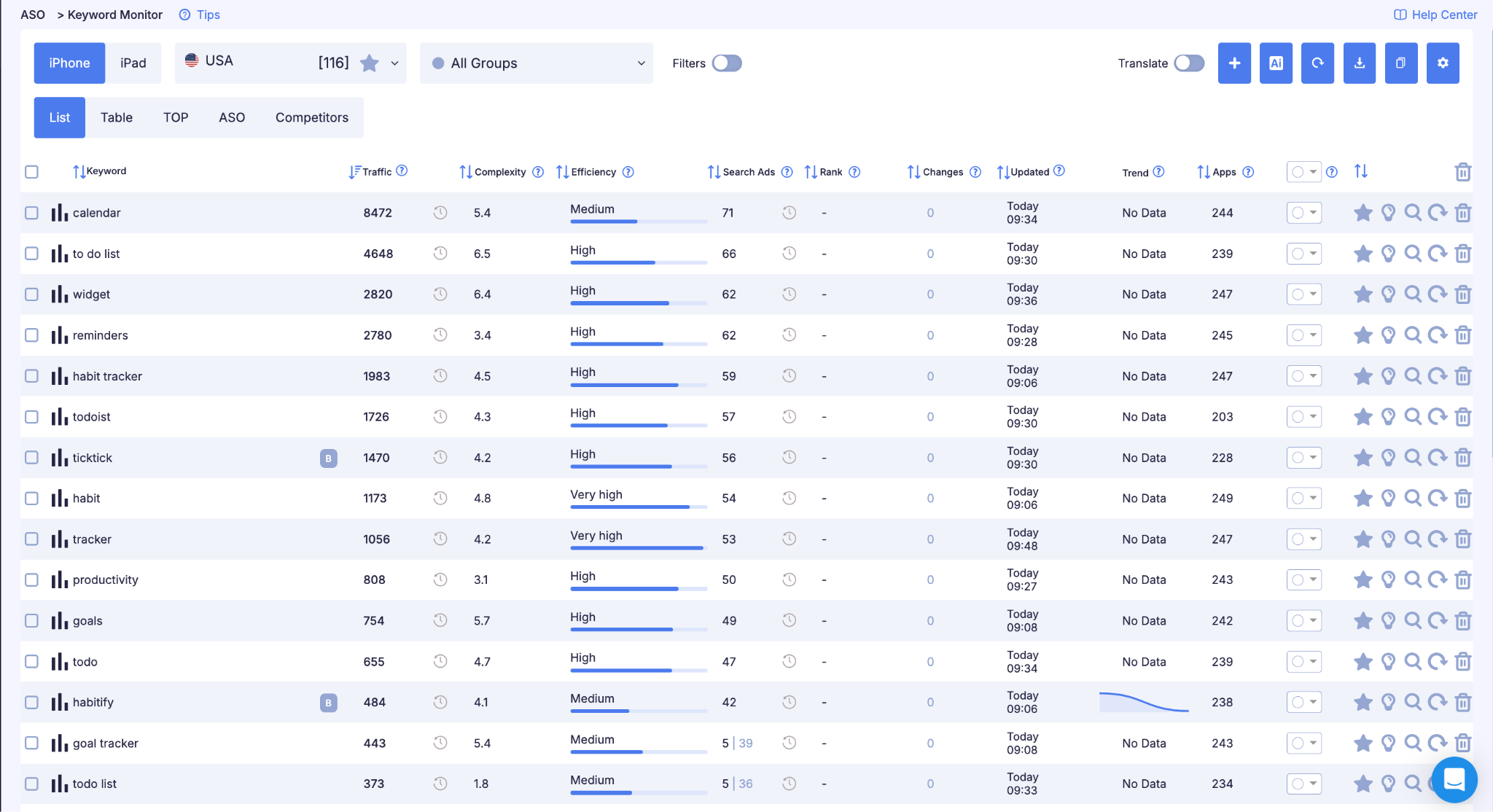
You can check every key metric for each query — traffic, difficulty, current rankings — in Keyword Monitor.
This is exactly why intent analysis comes before looking at traffic volume, not after.
Semantic Clusters: Why Exact Word Matching Loses Its Edge on Google Play
On the App Store, intent helps you pick the right words, but the algorithm still checks the text for exact matches: if the word isn't in the title, subtitle, or keywords field, the app won't be indexed for it, no matter how well the intent lines up.
Google Play handles intent differently because it uses NLP models that cluster synonymous and semantically related queries together. To Google Play's algorithm, "habit tracker," "routine builder," "daily habits app," and "streak tracker" aren't separate strings — they're all part of the same meaning cluster. The practical takeaway: on Google Play, cover intent with varied phrasing in the description text rather than repeating the same exact match over and over — synonym variety works better for relevance than mechanically repeating one word.
This also shapes how you organize your semantics: when building a keyword list for Google Play, it's more useful to group queries into meaning clusters — one cluster, one intent — rather than just by literal string matches. How to use these clusters when writing the full description is covered in the Google Play keyword placement section below.
Building Your Starting Keyword List
Keyword research doesn't start with a tool — it starts with a question: how does our user describe what our app does?
Several sources help answer that. Some work the same way on both stores; others deliver more on Google Play because the full description is indexed there.
The App's Description and Core Function
The first step is to write out every word and phrase that could describe the app — not marketing language, but functional descriptions: what it does, who it's for, and in what situations it's used. A habit tracker is a habit tracker, a goals journal, a daily planner, a reminder app, a streak tracker. Each of these descriptions is a potential keyword or part of one, and it applies to both stores.
User Reviews
One of the best sources of natural language. How do users themselves describe the app and what they do with it? Reviews often contain phrasing a marketing team would never come up with — and that's exactly what people type into search.
On Google Play, this source has an added benefit: review text is indexed by the algorithm. Phrasing users already use in reviews isn't just inspiration for your metadata — it's text the store is already reading and factoring into ranking.
App Store and Google Play Autocomplete
When a user starts typing a query into a store's search bar, the store suggests completions. These aren't random words — they're the real queries people make most often, and typing in a seed word and scrolling through every suggestion produces a ready-made list of high-demand variations. The mechanic is the same on App Store and Google Play, though each store's suggestion pool is its own.
For a systematic approach to working with autocomplete, see our guide on App Store and Google Play autocomplete as a keyword source.
Category and Adjacent Categories
Look at which category the app falls into and how the top apps in that category are named. Their titles and subtitles are a concentrated source of relevant keywords — those developers have already done their own research. On the App Store, this is limited to the title and subtitle; on Google Play, you can safely add the short description too — it's user-facing and written with search in mind.
Competitors' Full Descriptions on Google Play
This is a source with no direct equivalent on App Store, because the App Store description isn't indexed and doesn't reflect what's actually driving a competitor's rankings. On Google Play it's the opposite: the full description is working copy, not a showcase, and top competitors have loaded it with keywords for a reason.
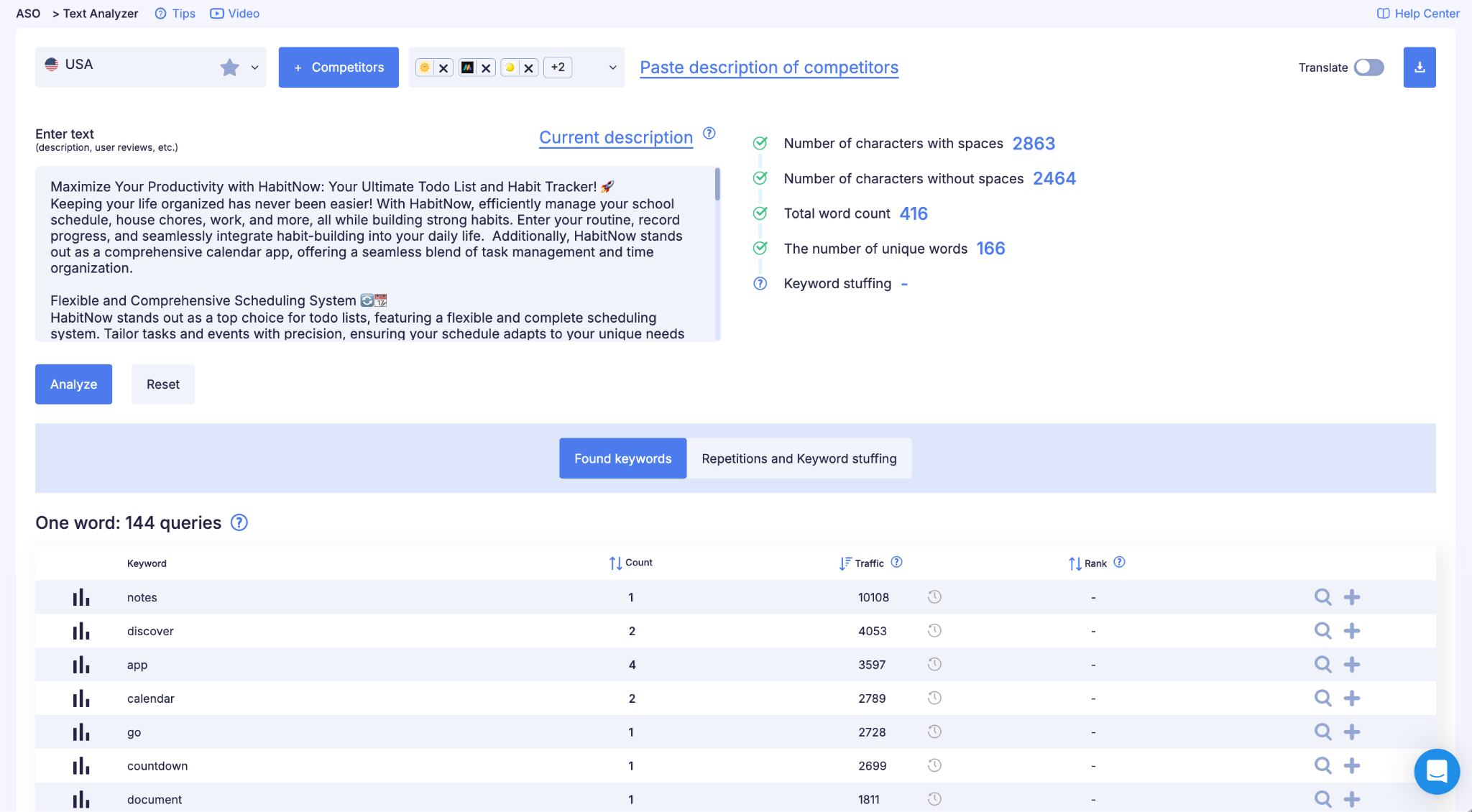
Take the descriptions of 3–5 top competitors and run them through Text Analyzer in ASOMobile — the tool finds every query with real traffic in any text and shows its density. That gives you a list of words the competitor is clearly using as working keywords, not just marketing phrasing.
Tools for Expanding the List
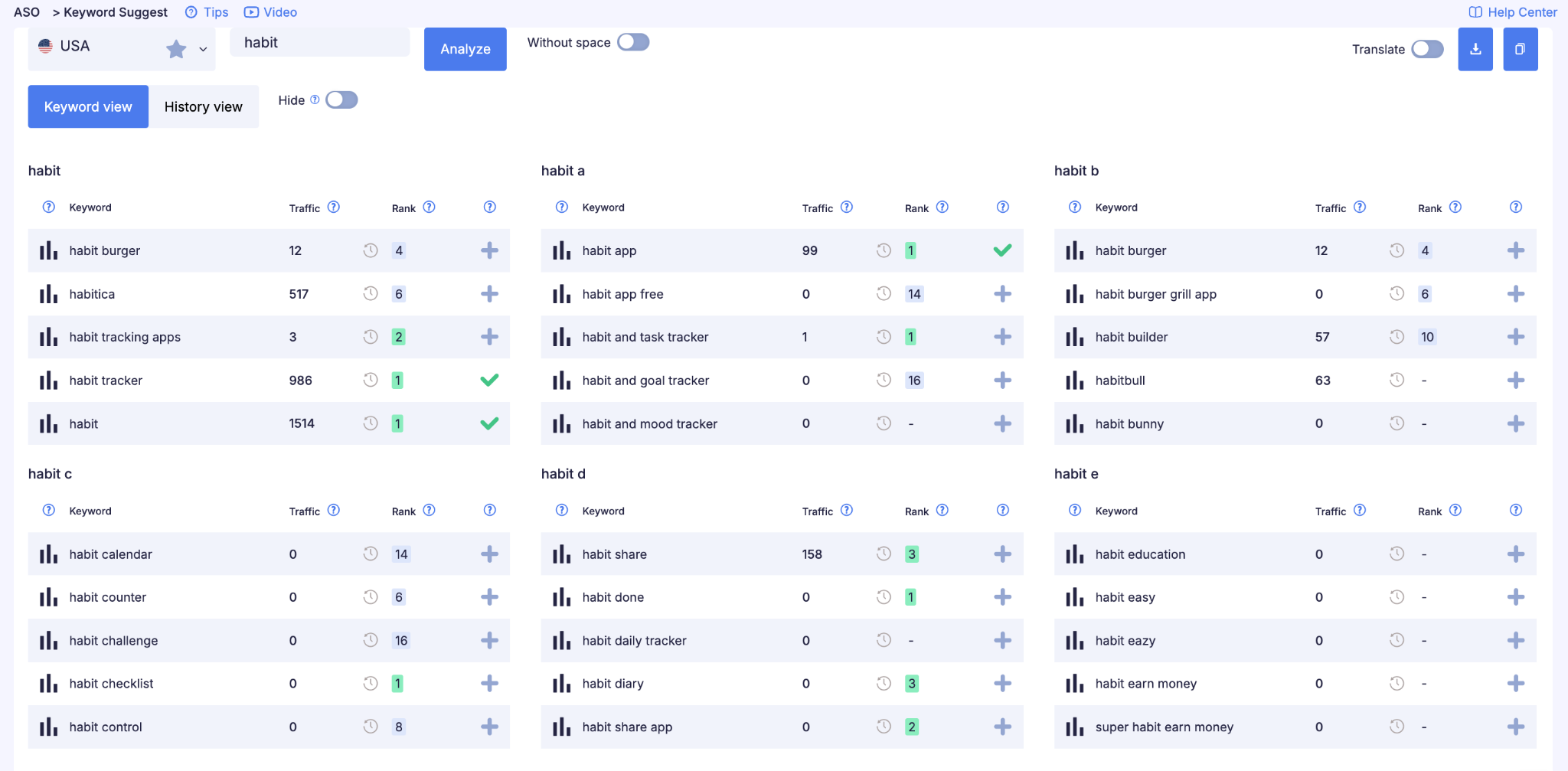
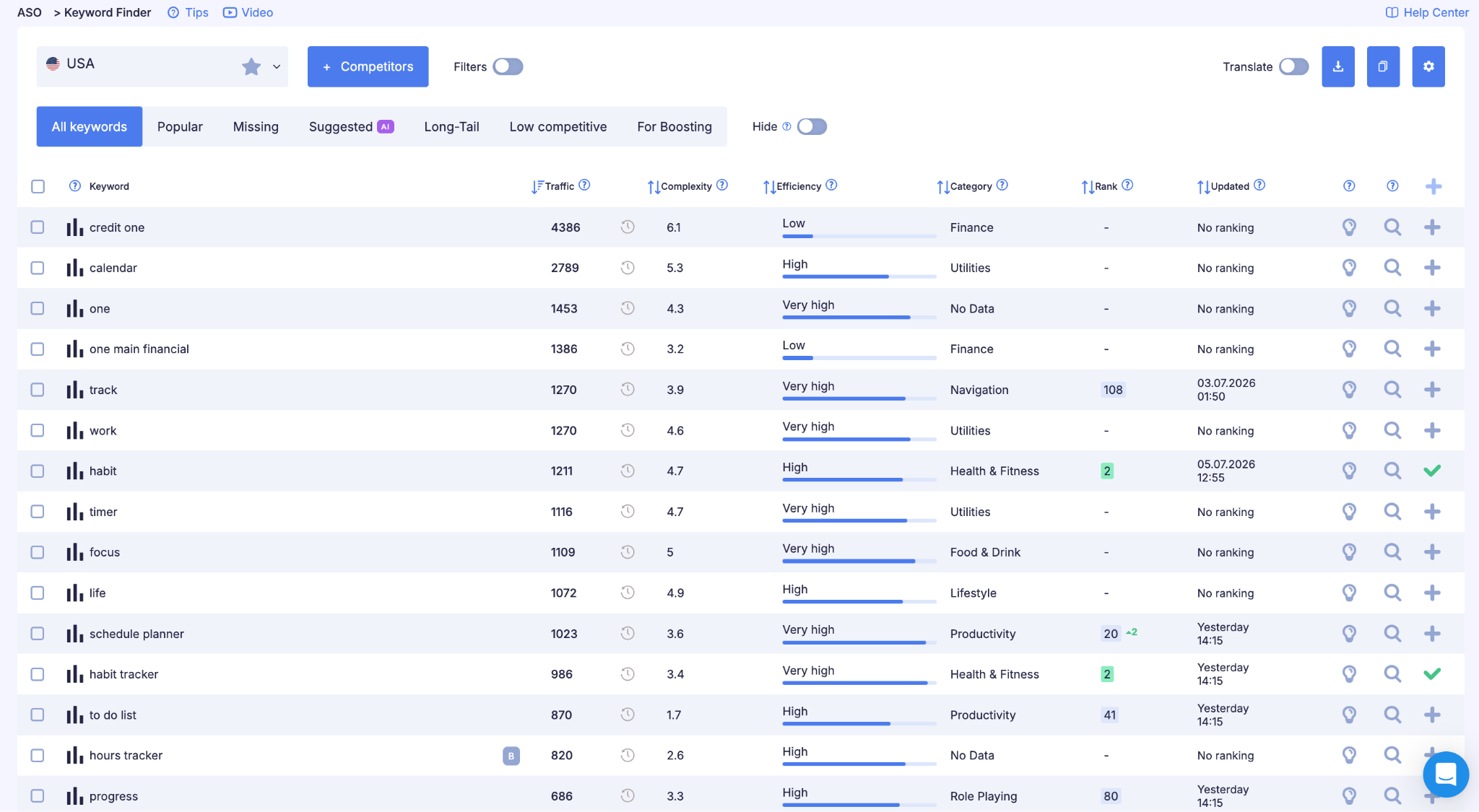
Once the base list is ready, it needs to grow. Keyword Suggest in ASOMobile builds expansions from real App Store and Google Play autocomplete data: take a seed word and see all its variations with traffic figures for each store separately.
Keyword Finder goes further: it analyzes competitor keywords and surfaces queries they rank for — including ones you'd never find on your own.
Bad List vs. Good List: Habit Tracker Starting Point
A common mistake at the collection stage is stopping at the obvious words. This applies equally to both stores.
Bad starting list: habits, goals, productivity, health, self-improvement, daily, reminder
What's wrong: most of these words are too broad. "Productivity" covers task managers, notes, and timers; "health" covers fitness, nutrition, medicine, and a dozen other directions. Someone looking for a habit tracker is unlikely to type just "goals" — the word covers too much ground. The list looks complete, but it only covers informational demand, where conversion will be close to zero.
Good list after expanding through autocomplete and Keyword Suggest:
- habit tracker — core category query, high traffic volume
- habit tracker daily — functional refinement, moderate competition
- habit tracker with streaks — specific feature, high conversion
- daily routine planner — adjacent query, different angle
- goal tracker app — category-led, moderate competition
- routine builder — niche, low competition
- morning routine app — long-tail, precise intent
- drink water reminder — narrow, but very high conversion
After expansion, the list grows from 7 broad words into 40–60 specific queries with measurable data. Next step: filtering and prioritization.
Competitor Analysis and Semantic Gaps
Your own keyword list is only half the work. The other half is understanding which queries competitors rank for, and finding the ones they cover that you don't. This is called a semantic gap, and competitors almost always have queries that drive traffic to them, are relevant to your app, and are missing from your metadata. These are ready-made opportunities you don't have to source from scratch — on either store.
How to Analyze Competitors
Start with 3–5 direct competitors — apps solving the same problem for the same audience. Look at their metadata: what's in the title, the subtitle, and on Google Play, the short description too. This is public information, and it already tells you a lot.
Next comes tool-based analysis. Spy Keywords in ASOMobile shows which queries a given app ranks for in search, giving you the competitor's full keyword picture rather than just what's visible in the metadata — just switch the platform filter to get a separate picture for App Store and Google Play.
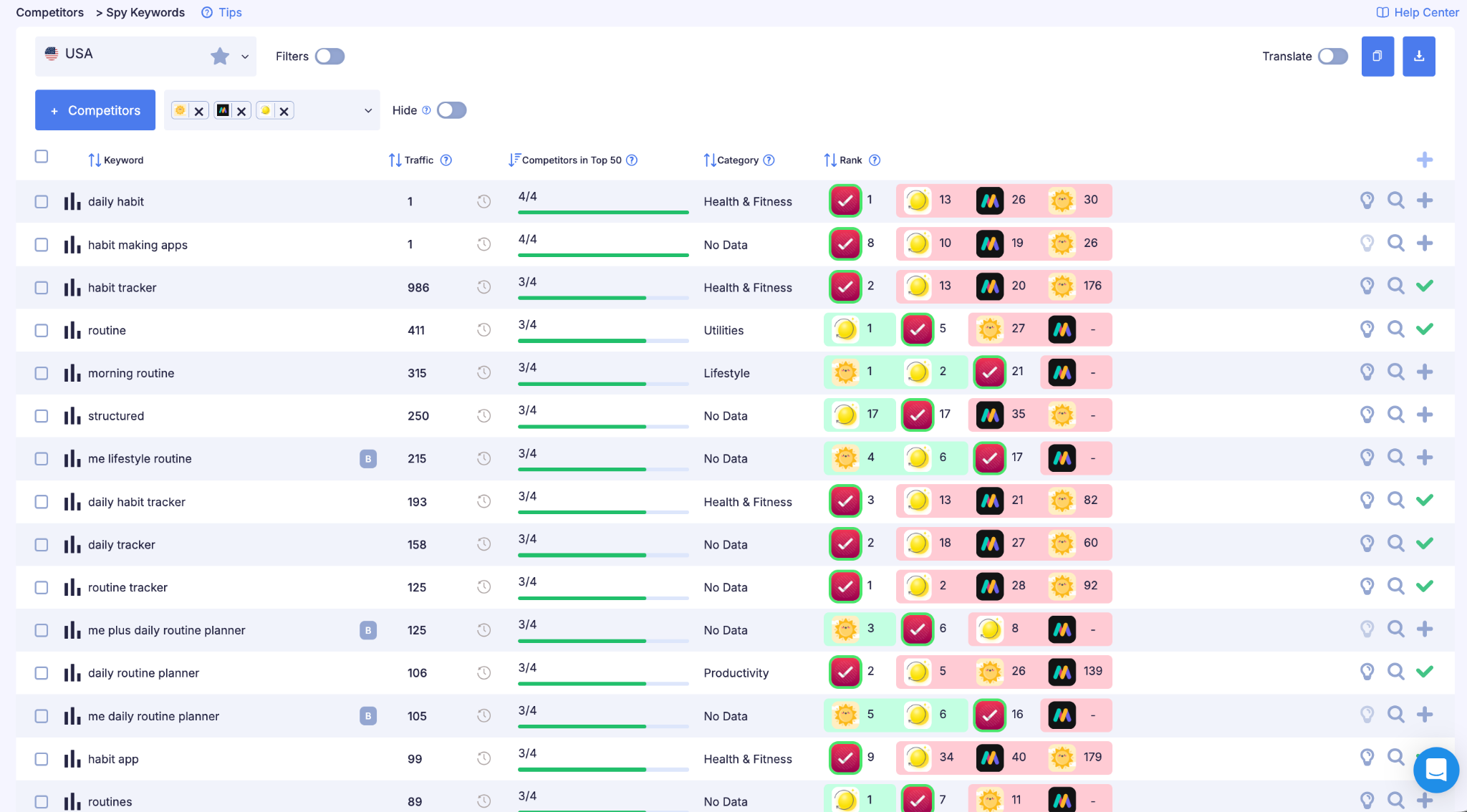
What to look for first: moderate-volume queries where a competitor ranks in the top 5 and you don't rank at all; functional queries that precisely describe your app but that a competitor has claimed and you haven't; competitive-type queries ("apps like X") if your app is a genuine alternative.
Bad Approach vs. Good Approach: Competitor Analysis for a Habit Tracker
We manually review competitors and copy words straight from their titles and subtitles.
Bad approach: took the words habits, goals, productivity, daily planner — everything visible on the top competitors.
What's wrong: these are exactly the words big apps already own in the top 1–3 spots with millions of installs. Adding them to your metadata won't earn you rankings — the algorithm will favor apps with far more weight. Meanwhile, you're spending metadata space on queries where you'll never gain visibility.
Good approach: run Spy Keywords on 3–4 mid-tier competitors — not the top apps, but ones sitting around rank 20 with fewer reviews — and find the queries they rank for where competition is lower.
That kind of analysis usually turns up queries like "habit tracker with reminders," "routine planner app," "streak counter," "daily checklist app." All functional, precise intent, and the apps ranking for them don't have millions of reviews — realistically attainable positions.
What Not to Do
Don't blindly copy a competitor's semantics. They may have words that only work in combination with their install numbers and rating, and the fact that a competitor ranks top 3 for a word doesn't mean you'll land there with the same word in your metadata — the algorithm factors in the app's overall weight. On Google Play, there's an added risk: copying someone else's phrasing into your full description without watching density can turn into keyword stuffing rather than optimization. We'll cover that in detail in the Google Play keyword placement section.
How to Prioritize Keywords
Once the list is built — and it can run to 200–500 words — you need to decide what to act on right now.
A solid prioritization logic looks like this. First priority: moderate-volume, highly relevant words — not the most popular, but ones where the app has a real shot at the top 10, and this is usually where quick wins live. Second priority: high-competition category words — worth targeting, but results won't come immediately and will only appear as the app's overall weight grows. Third priority: the long tail — three- or four-word queries with low volume but very high precision. "Water tracker for pregnancy" has small volume, but if that's exactly what someone is searching for, conversion will be high.
Bad Pick vs. Good Pick: Keyword Prioritization
After collection, we have 116 words. The typical mistake is to take the highest-traffic words and put them straight into the title.
Bad pick: title HabitFlow — Habits & Goals — two broad words with maximum competition; the app doesn't rank above position 50 for either.
Correct prioritization (App Store example):
| Query | Volume | Difficulty | Intent | Decision |
| habit tracker | High | High | Category | Title — worth it despite high competition |
| habit tracker daily | Medium | Medium | Functional | Subtitle — moderate competition, precise intent |
| habit tracker with streaks | Medium | Low | Functional | Keywords field — quick win |
| daily routine planner | Medium | Medium | Functional | Keywords field |
| goal tracker app | Medium | Medium | Category | Keywords field |
| fitness habits | High | High | Informational | Hold off — broad intent, strong competitors |
| morning routine app | Low | Low | Functional | Keywords field — long-tail, precise |
"Fitness habits" looks attractive in terms of volume, but the intent is informational, and competition is high — the top spot is held by apps with hundreds of thousands of reviews. Hold off until install volume grows. "Habit tracker with streaks" will realistically hit a top-15 position within a month.
The prioritization logic — volume, difficulty, intent — is the same for App Store and Google Play. What differs is where these words actually land: for the App Store, that's the title, subtitle, and keywords field, as in the example above; for Google Play, it's the title, short description, and density in the full description. We'll cover that separately in the sections below.
Checking Traffic by Country
Before your final selection, check how the words perform in your target markets, because queries popular in the US can have zero volume in Germany or Brazil, and vice versa. Worldwide Check in ASOMobile shows traffic for a specific query broken down by country, for either platform. For instructions on using the tool, see our Worldwide Check overview.
A typical scenario: "habit tracker" performs well in the US, but in Germany "Gewohnheiten App" or "Routine Tracker" is more popular, and in France, "suivi habitudes." If localizations are set up, every market needs its own research — words don't carry over automatically. App Store and Google Play also handle localization differently: App Store has primary and additional locales that expand reach for free, while on Google Play, language is tied to the user's device and works differently. We'll cover that in the Google Play localization section below.
Where to Place Keywords in App Store Metadata
This is the part where theory finally turns into concrete decisions.
What App Store (iOS) Indexes
App Store indexes three fields: the title (up to 30 characters) — the highest-priority signal for the algorithm; the subtitle (up to 30 characters) — second in weight; and the keywords field (up to 100 characters, not visible to users) — iOS-only. The algorithm doesn't factor the description into ranking; it exists only for the person who has already opened the app page.
How the Keywords Field Works
The field is filled with comma-separated words, no spaces: tracker,habits,goals,journal. A few rules people frequently break: don't repeat words already in the title and subtitle (the algorithm already counted them; repeating just wastes characters), don't use spaces after commas, use single words rather than phrases (the algorithm combines words from different fields into phrases on its own), and don't name competitors — Apple rejects metadata for that.
For a detailed breakdown of the iOS keywords field, see Keywords Field for iOS.
How to Distribute Words Across Fields
The highest-priority words go into the title: either the main category query or a functional one that precisely captures the app's core value. Both the algorithm and the user read the title, so it needs to stay readable.
The subtitle takes the second-priority query plus additional user value — a balance between algorithmic relevance and human readability.
The keywords field takes everything else: synonyms, long-tail queries, translations into other languages (for multilingual apps), spelling variants.
Bad Pick vs. Good Pick: Habit Tracker Metadata (App Store)
Bad:
- Title: HabitFlow — Your Daily App
- Subtitle: Track habits and reach goals!
- Keywords field: habits,goals,tracker,daily,productivity,health,fitness,routine,self,improvement
What's wrong: the title contains the vague phrase "daily app," which carries no search meaning. The keywords field duplicates words already in the title (habits, tracker); "self" on its own isn't indexed as a useful query; and spaces after commas waste characters.
Good:
- Title: HabitFlow: Habit Tracker Daily
- Subtitle: Smart to do: reminder widget
- Keywords field: list,task,routine,calendar,productivity,manager,todo,checklist,rabbit,procrastination,health,my
What changed: the title now includes "habit tracker" and "daily" — two real search queries. The subtitle reveals features through words people actually search for. The keywords field is cleared of duplicates and filled with proven-volume words that the algorithm will combine with what's already in the title.
Where to Place Keywords in Google Play Metadata
The logic is the same as on App Store: rank words by importance. The tools for doing it differ because Google Play simply doesn't have the same fields or indexing method.
What Google Play Indexes
Google Play indexes three fields, but none of them work like App Store's hidden keywords field. The title (up to 30 characters) carries the same top weight as on App Store; the limit was cut from 50 to 30 characters in September 2021, and at the same time Google banned words like best, #1, free, or download now from the title, short description, and developer name — Google treats them as ranking manipulation and manually rejects listings that use them. The short description (up to 80 characters) is the second-weighted field, and it's always user-facing in search and on the category page, so it has to do double duty: ranking and conversion. The full description (up to 4,000 characters) is the fundamental difference from iOS: on Google Play it's genuinely indexed and factors into ranking, not just read by a user who's already opened the page.
There's no hidden keywords field on Google Play at all. That means every word from your priority list has to be worked naturally into the text of these three fields — you can't hide them the way you can in the iOS keywords field; everything in Google Play's metadata is read by a human as well as the algorithm.
Keyword Density in the Full Description
This topic simply doesn't exist on the App Store because the description isn't indexed there. On Google Play, the algorithm looks not just at whether a word is present, but how often it appears relative to the length of the text — that's keyword density.
The industry benchmark: roughly 2–3% for your primary keyword in the full description — about one exact match per 250–300 characters of text. Secondary keywords need only 2–3 mentions across the whole text, with no strict percentage requirement. Total density across all target keywords generally shouldn't exceed 4–5%, or the algorithm starts reading the text as a keyword list rather than a natural description.
Where the keyword sits matters too. The first 160–250 characters of the full description carry more weight than text in the middle or end, so the primary keyword belongs in the first sentence, not somewhere later.
This is also where the semantic-cluster logic we covered earlier applies: Google Play understands synonyms, so instead of repeating "habit tracker" ten times, it's smarter to use the exact query once or twice and then lean on meaning-related variations — routine builder, daily checklist, streak tracker. To the algorithm, that's still a relevance signal; to a human reader, it's far more natural text.
You can check density and spot signs of stuffing in a finished text through Text Analyzer in ASOMobile: the tool breaks the text into 1–4-word phrases, shows traffic for each, and flags the ones appearing too often — a direct signal of keyword stuffing worth fixing before publishing.
The Risk of Overstuffing
Density cuts both ways. If your primary keyword shows up 15–20 times in 4,000 characters, Google Play's algorithm will likely read that as manipulation rather than natural text — and instead of a ranking boost, you can get the opposite effect. Stuffing is easy to spot by eye: the text reads like a keyword list rather than a description of what the app does. If a sentence doesn't sound natural when read aloud, density is probably already too high.
Other Fields Worth Considering
The developer name is indexed too, and you can carefully work one relevant term into it — it won't replace the core work on the three main fields, but it adds a small extra signal.
What's New (release notes) is a common myth: people assume it helps with keywords too. It doesn't — the What's New section isn't part of indexing and serves purely to drive conversion and retain people who've already installed the app.
Unlike the App Store, external links to a Google Play app page are factored into the algorithm — the one point where Google Play ASO overlaps with classic web SEO. Building links specifically for ASO isn't worth the effort, but if the app already has organic mentions and media coverage, that works in its favor.
Bad Pick vs. Good Pick: Habit Tracker Metadata (Google Play)
Bad:
- Title: HabitFlow — Best Habit App, Download Now
- Short description: Awesome app for habits and goals!
- Full description opening: HabitFlow. HabitFlow helps you track habits. With HabitFlow you can track daily habits, weekly habits, habit streaks, habit goals, and build better habits every day with HabitFlow.
What's wrong: the title violates Google Play policy with "Best" and "Download Now" — the listing risks rejection in review. The short description contains no real search query. In the description, "habit" appears 8 times across two sentences — textbook keyword stuffing that Text Analyzer would flag immediately.
Good:
- Title: HabitFlow: Habit Tracker & Planner
- Short description: Daily habit tracker with streaks, reminders and routine planner
- Full description opening: HabitFlow is a daily habit tracker that helps you build routines that stick. Set a goal, track your streak, and get a gentle reminder when it is time for your next habit. Whether it is a morning routine, a fitness habit, or a simple daily checklist — HabitFlow keeps you on track without the guilt.
What changed: the title and short description contain real search queries without violating policy. The first sentence of the full description sets the primary keyword right away, then follows with meaning-based variations — routine, streak, reminder, daily checklist — instead of repeating the same word. The text still reads like a normal description, not a keyword list.
Localization and Custom Store Listings on Google Play
On App Store, localization is essentially a bonus: many countries have more than one indexed locale at once, which expands your semantic core's indexing for free. Google Play doesn't work that way.
How Language Is Tied to a Google Play Listing
On Google Play, the listing a user sees switches based on the device's interface language, not the country. Developers can add listing translations in 70+ languages, and each translation is its own title, short description, and full description with its own semantic core: keywords that work in English text don't carry over automatically to German or Spanish — they need to be researched fresh for each language.
This is where the biggest difference from iOS shows up: Google Play has no mechanism in which a single storefront indexes several language locales at once, giving you extra room for keywords as a result. On Google Play, one language serves one country: if an app sells in Germany, Austria, and Switzerland, the same German listing can cover all three — simply because they share a language, not because Google Play is stacking locales to give you bonus keyword space the way App Store does.
Custom Store Listings: Targeted Listing Configuration
The role that additional locales play on App Store is partly filled on Google Play by Custom Store Listings (CSL) — customized versions of a listing shown to a specific user segment rather than everyone. You can target a CSL by country or region, by user status (people who've uninstalled the app or gone inactive, or people who signed up for pre-registration), or by acquisition source — a specific keyword, a UTM link, or a Google Ads campaign. Almost everything in a custom listing can be changed: title, short and full descriptions, icon, screenshots, and video — except the category, contact details, and privacy policy link, which remain shared across all versions of the listing. The current limit is up to 50 custom listings per app, which is plenty for dozens of markets and segments at once.
The practical ASO benefit: if a keyword or audience segment has a noticeably different intent from your main listing — say, the app runs a dedicated marketing campaign around "water tracker for pregnancy" — you can build a separate CSL focused on that exact semantic, without touching the main listing optimized for a broader audience.
What Not to Do
Don't roll out localization through machine translation without checking it. A mechanical translation often produces text that's grammatically correct but irrelevant to search: the word someone actually types into German search can differ from a literal translation of the English keyword. Before publishing, check every locale through Worldwide Check — the tool shows the real traffic for a specific query in a specific country, and it often turns out that a literal translation of your primary keyword barely gets searched, while a more natural local phrasing gets searched actively.
Reviews and Behavioral Factors in Google Play Ranking
On the App Store, review text and ratings mainly affect conversion: they help someone decide whether to install, but they don't feed directly into indexing. On Google Play, reviews play a double role — they're both a signal for the algorithm and a conversion tool.
Reviews as a Traffic Source
We touched on this in the keyword-collection section: review text is indexed on Google Play. If dozens of users write things like "great habit tracker with reminders" or "finally found an app for planning my morning routine" in reviews, that phrasing is already part of the text field the algorithm reads — with zero effort from the developer. Developer replies to reviews are indexed too, so you can naturally work target phrasing into a reply — not stuffed, just relevant.
Behavioral Signals: More Than Just Text
Google Play doesn't view an app as purely a set of text fields. It also tracks metrics the App Store doesn't weigh nearly as heavily.
Retention — how long and how often users come back to the app after installing. Low retention signals to the algorithm that the app isn't living up to its metadata's promises, which means its ranking for that same metadata can erode over time.
Uninstall rate — the share of users who delete the app shortly after installing. A high uninstall rate is almost always a sign of a mismatch between what the title and description promise and what the app actually does. Attractive but inaccurate metadata drives installs that quickly turn into uninstalls — and that hurts rankings more than an imprecise keyword choice would.
Install velocity — Google Play watches not just the absolute number of installs but the trend: a sharp increase often gives a temporary visibility boost, and a steady decline works the other way.
Android Vitals — the app's technical health: crash rate, ANR (App Not Responding) rate, launch time. We mentioned this in the metrics section: an unstable app gets less search visibility on Google Play regardless of metadata quality.
What This Means in Practice
There's no direct lever that raises retention or lowers uninstall rate through keyword choice alone — but keyword choice can help or hurt those metrics. If a title and short description promise something the app doesn't deliver, just to catch traffic from a high-volume query, that generates impressions in the moment but hurts retention and raises uninstalls in the medium term, and rankings follow them down. Accurate metadata isn't just a matter of taste — it's a direct safeguard for your behavioral metrics.
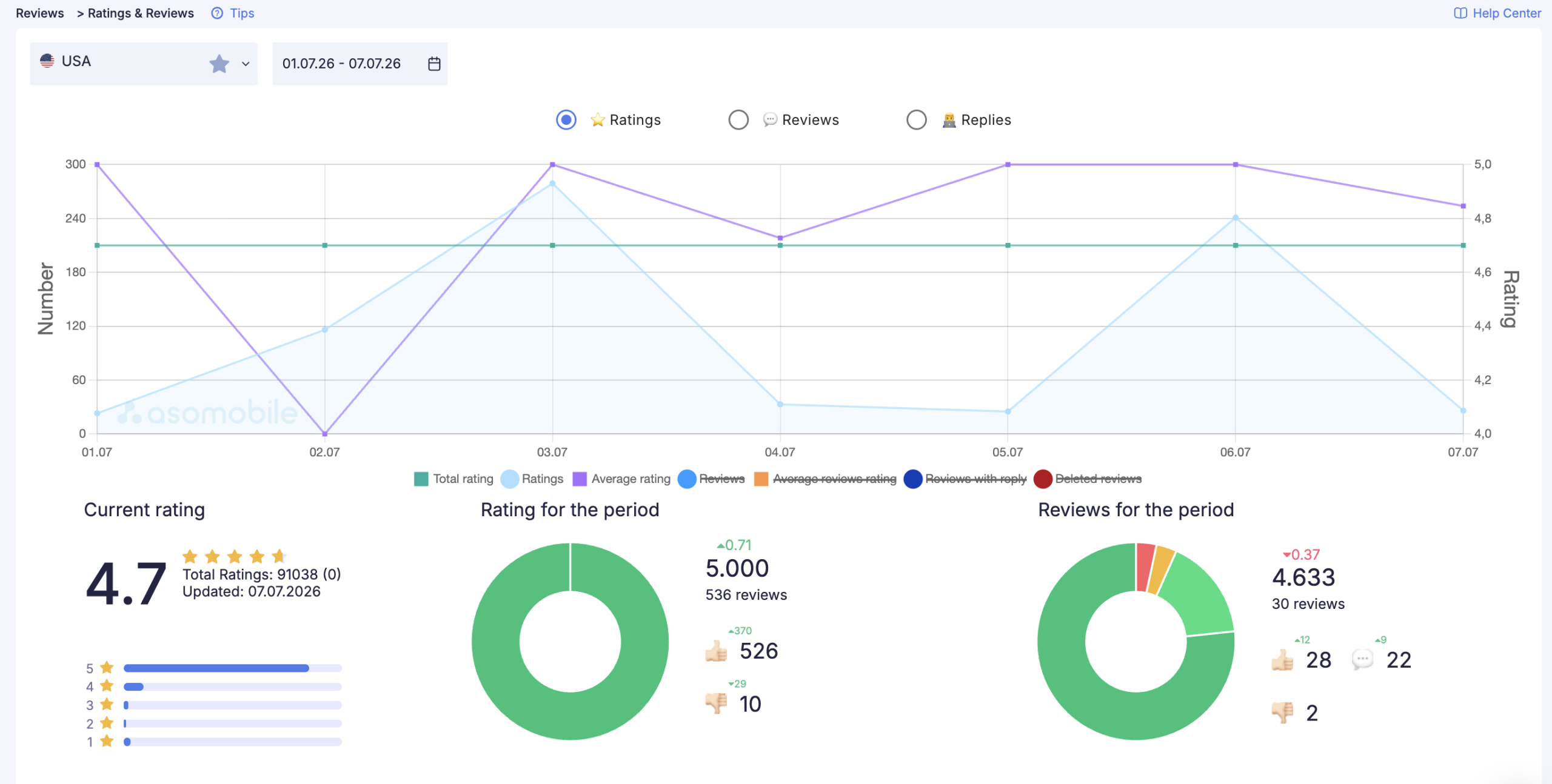
Monitoring reviews and ratings by country and app version is easiest through Rating & Reviews in ASOMobile — the dashboard shows rating trends and user sentiment — while Reviews & Responses helps you reply to new reviews quickly using templates, including working in phrasing your description missed, naturally.
Store Listing Experiments: Google Play's Native A/B Test
Google Play has a built-in, free A/B testing tool for your listing: Store Listing Experiments, available right in Google Play Console. App Store got a similar feature later, under a different name (Product Page Optimization), but we're focusing on Google Play here because its test mechanics tie into wording, not just visuals.
What You Can Test
Store Listing Experiments lets you compare variants of the icon, screenshots, feature graphic, video, short description, and full description. You can test each element on its own or in combination.
An important limitation: the app title can't be tested through an experiment. Changing the title only happens through a direct listing update, not an A/B test — so if you need to compare two title options, the only way is to test them sequentially as real metadata changes, with a gap between them to let data accumulate.
Local vs. Global Experiments
You can run an experiment for a single country or language — comparing listing variants for that specific audience — or make it global, where part of the audience sees variant A and part sees variant B regardless of country. For testing short and full description wording for a specific market, a local experiment makes more sense: what converts best in the English-language store won't necessarily work the same way in the German one.
How to Run a Test Correctly
One hypothesis at a time — changing the short description and the icon simultaneously makes it impossible to know what actually drove the result. Google recommends keeping an experiment running for at least 7 days to average out daily and weekly traffic swings, and gathering enough visitors per variant before drawing conclusions — check Google Play Console's current guidance for exact thresholds, since minimum-traffic recommendations get updated from time to time.
For ASO, Store Listing Experiments is primarily a conversion tool, not a direct keyword-research one: it won't tell you whether a word helps ranking, but it will tell you exactly which short-description phrasing converts an impression into an install better. That's especially useful once your keyword list is already collected and prioritized — the same set of words can be packaged into different phrasings with different conversion rates, and Store Listing Experiments helps you pick the stronger one.
Cross-Platform Strategy: One Semantic Core for Two Stores
If an app is published on both App Store and Google Play, it's tempting to just copy the same metadata from one store to the other. Part of that work can and should be genuinely reused — but part has to be handled separately because the rules diverge in the places that matter most.
What's Shared Across Both Stores
The semantic core at the start is one and the same. The question of how our user describes what the app does doesn't depend on the platform, so the base list of functional descriptions, user reviews, and direct competitor analysis is worth collecting once and using as a source for both platforms. The six intent types are universal too: someone searching "habit tracker with streaks" wants the same outcome no matter what phone they're typing it on.
What Needs to Be Handled Separately
From here the paths diverge, and here's exactly where:
Field distribution. App Store runs on a no-repeat logic: a word already sitting in the title or subtitle shouldn't be duplicated in the keywords field — that's wasted characters. Google Play operates on the opposite logic: reasonable repetition of a keyword in the description text constitutes keyword density, and without it, the algorithm assesses relevance more weakly.
Prioritization. The same word can be hard to reach on App Store, where difficulty is mostly set by the strength of the top apps' installs and ratings, and much more attainable on Google Play, where competitors' behavioral metrics add to that difficulty — or the other way around. Build your priority list separately for each platform, even when the starting semantics are shared.
Localization. Additional locales on the App Store and listing translations on Google Play operate under different rules and don't carry over between the two: what gives you a free bonus in one system simply doesn't exist as a mechanic in the other.
Reviews. On Google Play, review text is indexed and directly feeds semantics; on App Store, it only affects conversion. That means working on reviews carries extra ASO value on Google Play that it doesn't have on App Store.
Update frequency. Editing metadata too often is riskier on Google Play than on App Store, because every text change triggers a fresh evaluation of the behavioral signals around the listing — frequent, sharp edits can temporarily rattle rankings more than they would on App Store, where the signal is more text-based and predictable.
A Practical Protocol for Running Both Stores at Once
If you're running ASO on both stores in parallel, the workflow looks like this: build one shared semantic core → split it into two derived lists following each platform's indexing rules → prioritize each list separately → place keywords using each platform's field structure and density rules → monitor rankings separately, because even the same word can behave differently on the two stores.
Comparison Table: ASO on App Store vs. Google Play
We showed this table at the start of the article as a map of the differences — here it doubles as a working cheat sheet as you put together an action plan for your own app.
| Factor | App Store | Google Play |
| Ranking model | Lexical: exact matches in title, subtitle, keywords field | Full-text, with semantic analysis and synonym clustering |
| Dedicated keywords field | Yes, up to 100 characters, hidden from users | None — all keywords go into visible text |
| Description indexing | Not indexed | Indexed, up to 4,000 characters; density matters |
| Repeating keywords across fields | Avoid — wastes characters | Reasonable repetition works in your favor — that's density |
| Reviews | Affect conversion, not indexing | Text is indexed; affects both conversion and semantics |
| External links | No effect on ranking | Taken into account |
| Localization | Multiple indexed locales per country — free bonus characters | One language, one listing; segmentation via Custom Store Listings |
| Behavioral factors | Indirect, mainly through conversion and rating | Direct: retention, uninstall rate, install velocity, Android Vitals |
| Native A/B testing | Product Page Optimization | Store Listing Experiments |
| Frequent metadata changes | Relatively predictable effect | Riskier — triggers a fresh evaluation of behavioral signals |
How to Track Results
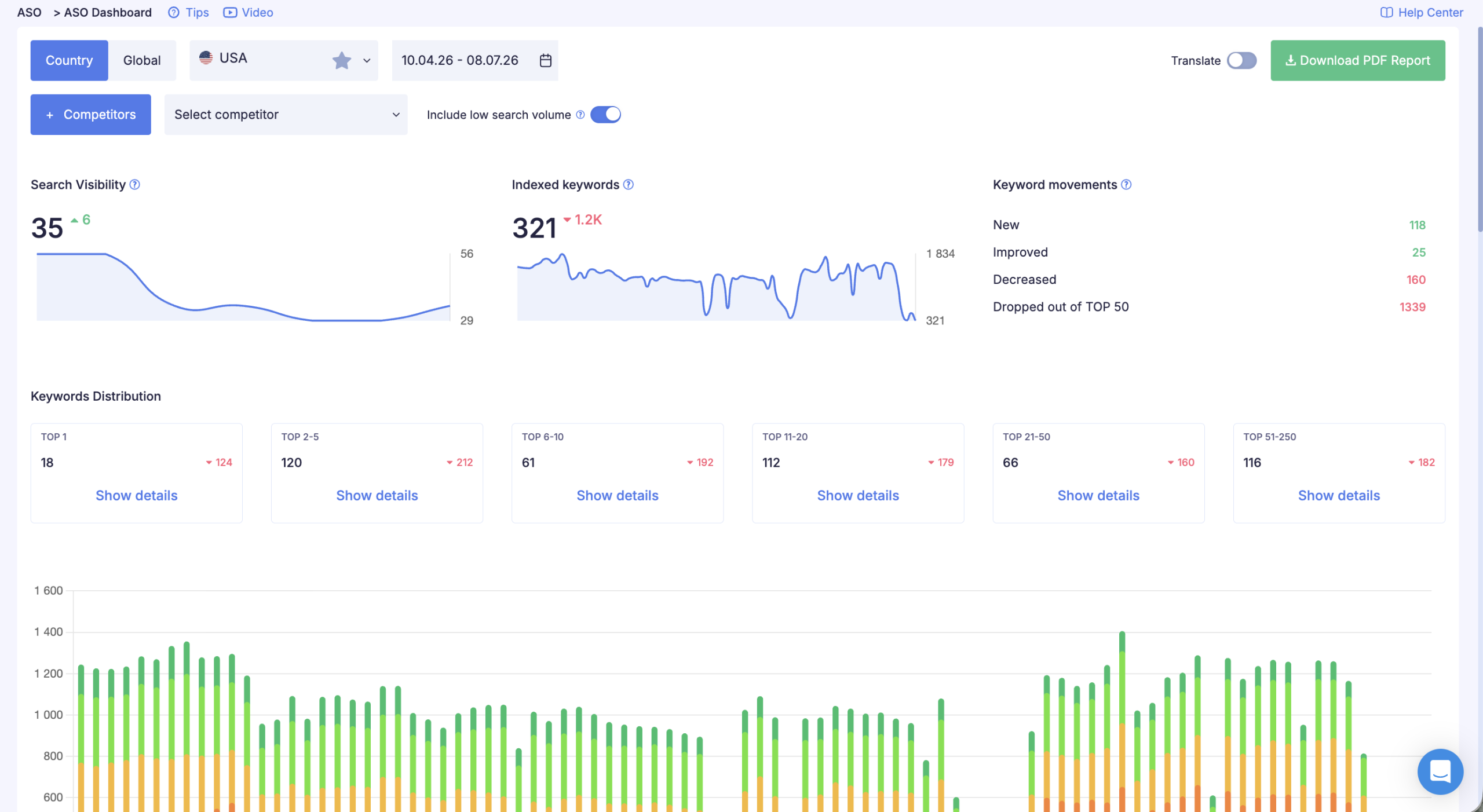
Once the metadata is updated, the next step is to watch what happens. App Store takes a few days to apply changes after an update is published. Google Play usually reindexes text edits faster — often within a day, since text-only changes without a new build don't require a full review.
What to track: rankings for target queries — for every keyword on your priority list, you need to know where the app ranks, because a top-10 spot delivers fundamentally more traffic than position 50. Ranking trend — watch the trend, not just the current spot: is the position climbing or falling, and a drop after a metadata update is a signal the change didn't work. Search traffic — rising rankings should translate into more impressions and more visits to the app page. Conversion — if impressions are rising but installs aren't, the problem is either a mismatched intent or the app page itself: icon, screenshots, description. For Google Play, add technical stability to that list — a spike in crashes or ANRs after an update can tank visibility on its own, even with perfect metadata, so check Android Vitals alongside rankings rather than separately.
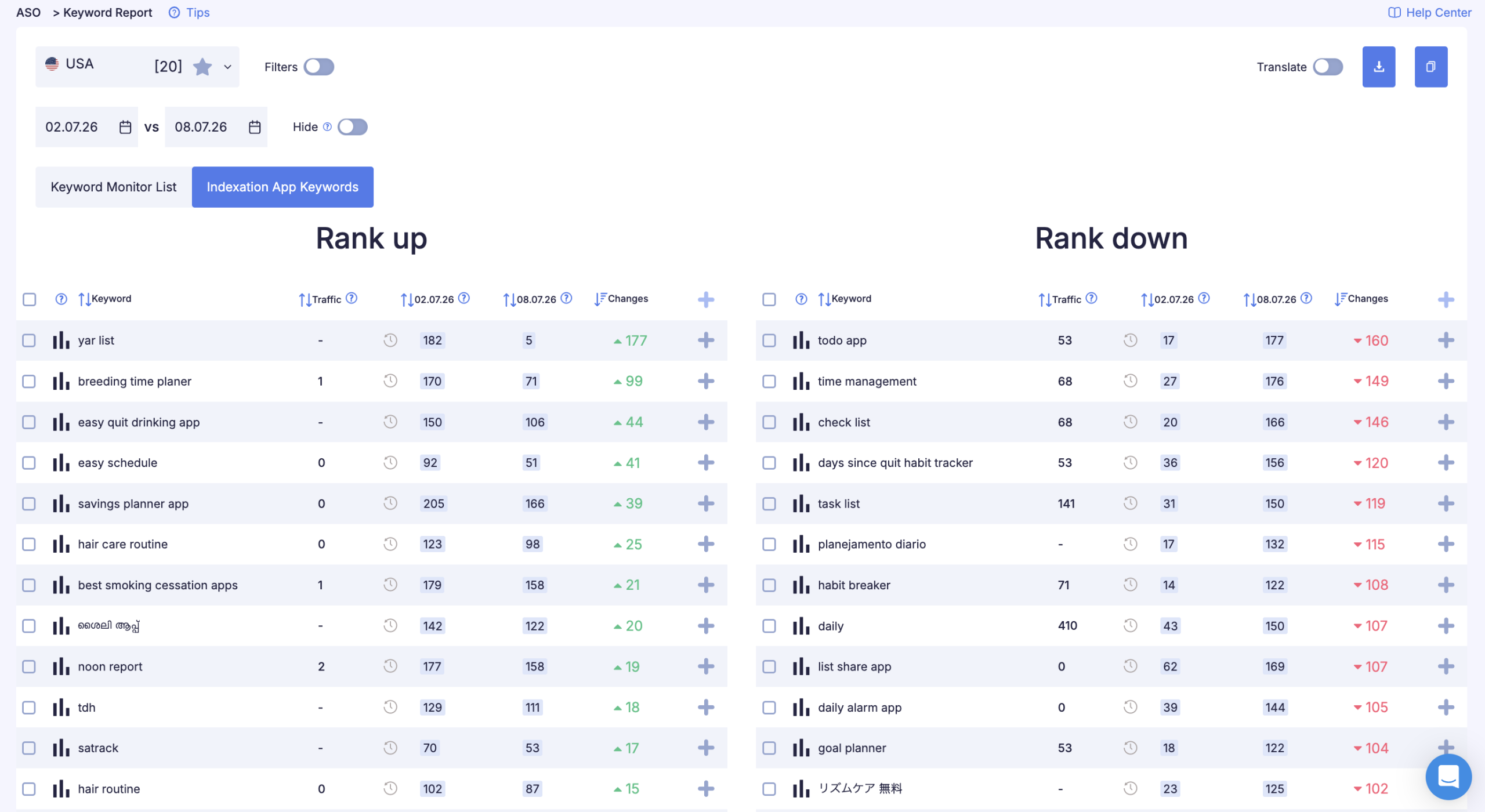
Keyword Report in ASOMobile pulls all this tracking together for every keyword in one place across both platforms. For how to read the report, see Tracking Keyword Trends with Keyword Report.
What Monitoring Shows Four Weeks After an Update
After updating the metadata for the habit tracker example above, a typical picture looks like this:
- habit tracker daily: position climbed from 34 to 11 — into visibility range
- habit tracker with streaks: entered the top 20, previously not indexed at all
- routine planner: top 15 from the first week — low competition, quick result
- habit tracker: position 47, unchanged — high competition, needs install growth
This is exactly why chasing "habit tracker" from day one isn't the right strategy. While the app builds up weight, moderately competitive queries generate real traffic and real installs, which eventually help it break through on the main keywords too. Reading this dynamic works the same way on App Store and Google Play, though slow growth on highly competitive keywords on Google Play is more often tied to behavioral metrics as well, not just install counts and reviews.
How often to update metadata. The standard cycle is every 1–2 months. Less often and you miss opportunities; more often and you don't have enough data to judge results. Exception: if rankings drop sharply, respond quickly. On Google Play, this rule deserves even more discipline: editing text too frequently rattles the behavioral signals covered earlier, so it's especially important to stick to the cycle rather than rewriting the listing at every short-term ranking swing.
How ASOMobile Helps with Keyword Research
Everything described above can be done manually — tracking autocomplete by hand, maintaining spreadsheets, checking rankings periodically. It takes a lot of time and still doesn't provide the full picture, especially when working across two platforms at once.
ASOMobile covers every stage of the process for both App Store and Google Play.
Keyword collection: App Keywords shows the current indexation of any app — a competitor or our own — making it a direct source of keyword ideas. Keyword Suggest builds expansions from App Store and Google Play autocomplete data, showing all variations of a seed word with traffic figures for each store separately. Keyword Finder analyzes competitors' semantics and identifies queries that work for them but are missing from our list.
Competitor analysis: Spy Keywords gives a full picture of which queries any app ranks for on either platform, and makes it easy to compare our keyword set against several competitors to spot gaps.
Text optimization for Google Play: Text Analyzer breaks down any text — our own description, a competitor's description, reviews — into 1–4-word phrases, shows traffic and density for each, and flags signs of keyword stuffing. This is the one step in the whole process that has no equivalent on App Store, precisely because the description isn't indexed there.
Geographic coverage: Worldwide Check shows traffic for a query by country on both platforms — useful when working across multiple markets at once and for checking Google Play localizations before publishing.
Reviews and behavioral signals: Rating & Reviews gives a combined view of rating trends and user sentiment by country and period. Reviews & Responses helps you reply to reviews quickly using templates — on Google Play, it also doubles as a semantic tool, since developer replies are indexed.
Rank monitoring: Keyword Monitor tracks app rankings for chosen queries in real time on both platforms. Keyword Report builds a history for each keyword — useful for evaluating results after a metadata update.
Full picture: ASO Dashboard gives an overview of app health with clear visual summaries.
Metadata decisions: ASO Creator helps you build metadata within each platform's character limits, checks for duplicates and signs of keyword spam specifically for Google Play, and shows how your words are distributed across fields.
Pre-Update Checklist for App Store and Google Play Metadata
Before submitting an update, run through this list.
Shared Across Both Platforms
- Every word on the priority list is checked for volume, relevance, and competition
- Search intent is clear for every keyword and matches what the app does
- Competitive queries are checked — no direct references to other brands
- Geographic coverage is checked: keywords are relevant for target markets, including configured localizations
- Rank monitoring is set up to evaluate results after the update
Additional Checks for App Store
- The most important queries are in the title or subtitle
- The keywords field has no duplicates from the title and subtitle
- The keywords field has no spaces after commas
- The keywords field is within the 100-character limit
- The title and subtitle read like normal text, not a word list
Additional Checks for Google Play
- The most important queries are in the title and short description
- The primary keyword sits within the first 160–250 characters of the full description
- Primary keyword density is within 2–3%, total density of all target keywords no higher than 4–5%
- The title, short description, and developer name contain no banned words like best, #1, free, download now
- The full description text has been checked in Text Analyzer for signs of keyword stuffing
- Localizations have been checked through Worldwide Check rather than machine-translated
- If Custom Store Listings are in use, it's clear which segment and semantics each one targets
Simple, budget-friendly optimization 💙
FAQ: Frequently Asked Questions
Keyword research is the process of finding the search queries people use when looking for apps, and deciding which of those queries belong in your metadata. On App Store, that’s the title, subtitle, and keywords field; on Google Play, it’s the title, short description, and full description. The goal in both cases is the same: organic traffic from users searching for exactly what your app does.
Start with a base list of words describing the app’s functions and value. Expand it through App Store and Google Play autocomplete and tools like Keyword Suggest. Analyze direct competitors’ semantics through Keyword Finder or Spy Keywords — on Google Play, also run competitors’ full descriptions through Text Analyzer, since that text is indexed. Filter the list by relevance, search volume, and competition difficulty. Make the final selection based on conversion potential: words where a person is highly likely to install your specific app.
Search intent is what a person actually wants to find when they type a query into a store’s search bar. The same search volume can hide very different intentions: one person is just browsing a category (informational intent), another is looking for a solution to a specific problem (problem-oriented intent), and another wants a specific feature (functional intent). Understanding intent helps you choose words that bring in users who are ready to install.
No. App Store has a separate, hidden 100-character field that only the algorithm sees. Google Play has no such field — every keyword has to be worked naturally into the title, short description, and full description, and all of that text is visible to users.
Yes, and it’s one of the biggest differences from App Store. The full description on Google Play (up to 4,000 characters) is indexed and factors into ranking, so density and wording matter there. On the App Store, the description is only visible to users who’ve already opened the app page — it has no effect on rankings.
The industry benchmark is around 2–3% for your primary keyword, and no more than 4–5% total across all target keywords combined. Higher density risks being read by the algorithm as stuffing rather than natural text. You can check the density of a finished description using Text Analyzer.
The iOS keywords field is capped at 100 characters — roughly 15–20 individual words. Add 2–3 priority queries in the title and subtitle, and you’re looking at around 20–25 actively working words total. Precision matters more than count: 15 relevant, high-volume words will outperform 25 words that don’t reflect what the app actually does.
The semantic core at its base is the same — the set of functional descriptions, intents, and competitive queries doesn’t depend on the platform. But the final lists for the two stores will differ: different field distributions, different densities, and different competition for the same query. Collect your semantics once, then prioritize and place them separately for each platform.
The standard cycle is every 1–2 months, for both platforms. That’s enough time to gather data on rankings and conversion after the previous update. For a newly launched app, it makes sense to run your first results analysis 3–4 weeks after publishing. On Google Play, treat frequent edits with extra caution, since every text change resets the algorithm’s read on the behavioral signals around the listing.
Competitors have already done their own semantic research. Analyzing their keywords with Spy Keywords helps you find high-demand queries you might have missed — especially niche and functional ones — on either platform. It’s faster than building semantics from scratch. Just don’t copy blindly: only take queries that are genuinely relevant to your own app.