Reinstalls are repeat installs by users who had previously downloaded the app but, for one reason or another, deleted it. In some app categories, returning users account for up to half of all traffic — and sometimes even more. That means focusing only on retaining your current core audience is no longer enough; you also need to know how to bring back users who have already left.
In today's market, CPI is rising, targeting is tightening due to privacy restrictions, and competition for new users is increasingly becoming a budget race. Against this backdrop, reinstalls are becoming one of the most effective growth levers: returning users already know the product, and reactivating them is usually cheaper than acquiring someone new.
In this article, we'll look at why users delete apps, how to track reinstalls in the new reality, and which strategies actually work for winning users back.
Why Users Delete Apps: Churn Reasons and Triggers
Before you can win users back, you need to understand why they left. App deletions are rarely random — there is usually a specific trigger behind every uninstall.
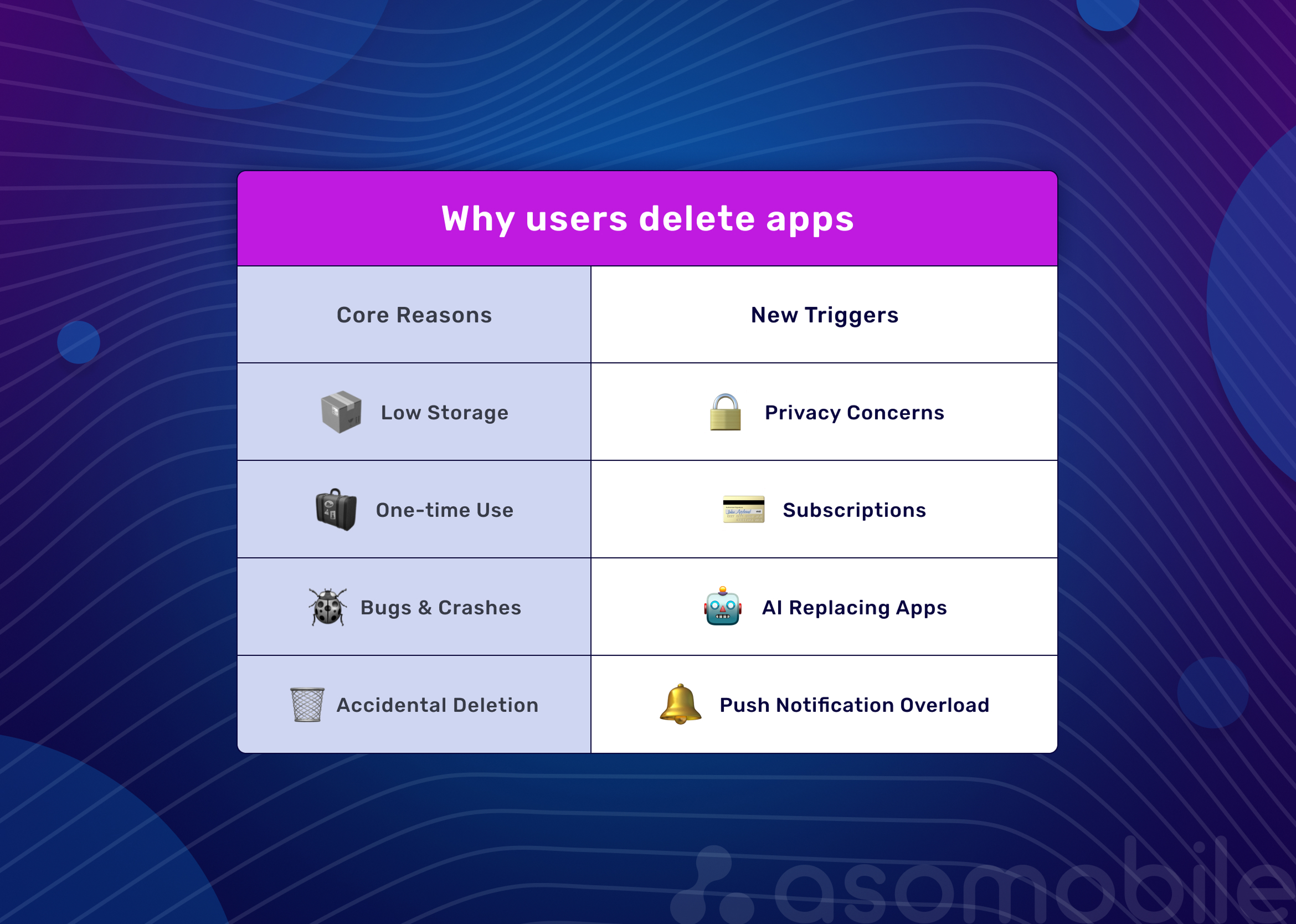
The core reasons are still fairly predictable:
- Low storage. Users clean up their phones, and the first apps to go are usually the ones they have not used in a while.
- Seasonality and one-off use cases. A user downloads an app for a trip, uses it, and deletes it until the next journey. The same goes for promotions: they came for a discount, got it, and then lost interest.
- Errors and crashes. Even a single crash can push a user to delete an app, and after 2–3 issues, they often leave for good.
- Accidental deletion. It happens — and it is something worth keeping in mind.
But today, these factors alone are no longer enough to explain all churn. The industry has changed — and with it, new uninstall triggers have emerged:
- The privacy factor. Users have become much more attentive to the data apps collect. If a flashlight app asks for access to contacts, or a calculator wants location permissions, that raises suspicion. Apps that request excessive permissions or have a reputation for data harvesting are more often deleted.
- The subscription model. Many users try an app during the trial period and then delete it once the trial ends, without fully understanding its value. The problem worsens when there is no clear reminder of exactly what they will lose.
- AI is replacing app functions. The rise of AI assistants is changing the landscape: simple utility apps — translators, note-taking apps, scanners — are increasingly being replaced by built-in AI features or all-in-one assistants. As a result, apps with straightforward functionality are under particular pressure: it is getting harder and harder to explain why users should keep a separate app installed.
- Too many push notifications. Aggressive retention tactics can backfire. When notifications become excessive and irrelevant, users do not just turn them off — in half of the cases, they delete the app altogether.
Uninstall and Retention Benchmarks by Category
Retention depends directly on the type of app. What looks normal for one category may look like failure in another. That is why churn and reactivation potential should always be evaluated in the context of your own niche.
| Category | Day 30 Retention | Characteristics |
| News | 11.3% | Spikes around major events, then a rapid drop-off |
| Finance | 4.6% | High trust, everyday needs |
| Shopping | 5% | Depends on purchase cycles and seasonality |
| Food & Drink | 3.7% | Delivery apps retain better; recipe apps worse |
| Health & Fitness | 3.7% | Peak in January, decline by March |
| Travel | 3% | Seasonal usage, long breaks between sessions |
| Gaming | 2.4% | High D1, sharp drop without progression |
| Utilities | 2.6% | Used when needed, not every day |
When and Why Users Come Back: A Typology of Returns
Deleting an app does not mean losing a user forever. People do come back — and those returns follow recognizable patterns. We identify three main types of reinstalls, and each one calls for its own reactivation logic.
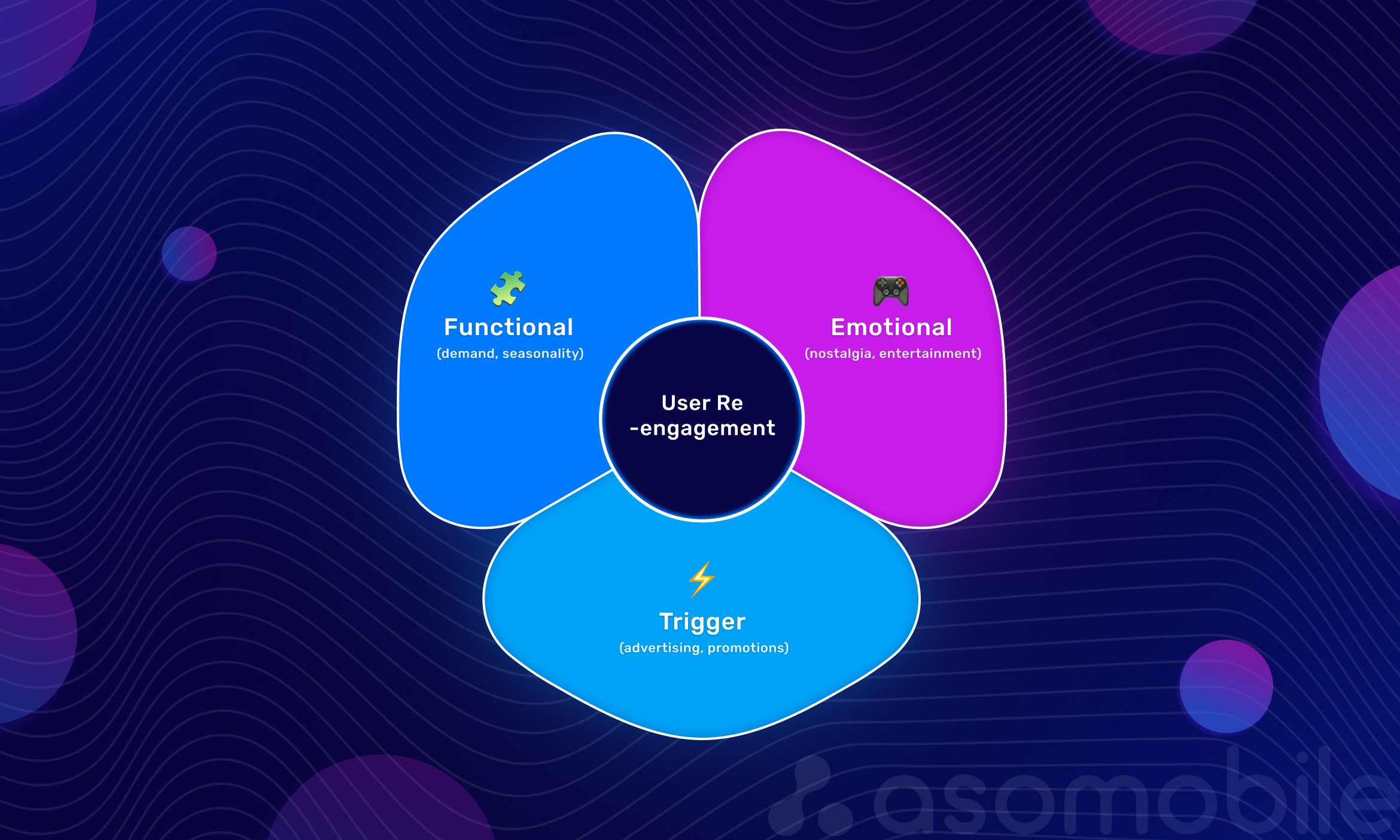
Functional Return
A user deleted the app because they only needed it for the moment: to buy tickets, order food, or book a hotel. When that need comes up again, they remember the convenient tool and reinstall the app.
Examples: travel services, marketplaces, taxi aggregators, food delivery apps.
How to influence it: remind these users of your app at the right moment. Seasonal ASO, branded search ads, and push notifications with relevant offers, such as "Summer is coming — find great flight deals," tend to work best here.
Emotional Return
Here, the driving force is nostalgia, boredom, the urge to unwind, or the desire to return to a familiar environment. This is most common in games, social apps, and entertainment products. A user might delete a game because they got stuck on a level — then remember it a month later over coffee.
Examples: mobile games, streaming services, and dating apps.
How to influence it: emotional triggers matter most here — new seasons, events, and content updates. It is important to stay in touch through email or push — without being intrusive — and show that there is something fresh in the app. ASO elements such as the icon and screenshots should also convey the right mood.
Triggered Return
The user was not planning to come back, but an external trigger did the job: they saw an ad, got an email with a discount, or read news about a major update. This is the most manageable type of return.
Examples: any app that runs marketing campaigns.
How to influence it: every channel can work here — paid (ASA, UAC), owned (push, email), and publicity-driven triggers such as new features, partnerships, or updates. The key is to segment churned users and match each segment with a relevant offer.
Understanding the type of return helps you choose the right tools instead of acting on guesswork:
| Return Type | Main Channel | What to Show |
| Functional | Search, brand campaigns | "Back when you need it" + a relevant offer |
| Emotional | Events, content, social media | "Back when you need it" + a relevant offer |
| Triggered | Push, email, paid ads | Discount, new feature, limited-time event |
Even if a user has deleted your app, that does not mean they are gone for good. What matters is understanding which motivation will work for that particular user and building your communication around it.
How to Track Reinstalls Properly in the Privacy Era
Before building return strategies, we need to agree on terminology and understand what data we can actually work with in 2026. With SKAN, user-level data restrictions, and differences in platform logic, tracking reinstalls has become a separate challenge — not just a marketing one, but a technical one as well.
Three terms are often confused, even though they mean different things:
- Reinstall — a repeat install by a user who had previously deleted the app. By itself, this event is not always reattributed to a new source: depending on your attribution settings and whether retargeting campaigns are running, a reinstall may remain tied to the source or be counted as organic.
- Re-attribution — a reinstall that happened after an interaction with an ad campaign and was reassigned to a new media source within the re-attribution window. In other words, this is a paid user return.
- Re-engagement — bringing a user back into an already installed app through a deep link, push notification, or ad. This is not a reinstall, but a renewed engagement.
The Impact of SKAdNetwork and Platform Restrictions
The main issue in 2026 is that SKAdNetwork was originally built to measure installs, not reinstalls or retargeting. That creates several limitations:
- Re-engagement campaigns are not supported in the standard SKAN model.
- Data arrives with a delay and in an aggregated form. Instead of user-level attribution, we receive anonymized signals 24–48 hours later — and sometimes even later.
- No creative-level visibility. We can see that a campaign worked, but we cannot tell which exact creative brought the user back.
- A minimum data volume is required. For SKAN to return a conversion value, a campaign needs a sufficient number of installs, which creates a blind spot for smaller tests.
Why do the numbers differ across platforms?
If you compare reports in App Store Connect, Google Play Console, and MMPs and notice discrepancies, that is completely normal. These platforms use fundamentally different counting logic.
| Platform | How it counts reinstalls | Does it account for re-attribution? | Access to user-level data | Delay |
| App Store Connect | Counts it as a new install if the user previously deleted the app | No, it does not tie the install to a source | No, aggregated data only | No (in the dashboard) |
| Google Play Console | Counts unique installs, meaning the same user is counted twice if they delete and reinstall the app | No | No, aggregated data only | No |
App Store and Google Play give us the big-picture answer to "how many times the app was installed," but they do not tell us which of those users came back through paid campaigns and which returned on their own. MMPs help surface re-attribution, but they require proper setup and operate under data constraints.
Modern Strategies for Increasing Reinstalls
Winning users back is not a one-off campaign — it is a system built around multiple tools. We have grouped them by area of responsibility to make it clear where ASO comes in, where paid campaigns take over, and where CRM and content play a role.
ASO Tools for Reactivation
Your app page is not just a storefront for new users. It is also visited by people who have already deleted the app — especially if they return via a branded search or click through from an ad. That is why ASO should work for reactivation too.
Updating the icon and visuals for major releases.
When meaningful changes occur within the app, the storefront should signal them as well. A new icon and fresh screenshots grab the attention not only of new users but also of former ones. They see that the product is evolving, which gives them a reason to give it another try. Visual changes should be noticeable and reflect the essence of the update.
Seasonal ASO.
Holidays and seasonal events are powerful reinstall triggers. People search for apps for specific occasions: booking tickets for a vacation, shopping for holiday gifts, or following sports events. Updating your storefront for the season — with themed icons, screenshots, and descriptions — increases search relevance and reminds former users that your app is worth returning to.
Testing custom product pages.
In the App Store and Google Play, you can create separate versions of your product page for different audiences. This is an ideal reactivation tool: you can build a page that speaks directly to churned users with messages like "We fixed what was getting in your way" or "We've added what you were waiting for." These pages can then be targeted through paid campaigns aimed at returning users.
Promoting In-app events in the App Store.
Events inside the app — tournaments, new seasons, challenges — now appear in search results and on the app page itself. This creates a direct communication channel with former users: they can immediately see that something interesting is happening in the app right now, which gives them a reason to come back.
Working with the "What's New" Section (Changelog)
All users see the "What's New" section during updates, but it also matters for reinstalls. When someone visits your app page after a long break, the changelog is often the first thing they read to see whether anything has changed since they last used it.
The formula for an effective message is: problem - solution - benefit.
Instead of the dry "bug fixes," give users a clear explanation of what actually changed for them: Improved chat stability — messages now load faster. Or: Optimized app launch — it now opens noticeably faster, even on low-end devices.
This kind of messaging shows users that you are listening and working, not on abstract bugs, but on their real pain points.
It is important to write changelogs in human language, focusing not on technical details, but on user value. Well-structured release notes increase both engagement and trust.
Paid Strategies
Paid traffic is one of the most controllable ways to bring users back. The key is to set up your campaigns and segments correctly.
Apple Search Ads: Campaigns for Returning Users
In ASA, you can target users who have already installed your app before. This is a separate campaign type with its own bidding logic. These campaigns often deliver higher ROI because returning users are more likely to convert on key actions and are already familiar with the product.
What matters:
- Separate bids. Returning users convert differently from new ones. It makes sense to set separate bids for them — often higher ones, if their LTV is higher.
- Brand defense. Brand-based return campaigns help protect your audience from competitors trying to intercept your branded traffic.
- Custom Product Pages for reactivation. Returning users can be shown dedicated versions of the product page with messages like "Welcome back! There's a lot that's new." This improves relevance and conversion.
Google App Campaigns: UAC for Re-engagement.
Google offers a dedicated campaign type — App campaigns for engagement (ACe). These campaigns make it possible to bring back users who already have the app installed and drive them toward specific in-app actions.
Requirements and setup:
- You need at least 50,000 installs to launch this type of campaign.
- Deep linking is required — links should take users not just into the app, but to the right screen.
- You can create audiences in Firebase (for example, "didn't open the app in 30 days" or "abandoned cart") and target them directly.
- Google automatically selects creatives and placements (YouTube, Search, Play, Display Network) based on your re-engagement goal.
Different marketing goals for engagement campaigns:
- Re-engage lapsed users (have not opened the app in 7+ days)
- Re-engage lapsed purchasers (made purchases before, but not recently)
- Re-engage non-purchasers (installed the app but never purchased)
- Re-engage unnotified users (turned off push notifications)
CRM Marketing
Push notifications triggered by inactivity. If a user has not opened the app for 7–14 days, you can send a push notification reminding them of its value. The key is not to spam, but to offer something specific: a new feature, a personalized discount, or an important event.
Email campaigns and win-back flows. For many app categories, email remains one of the core return channels. An effective win-back campaign solves three tasks: it cuts through banner blindness, reminds users why they installed the app in the first place, and shows what they are missing by staying away.
In-app messages for retention. While a user has not yet deleted the app, but has already become less active, you can show them in-app messages with offers, discounts, or questions about why their interest is fading.
Working with Ratings and Reviews
Ratings and reviews are social proof. When users decide whether to reinstall an app, they almost always look at the rating and recent feedback. A high rating and active responses lower the barrier to reinstalling.
How high ratings and developer responses build trust. Apps with strong ratings and active communication inspire more confidence. Users can see that the product is not abandoned, that the developer responds to issues, and that the app is genuinely improving.
Responding to negative feedback in practice. Negative reviews should be answered quickly and constructively:
- thank the user for the feedback;
- acknowledge the issue if it is real;
- explain what has already been done or will be done;
- offer a support channel if needed.
These responses are visible to everyone reading the reviews. Quite often, they become the reason someone decides to give the app a second chance.
Content Triggers
For many app categories, reinstalls are driven not by ads, but by content. This is especially true for games, entertainment apps, and media products.
New seasons. Games like Fortnite or Among Us build returns around seasonal updates. A new season means new content, new mechanics, and a fresh reason to log back in. This is a powerful emotional trigger for users who played before.
Events. Holiday events (Halloween, New Year's Day, Valentine's Day) are a great way to remind users about your app. Themed quests, special items, and limited-time activities create excitement and bring back even long-lost users.
Partnerships and collaborations. When an app announces a partnership with a well-known brand, franchise, or celebrity, it creates a news hook that can capture the attention of former users.
Media-driven moments. For news apps, sports streaming apps, and forecast-based services, reinstalls often happen "on their own" around major events such as elections, championships, or natural disasters. The task is to be ready for those spikes and not miss them in your analytics.
The key principle behind all content triggers is visibility: they should be reflected both on the storefront (icon, screenshots, in-app events) and in communications (push, email), so users clearly understand that something new and interesting is happening in the app.
Metrics to Watch
Without numbers, reinstalls quickly turn into guesswork. It is not enough to see that users are coming back — you need to understand which channels are working, how much they cost, and how the returning audience affects your product economics. Below are the key metrics and where to find them.
- Reinstall rate — the share of repeat installs in total traffic.
This metric shows how many users came back after deleting the app. It is calculated as the ratio of reinstalls to total installs over a given period. A "good" value depends heavily on the category: for seasonal services like travel or delivery, it is usually higher; for utilities, it is usually lower.
Where to find it: App Store Connect — the Redownloads metric; Google Play Console — the Statistics section, using the Returning users filter. In Google Play, it is important to distinguish between Returning users (people who deleted and reinstalled the app) and simply active users who came back to the app.
- Re-attribution rate — the share of reinstalls that happened after an ad interaction and were reassigned to a new source.
This metric helps evaluate the effectiveness of paid reactivation campaigns — for example, ASA targeting returning users or UAC for re-engagement.
Where to find it: in MMP retargeting reports. Keep in mind that SKAdNetwork does not support re-engagement directly so that the data may arrive with a delay.
- Cost per reactivation — the cost of bringing one user back.
It is calculated as the reactivation campaign budget divided by the number of reinstalls it generated. Ideally, this metric should be lower than CPI — otherwise, it would be cheaper to acquire a new user.
Where to find it: calculated manually based on MMP re-attribution data and campaign budgets.
- Time to reinstall — the amount of time between deletion and repeat install.
Understanding this interval helps you configure win-back campaigns more accurately. If most users come back after 30 days, there is little point in sending a push notification just one week after deletion.
Where to find it: in MMPs with uninstall and reinstall events configured, or through cohort analysis in Google Play Console.
- LTV returned users vs new users — a comparison of the lifetime value of returning users and new ones.
This is a key metric for understanding the economic efficiency of reactivation. In many cases, the LTV of returning users is higher — they are already familiar with the product and come back more intentionally.
Where to find it: in MMPs tied to subscription events (for subscription-based apps), in Google Play Console under Subscription reports, or in internal analytics where LTV by cohort can be configured.
Benchmarking and Impact on Unit Economics
Numbers mean little on their own — what matters more is how they change over time and how they compare to the market. It is useful to understand the average metrics for your category so you can assess your own performance more realistically.
Google Play Console lets you compare your metrics against peer groups, which helps you evaluate the situation more objectively. The main question all reinstall metrics should answer is this: how does user reactivation affect overall unit economics? If the cost per reactivation is lower than CPI and the LTV of returning users is equal to or higher than that of new users, reactivation becomes one of the most efficient growth channels available.
Practical Checklist: How to Build a User Return System
To make reinstalls a predictable growth channel instead of a chaotic effort, we use a simple step-by-step framework:
Analyze your current uninstall rate and the reasons for churn. Start with the scale of the problem: how many users are leaving, and at what stage? D1, D7, and D30 retention help identify where losses become critical. Then gather the reasons: negative reviews, crashes, failed updates, and repeated behavior patterns that happen before deletion.
Segment churned users. Not all churned users are the same. Divide them by time since churn, behavior, monetization, and value before leaving. Then build a separate return hypothesis for each segment.
Refresh ASO before a major release or seasonal event. Your app page should signal a change. If you are launching a big update, refresh the icon, screenshots, and description. If a seasonal peak is coming, adapt the storefront accordingly.
Set up paid campaigns for returning users. Both ASA and Google UAC offer dedicated ways to bring users back. These campaigns need separate budgets, separate bids, and their own creatives. And do not forget deep links: users should land directly on the most relevant screen.
Launch a CRM win-back flow. For users who left an email address or did not disable push before deleting the app, set up automated return scenarios. Messages should differ by segment: one for post-trial churn, another for long-term inactivity.
Monitor competitors. Look at how competitors approach reactivation: what creatives they use, which updates they highlight, and how they structure their storefronts. This helps you spot trends and identify open opportunities.
A/B test your hypotheses. Every idea should be tested. One hypothesis — one experiment. That is the only way to understand what truly works and what sounds convincing in theory.
Conclusion
Bringing back users who deleted your app is not just a way to boost install numbers in reports. It is a separate growth channel that requires the same level of system thinking as acquisition or retention.
The main takeaway is simple: reinstalls do not work as a one-off tactic. It is not enough to launch a couple of campaigns and hope for results. You need a combination of ASO, paid tools, CRM, content, and analytics — only then does user return become manageable.
That is why it is best to start small: analyze uninstall rate, segment churned users, and ask the right questions. Who are they? When did they leave? Why? Under what conditions are they likely to return? For each segment, create a separate hypothesis and run a careful test. If it works, scale it. If not, document the insight and move on. That is how user reactivation turns from an occasional effort into a real growth mechanism.
Optimize with ASOMobile 💙
A reinstall is a repeat installation by a user who had already installed the app, then deleted it. In analytics, it is important to distinguish between a reinstall as a repeat install and re-attribution — when the return occurred after interacting with an ad campaign.
Most often, users come back for one of three reasons: a renewed need (for example, a trip or a purchase), an emotional trigger (a game, entertainment, or habit), or an external trigger such as an ad, an update, or a discount. Understanding these motivations helps you choose the right reactivation strategy.
Reinstalls occur when a user re-downloads the app after deleting it. Re-engagement is when a user returns to an already installed app through a push notification, an ad, or a deep link. In analytics and marketing campaigns, these are treated as separate scenarios.
In practice, the most effective approach is a combination of tools: ASO and app storefront updates, returning-user campaigns in ASA or Google UAC, CRM communications (push and email), and content triggers such as new features, seasons, events, or partnerships.
Users delete apps for several common reasons: lack of storage on their device, one-time use cases (for example, for a trip or a promotion), technical issues such as crashes and bugs, or simply losing interest. In recent years, new triggers have also emerged: privacy concerns, subscription fatigue, AI assistants replacing simple app functions, and excessive push notifications. Understanding these reasons is the first step toward building an effective user reactivation strategy.