Anyone who has worked with the Social category knows the feeling: the store page looks solid, the screenshots are clean, the keywords are in place — and it still doesn't convert the way it should. Not because the product is bad, but because the page is answering questions users in this category simply aren't asking.
In this piece, we break down how search actually works in Social, where the real growth opportunities are, and what to look at first — whether we're working on a messaging app, a dating app, or a niche community product.
Why search competition is different for social apps
In most categories, users come to the store with a clear task: find the best app for X. Social is different. Users often already know what they want to install, or they arrive with a very specific query — not "social app," but "anonymous chat," "app for anime fans," "video dating no sign-up."
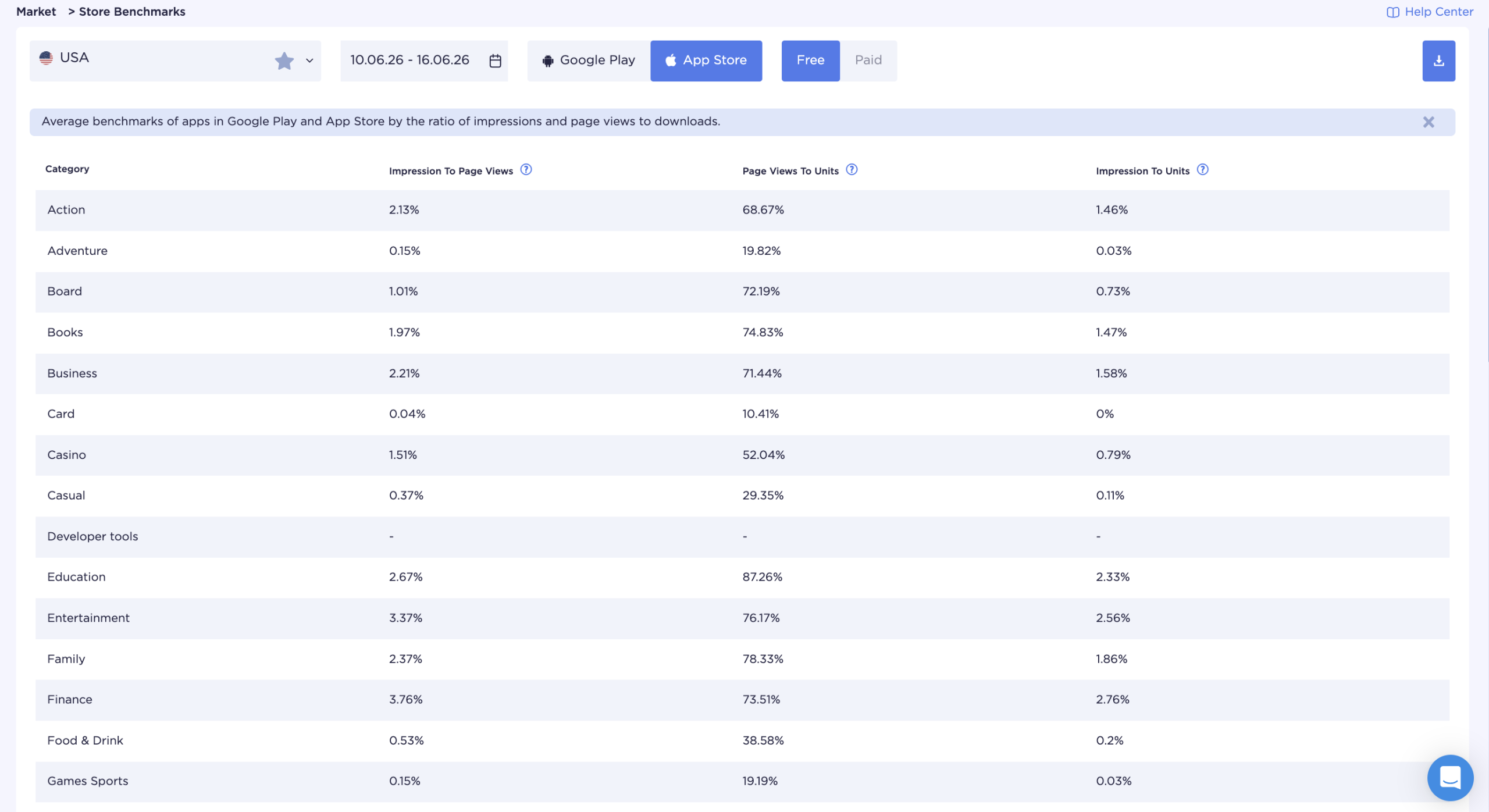
App Store data confirms this pattern: Impression-to-Page View in the Social category is among the lowest across all categories, while Page View-to-Install is among the highest. Users rarely browse the app catalog in search of a new social network. They either search for a specific app by name or arrive via a highly targeted query.
On Google Play, organic discovery is more active — users find apps through search more often without a pre-formed intent. The store page plays a bigger role in the outcome here than it does on iOS.
The practical takeaway: on iOS, the job is to get in front of users before they've formed intent — through brand or feature-led search. On Android, the job is to convert users who are already on the page.
The second factor is how crowded the top of the chart is. Social is one of the few categories where the top is essentially locked: Facebook, Instagram, WhatsApp, TikTok, and Snapchat have held their positions for years, backed by hundreds of millions of reviews. Going head-to-head with them on generic keywords isn't a strategy. The real opportunity is finding uncontested keyword clusters within sub-niches.
How users search for social and community apps
Search demand in the Social category is fragmented. One user searches "WhatsApp" by brand. Another searches "group chat app for families." A third looks for "anonymous confessions app." All three are in the same category — but they represent three completely different scenarios with different competitors.
The main types of search queries in Social:
Brand search. The user already knows the app and searches for it directly. We can't compete here — we can only protect our own brand from competitors bidding on our name.
Non-brand discovery. The user is looking for an app type without a specific brand in mind: "messaging app," "dating app," or "social network for professionals." High-volume queries, but also maximum competition.
Feature-led queries. The user is looking for a specific capability: "end-to-end encrypted chat," "disappearing messages app," "video speed dating." Medium search volume, high intent — the best cluster for a new or niche app.
Niche community keywords. Targeting a specific audience or interest: "app for gamers to chat," "Muslim dating app," "social network for artists." Lower volume, but higher conversion — the user is searching for exactly what our app is.
Competitor keywords. Some users are looking for alternatives: "apps like Telegram," "Tinder alternatives," "Discord replacement." A strong cluster for apps with a clear differentiator from the market leader.
Long-tail queries. "Free group video chat no account," "anonymous social app for teens" — low competition, precise intent. Often overlooked, even though a new app can reach the top quickly here.
Understanding which query type dominates in our sub-niche shapes the entire keyword strategy.
Brand, non-brand, feature-led, and niche keywords: how they work across sub-niches
The Social category spans several sub-niches, each with its own search logic and main barrier to entry.
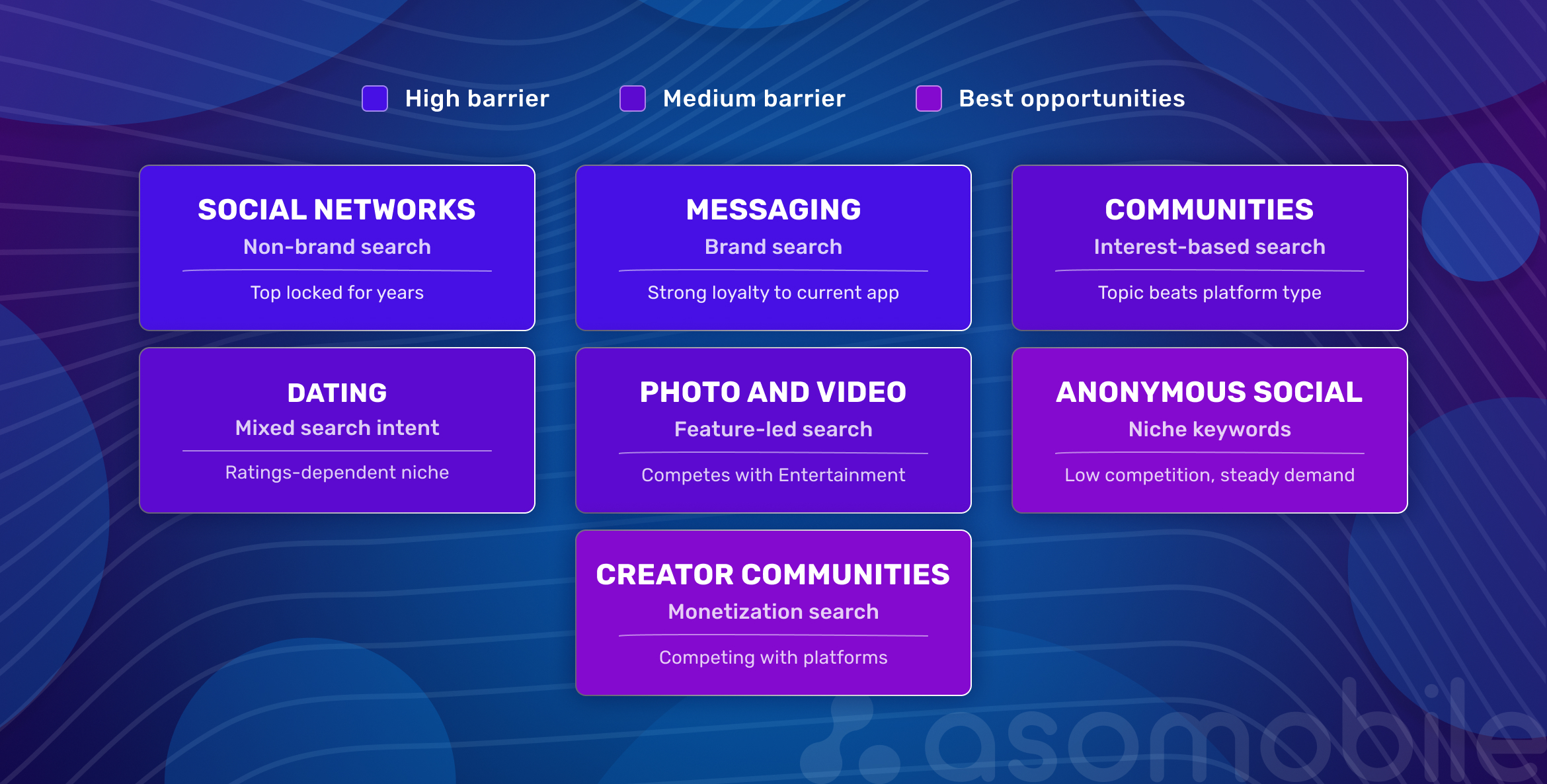
Two observations the cards don't explain on their own.
First: for messaging apps and social networks, the working strategy isn't to compete for category keywords — it's to go niche by audience (professionals, students, a specific country) or by format (audio, video, async communication). That's where the top isn't already taken.
Second: for communities and forums, users search "community for [topic]," not "community app." Keywords need to be built around the topic, not the platform type — this changes the entire semantic structure.
How top social apps use metadata and category positioning
Market leaders — Facebook, Instagram, TikTok, X — stopped optimizing their app names for keywords long ago. Their brand is the search query. For them, ASO is about protecting rankings and managing ratings.
Everyone else works differently. Mid-tier apps embed a function or niche directly in the name: not just a brand, but brand + keyword. This isn't accidental — it's a deliberate strategy to capture feature-led and niche search traffic.
A few approaches that work in the Social top charts:
App name = brand + keyword. Apps without strong brand recognition add a function or an audience to their names. Example: not just Yuzu, but Yuzu — Dating for Anime Fans. The user understands the product in the search results before ever tapping through to the page.
The subtitle covers the second keyword cluster. The name takes the primary keyword; the subtitle takes a related or niche one. Most apps leave the subtitle blank or fill it with a tagline. That's a direct loss in keyword coverage.
The description serves the search algorithm, not the user. In the App Store, the description isn't indexed directly, but the first lines affect conversion. In Google Play, the description is indexed in full — keywords should be distributed throughout the text, with particular attention to the opening paragraphs.
Category and subcategory selection. The category an app is listed in affects which top charts it appears in. Some Social apps deliberately choose a neighboring category — Entertainment or Lifestyle — where competition is lower.
How screenshots, ratings, and reviews affect conversion in search
Getting into search results is half the job. The other half is converting an impression into an install. In Social, this is especially difficult — users have seen it all before and are skeptical, having already tried similar apps.
The first screenshot isn't an interface demo. It answers one question: why should I download this? In Social, screenshots that show a scenario work — real conversations, atmosphere, outcomes — not a feature list. Stock photos of happy people holding phones get spotted and scrolled past immediately.
A rating below 4 stars noticeably reduces conversion, especially in the dating segment, where every star represents a personal experience. Ratings are among the search ranking signals in both stores, though the App Store and Google Play are placing increasing weight on post-install behavioral factors.
Reviews get read in Social. It's one of the few categories where users genuinely study other people's experiences before installing. Responding to negative reviews and prompting ratings through in-app nudges affects not just reputation but conversion — prospective users see how the developer handles criticism.
Update frequency signals that the product is alive. An app with no updates for over a year reads as abandoned. Regular updates with a brief changelog improve store rankings and build user trust.
| Search signal | What it reveals | Action |
| High impressions, low page views | Icon or brand recognition problem | Test the icon, add social proof to the app name |
| High page views, low installs | Store page isn't convincing | Rework the first screenshot, check rating |
| Brand search with no traffic | Low brand awareness | Build non-brand keyword coverage, work on PR |
| Feature-led queries converting well | Users are searching for a specific capability | Strengthen that feature in metadata and subtitle |
| Niche keywords with low competition | Opportunity to rank without direct competition | Add niche keywords to keyword field and description |
| Low rating with good traffic | Product isn't meeting expectations | In-app review prompts, address UX friction |
How to analyze social app competitors with ASO tools
Competitor analysis in Social isn't a one-time exercise. Major players regularly update their metadata, add features to descriptions, and test new screenshots. Tracking these changes reveals where the market is heading.
Five things to monitor consistently:
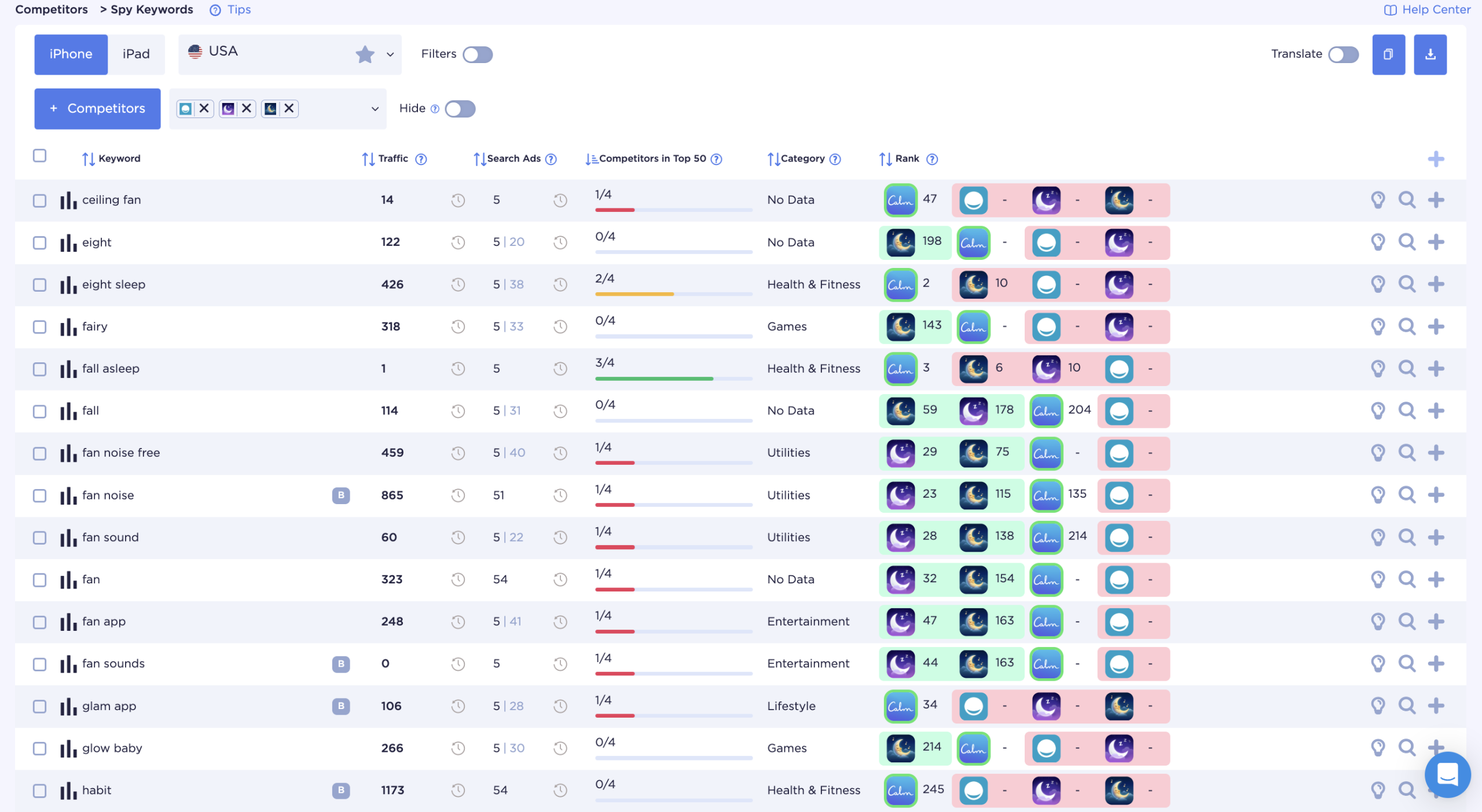
First — keyword gaps: which keywords competitors use that you don't. Not to copy them, but to understand what demand they're capturing.
Second — metadata changes. When a competitor updates their app name or subtitle, it's a signal: they've found a better keyword or are testing a new positioning angle. Timeline tools let you track the history of those changes.
Third — visual strategy: how competitor screenshots are evolving, what leads on the first screen, what copy they're using. This is direct evidence of what's converting in our niche.
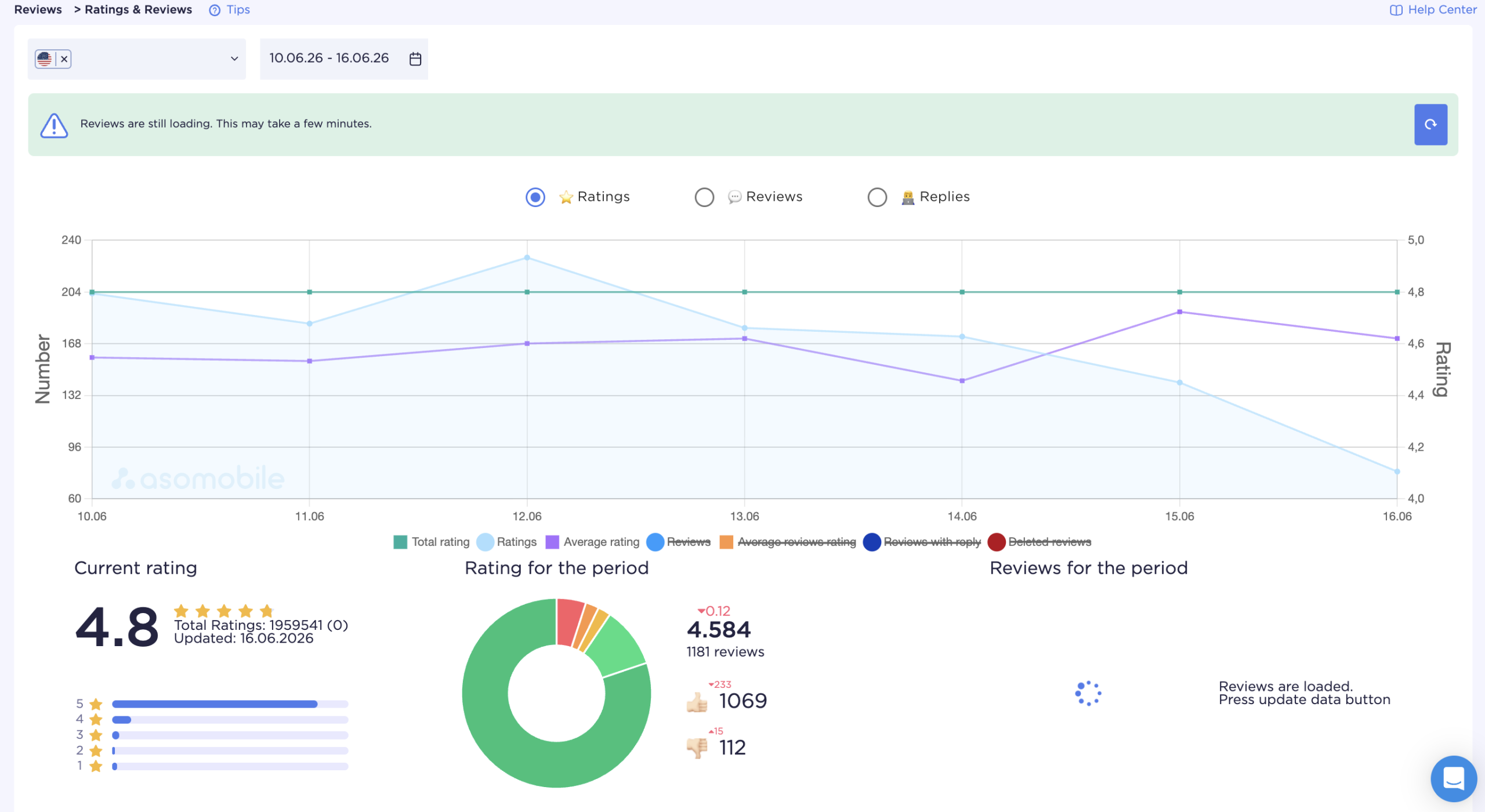
Fourth — rating dynamics. A sharp drop in a competitor's rating is an opportunity to capture their audience. A rise means they've improved something.
Fifth — organic keyword rankings: which queries a competitor has moved up or down on over the past month. This shows where opportunities are opening or closing.
Keep this analysis at the sub-niche level, not across the full Social category. Your real competitors aren't Facebook and Instagram — they're apps with a similar use case and audience.
How ASOMobile helps track social app search performance
Social is a broad category with high volatility in the mid- and lower-market tiers and strong dependence on external traffic. Analytics tools aren't for one-off checks — they're for ongoing monitoring.
In ASOMobile, teams working on Social apps most commonly use:
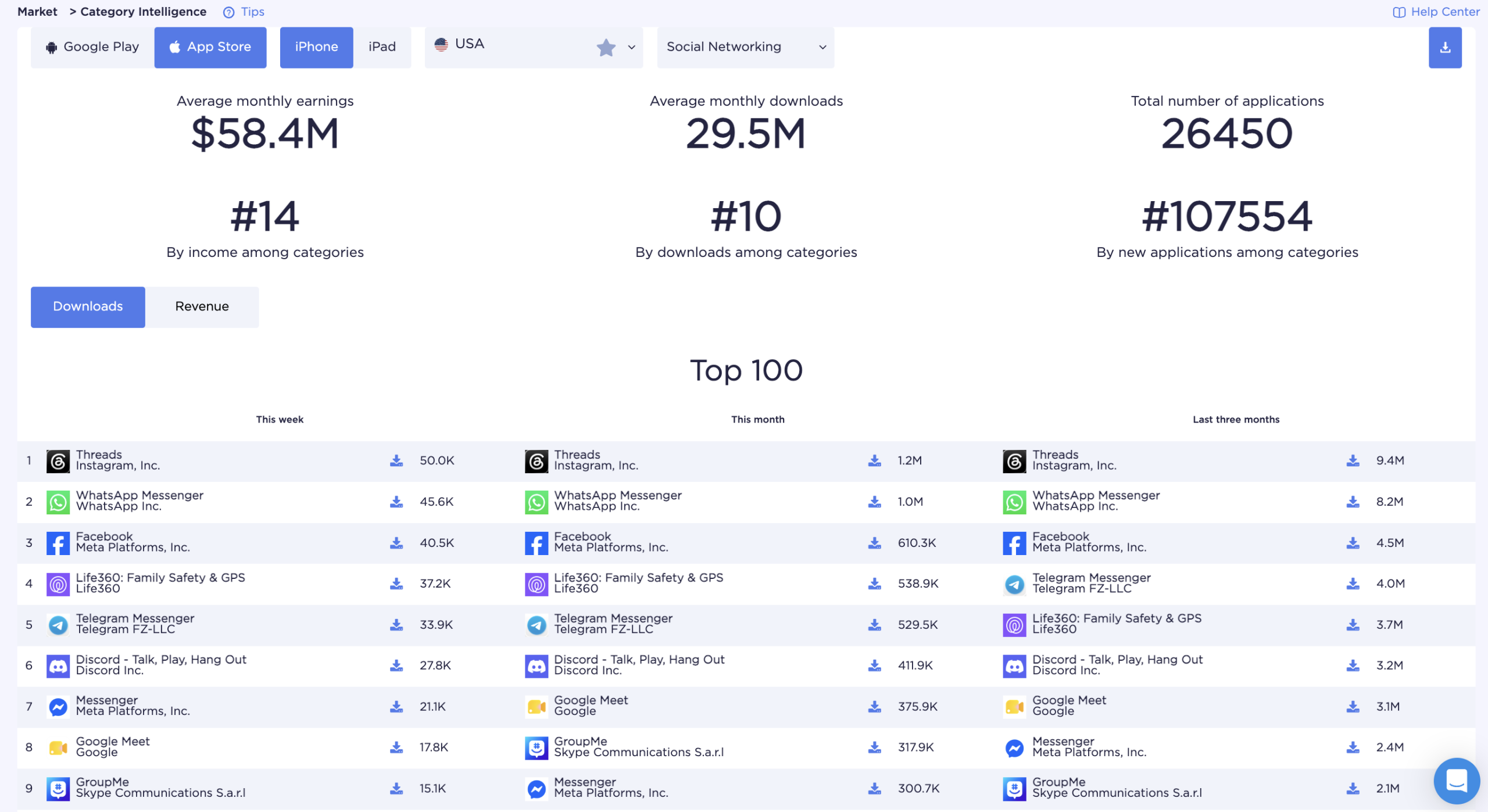
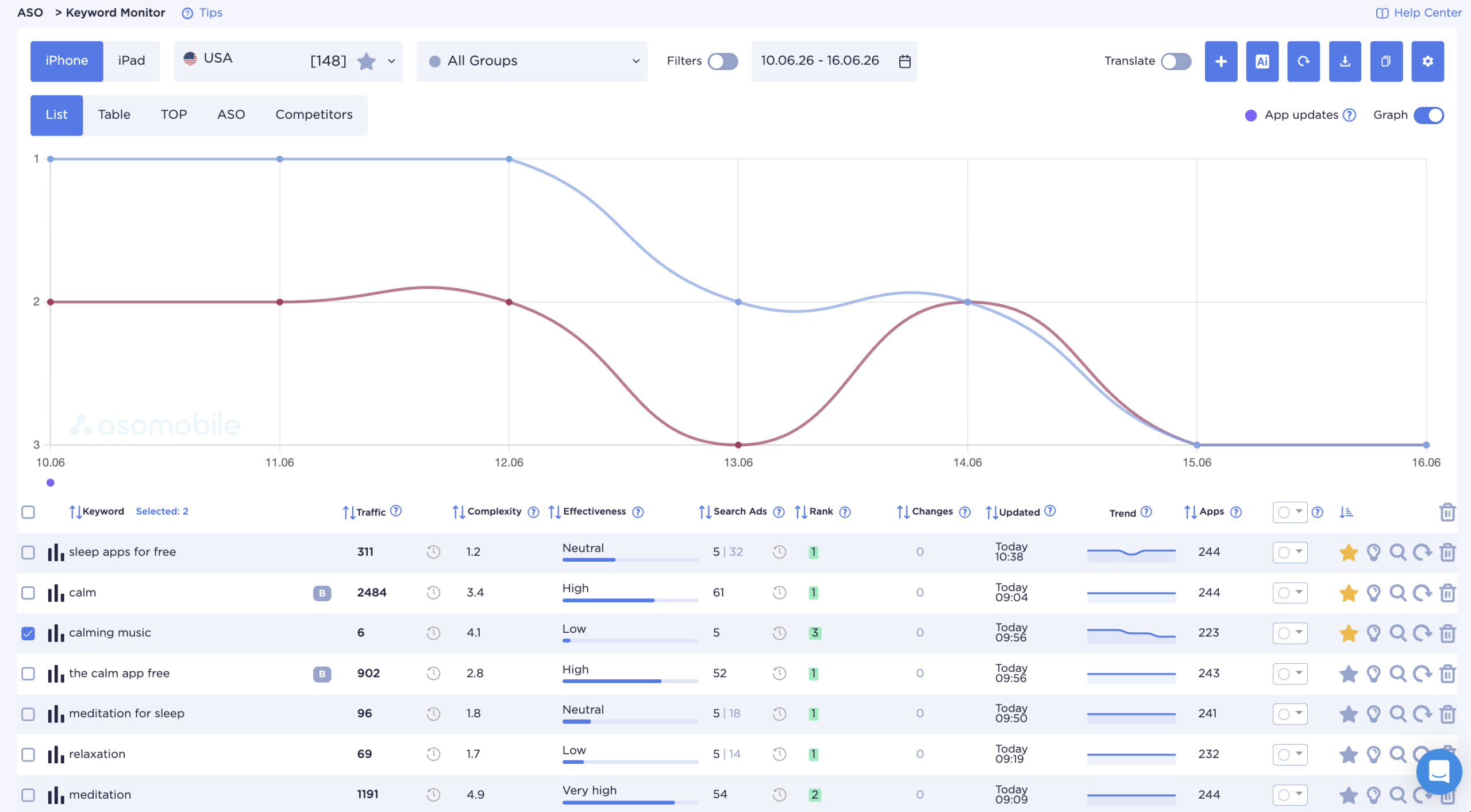
Keyword Monitor — monitoring rankings for brand, feature-led, and niche queries over time. We can see how a metadata change affects rankings the next day, not a week later.
Spy Keywords shows which queries competitors rank for. Timeline surfaces the history of their metadata changes. Visual Comparison shows how our store page looks next to competitors in search results.
Category Insights provides data on the top of the Social category and its subcategories: which apps rank first, on which keywords, with what ratings. It's the starting point for building our keyword strategy.
Store Benchmarks show average conversion metrics for the category — Impression-to-Page View and Page View-to-Install. We can see exactly how our numbers compare to the Social category norm.
Ratings and Reviews monitoring tracks rating trends for our app and competitors. Sharp changes show up in context — alongside update dates and metadata changes.
Key takeaways
The top of Social is locked — that's just the reality, and fighting it directly is a waste of resources. Brand search dominates, users have seen everything before, and competitors update their metadata while you sleep.
But organic growth here is real. We build it through feature-led, niche queries, a store page that convinces in the first two screenshots, and consistent competitor monitoring — because the positions you hold today need defending tomorrow.
The foundation is always the same: a clear understanding of which search demand we're actually serving, and who we're serving it for. Everything else is tools and consistency.
Simple ASO. Real results. 💙
FAQ: Frequently Asked Questions
Social app ASO is the optimization of an App Store or Google Play listing with the specific search dynamics of the Social category in mind: a high share of brand-driven queries, dominant players owning generic keywords, and the importance of niche and feature-led keyword coverage. It encompasses metadata, visuals, ratings, and reviews.
Large apps compete through brand demand and reputation. Mid-tier and niche apps compete through feature-led queries, audience-specific niche keywords, and competitor keywords. Competing directly on broad terms like “social network” or “messaging app” rarely pays off without a strong ratings base and substantial review volume.
It depends on the sub-niche. The general principle: avoid high-volume generic terms where the top has been locked for years, and build keyword coverage around specific use cases. For a messaging app — feature keywords: “encrypted group chat,” “video call no account.” For a dating app — niche by audience or mechanic. For a community app — the topic, not the platform type.
Track consistently: which keywords competitors use in their metadata, how their screenshots evolve, how their ratings move. Analyze competitors at the sub-niche level, not across the entire Social category — otherwise we’re benchmarking against Facebook rather than our actual competition.
Yes, and in Social the effect is stronger than in most other categories. Ratings are one of the search ranking signals in both stores, though both are placing increasing weight on post-install behavior. In the dating segment, a rating below 4 stars is a visible barrier to installation. Reviews are actively read, and prospective users notice how developers respond to criticism.
ASOMobile lets us track keyword rankings over time, identify gaps in our keyword coverage relative to competitors, review the history of competitor metadata changes through Timeline, and benchmark our conversion metrics against the Social category average through Store Benchmarks.