Finance plays by different ASO rules. The algorithm is the same, but the user isn't. Before looking at features, people here decide whether the app can be trusted at all. Trust comes before interest, and that changes everything: which keywords to pick, how to build screenshots, and why a 3.9 rating is a critical problem rather than just an awkward number.
Note: this scenario is illustrative. The app is hypothetical, but the workflow and the approach to metrics are real and based on ASO practice in the Finance category.
Below is a step-by-step breakdown of how to build an ASO strategy for a Finance app from scratch.
Step 1. Starting point: audit and visibility
The app in this case is a personal finance manager with expense tracking, category budgets, spending analytics and savings goals. Freemium subscription model. Markets: the US, the UK and Germany.
At launch, the picture is typical for a new Finance product. The app shows up in search only for its own name and a few broad queries, with nothing ranking above positions 40–50. The metadata is generic: the name includes finance, money and tracker without tying them to any specific feature. Screenshots show the interface with no use cases, no numbers and no trust signals. Rating: 3.9. No replies to negative reviews.
The audit flagged three problems: weak keyword coverage, conversion losses on the product page, and a rating that undermines trust before the user even reads the description.
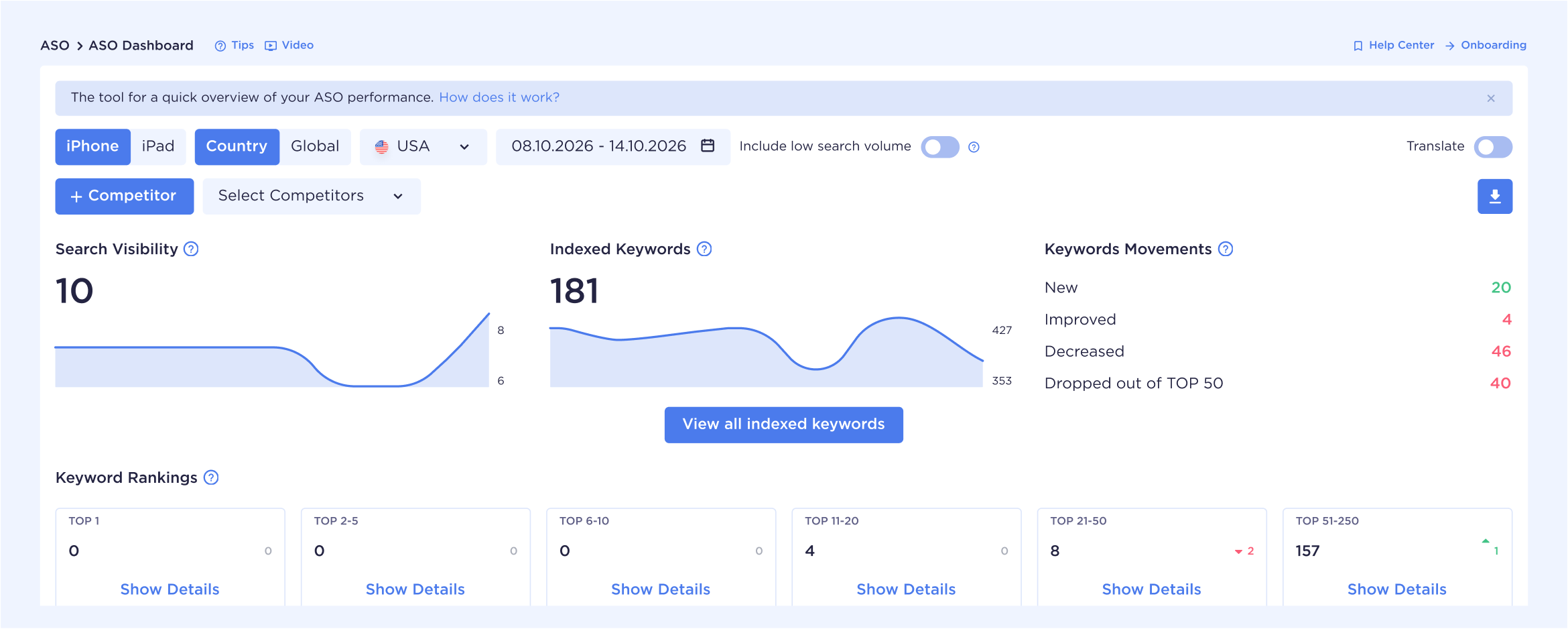
At first glance, the app has more than a hundred indexed keywords. But once you filter out positions with zero traffic, it becomes clear that the keyword set is scattered and doesn't deliver the visibility the app needs.
Step 2. Competitive benchmark and market analysis
In Finance, competitor analysis isn't about copying the leaders. It's about finding where they're weak.
We look at three levels of competition.
Direct competitors: apps with similar functionality, such as Monarch Money, YNAB, Copilot, PocketGuard, and Spendee. They have strong coverage for budget planning, expense tracking, and spending tracking. Average ratings sit at 4.6–4.8. But the analysis turned up something interesting: almost none of them target audience-specific queries, like those for freelancers, couples, or students. Problem-driven queries such as stop overspending or get out of debt are also left untouched.
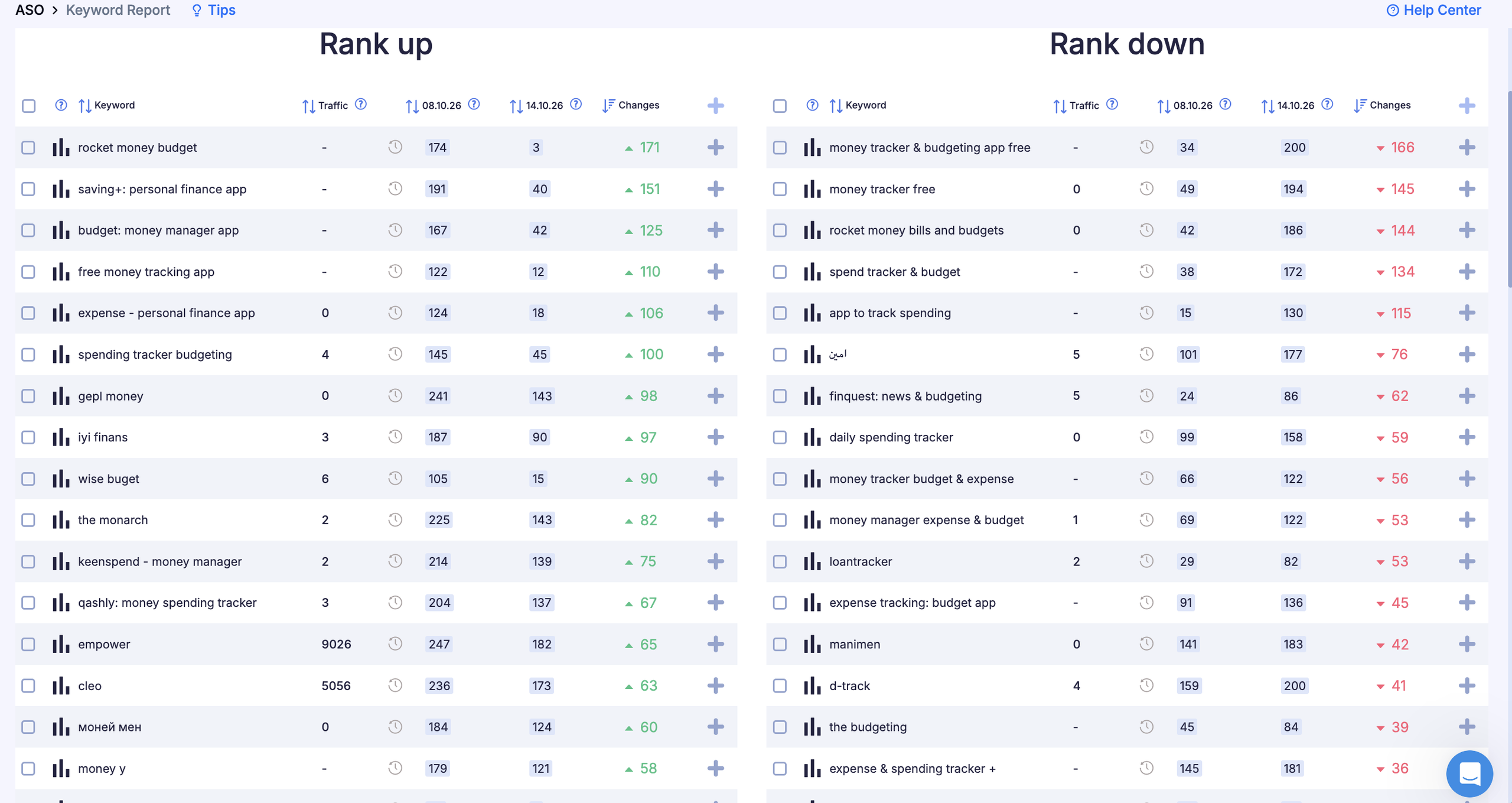
Here's what Copilot's current indexing looks like, with keyword dynamics.
Category leaders: banks and big fintech, such as Revolut, Wise, and Cash App. They dominate high-volume queries, and competing with them head-on makes no sense. But they also generate demand for queries like Mint replacement or Revolut alternative: users who are disappointed with a leader start searching, and that's some of the warmest traffic in the whole category.
Adjacent products: banking apps with a built-in expense tracker. This is hidden competition. Someone searching for an expense tracker may simply stay in their bank's app. Positioning against them requires clear differentiation: not just having the feature, but a visible advantage in a specific use case.
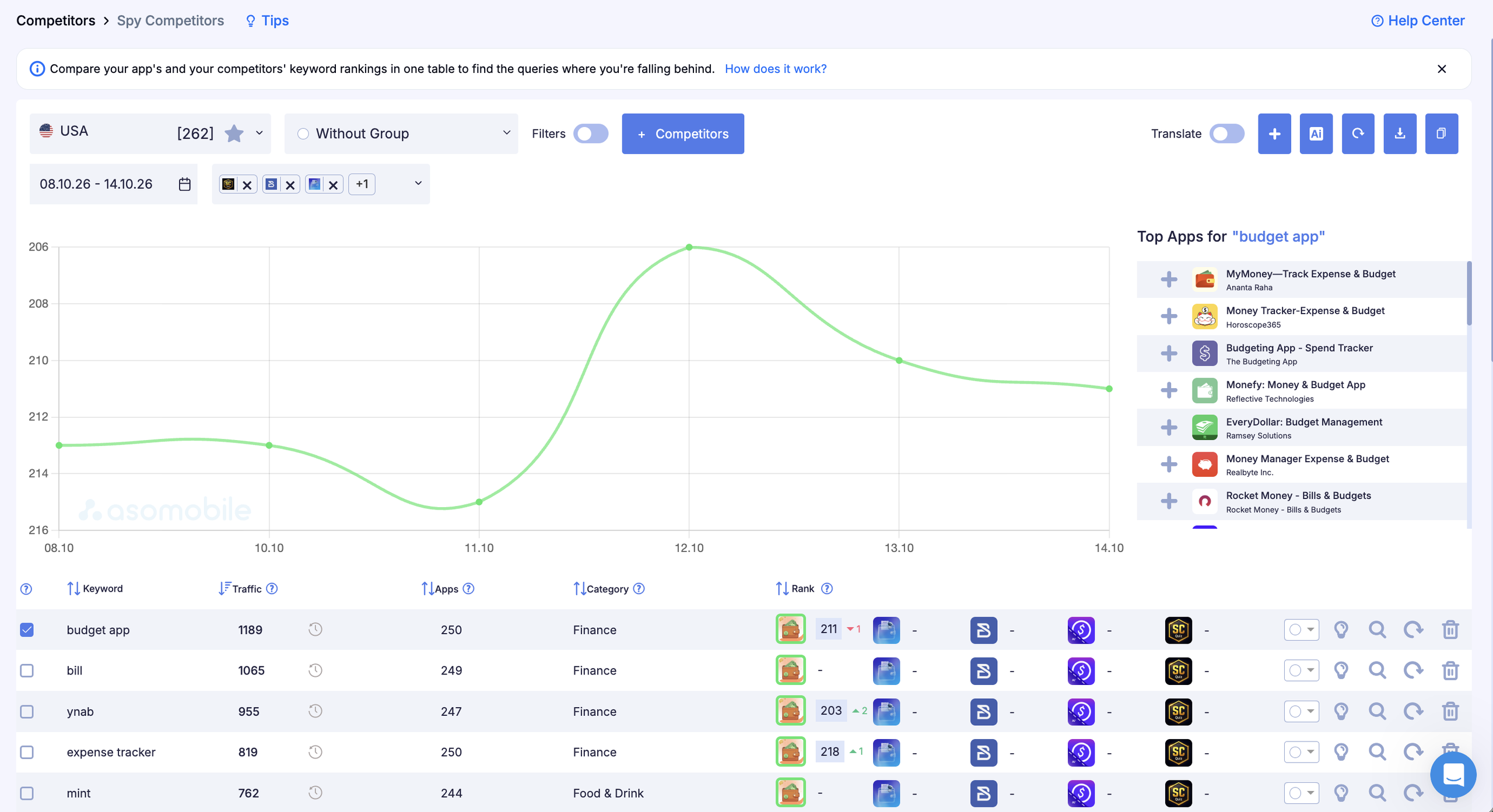
The key insight: no direct competitor is optimized for an expense tracker for freelancers, a shared budget app for couples, or a debt payoff tracker. That's three ready-made entry points with real volume and minimal competition.
Step 3. Building keyword groups
Keyword research in Finance works differently than in entertainment categories. Broad queries like finance app and money manager belong to leaders who have built up their positions over years. That's why we focus on functional and niche queries instead of fighting for broad ones.
For this app, we defined five groups.
Budgeting and planning is the core group and the closest to the app's functionality: budget planner app, monthly budget tracker, budget by category, envelope budgeting app. Moderate competition, clear intent.
Expense tracking is the second priority: expense tracker, daily spending tracker, track my spending, spending log app. Volume is high, and competition is too, so we enter through niche modifiers rather than head-on.
Savings goals are the differentiator: savings goal tracker, save money app, savings planner, money saving challenge app. Competition is noticeably lower, and someone searching for a savings goal tracker knows exactly what they need.
Audience-specific queries are the entry points with the highest conversion: expense tracker for freelancers, budget app for couples, student budget app, family expense tracker. Users describe themselves in the query, and if the app matches that profile, conversion is several times above average.
Problem-driven queries are a long tail with strong intent: stop overspending app, debt payoff tracker, get out of debt app, no spend challenge app. The user has already named the problem. They aren't looking for general finance content. They want a solution.
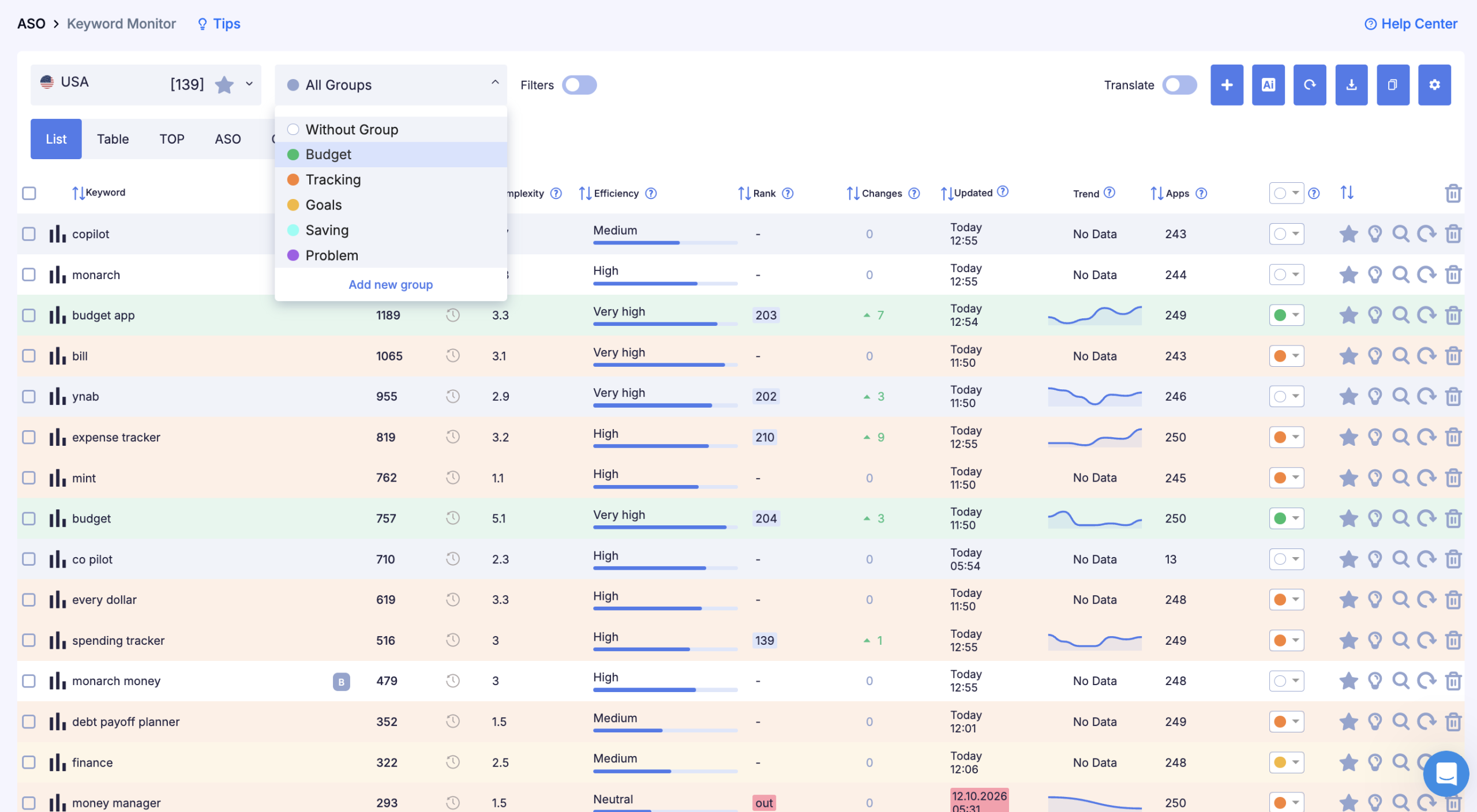
Result: 139 keywords split into 5 groups. Budgeting is the priority, expense tracking comes next, and the other three are used in the description and additional locales.
Step 4. Prioritizing keywords by intent and opportunity
Not every keyword with decent volume is worth working on. In Finance, we evaluate six things.
Relevance: the query describes what the app does. Expense tracker fits; personal loan app doesn't.
Intent: is the user ready to install or just researching? “ Best budget app" signals high intent, while "how to budget money" is informational and converts worse.
Competition: is there a real chance of reaching the top 20 within a reasonable time? Queries with banks at the top are a low priority at launch.
Current visibility: if the app already ranks 35th for budget planner, the task is to push it into the top 20, not to start from zero on a different query.
Product fit: the feature in the query must actually exist in the app. Optimizing for something you don't have is a direct path to negative reviews.
Conversion potential: audience-specific queries convert better than broad ones because the user has already described themselves in the search.
First priority: budgeting and audience-specific queries for freelancers, couples, and students. Expense tracking comes second. Savings goals and problem-driven queries form the third tier, used in the description and additional locales.
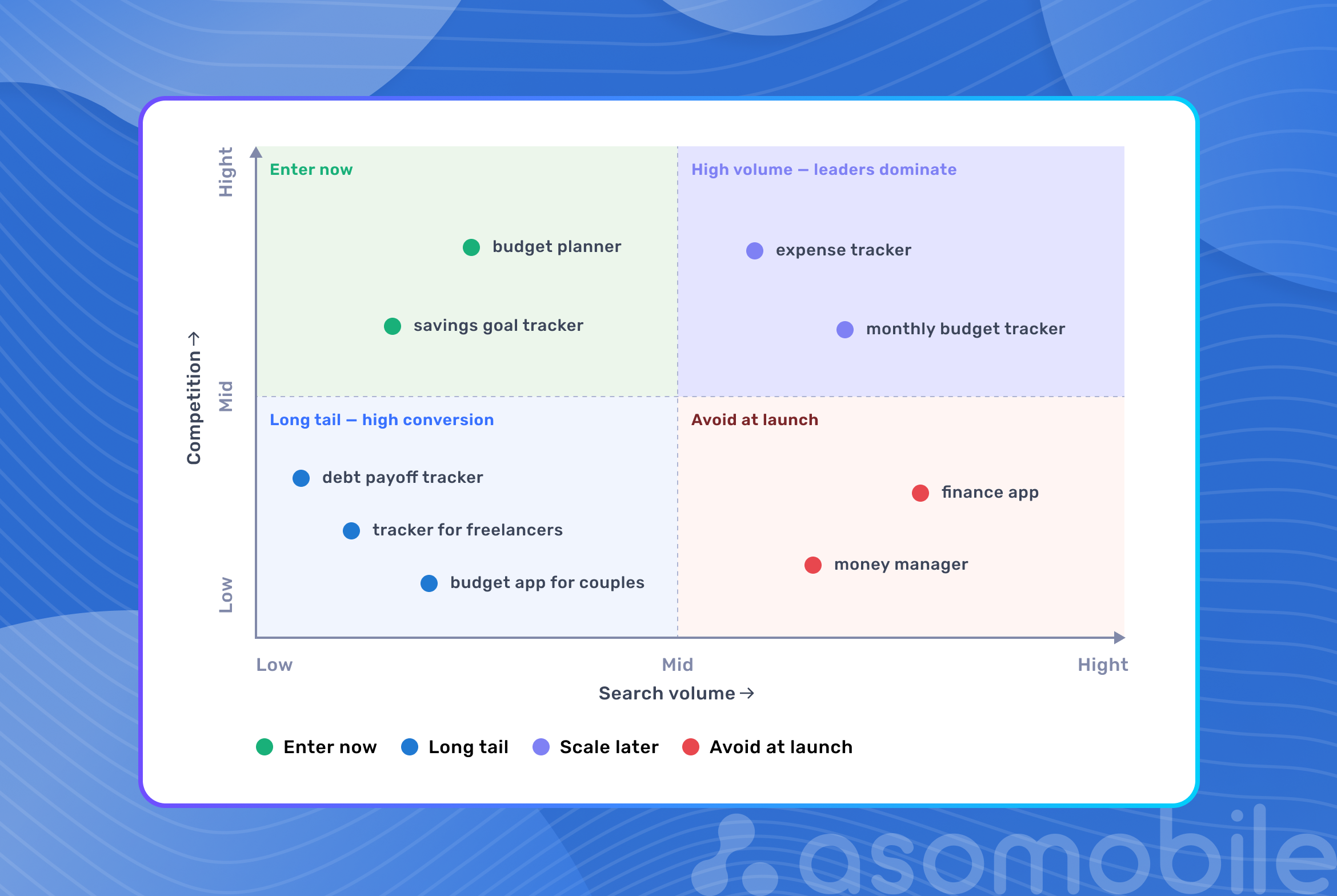
Step 5. Metadata optimization for App Store and Google Play
The algorithm ranks the app based on its metadata, and users rely on the same metadata to decide whether to open the page. Every field affects both indexing and conversion.
We rebuilt the name using a Brand + feature formula. We changed a generic option like Finance & Money App to Budget Planner & Tracker. The name now covers several keywords from the priority group and immediately reads as a specific product rather than an abstract finance app.
The App Store subtitle has 30 characters and is the second most important element for indexing. We used it to describe concrete user tasks: Expenses, Goals & Savings. Three words, three features, nothing extra.
The Keywords field has 100 characters, no spaces, and no repeats from the name or subtitle. Niche, audience-specific keywords: couple,freelancer,student,family,debt,payoff,spending,log,monthly,envelope,category,overspend.
The Google Play description focuses on the first 3–4 sentences visible before the Read more button. That's where the product's essence and main advantage go, not a corporate slogan. Then come features, security information, and an FAQ inside the description.
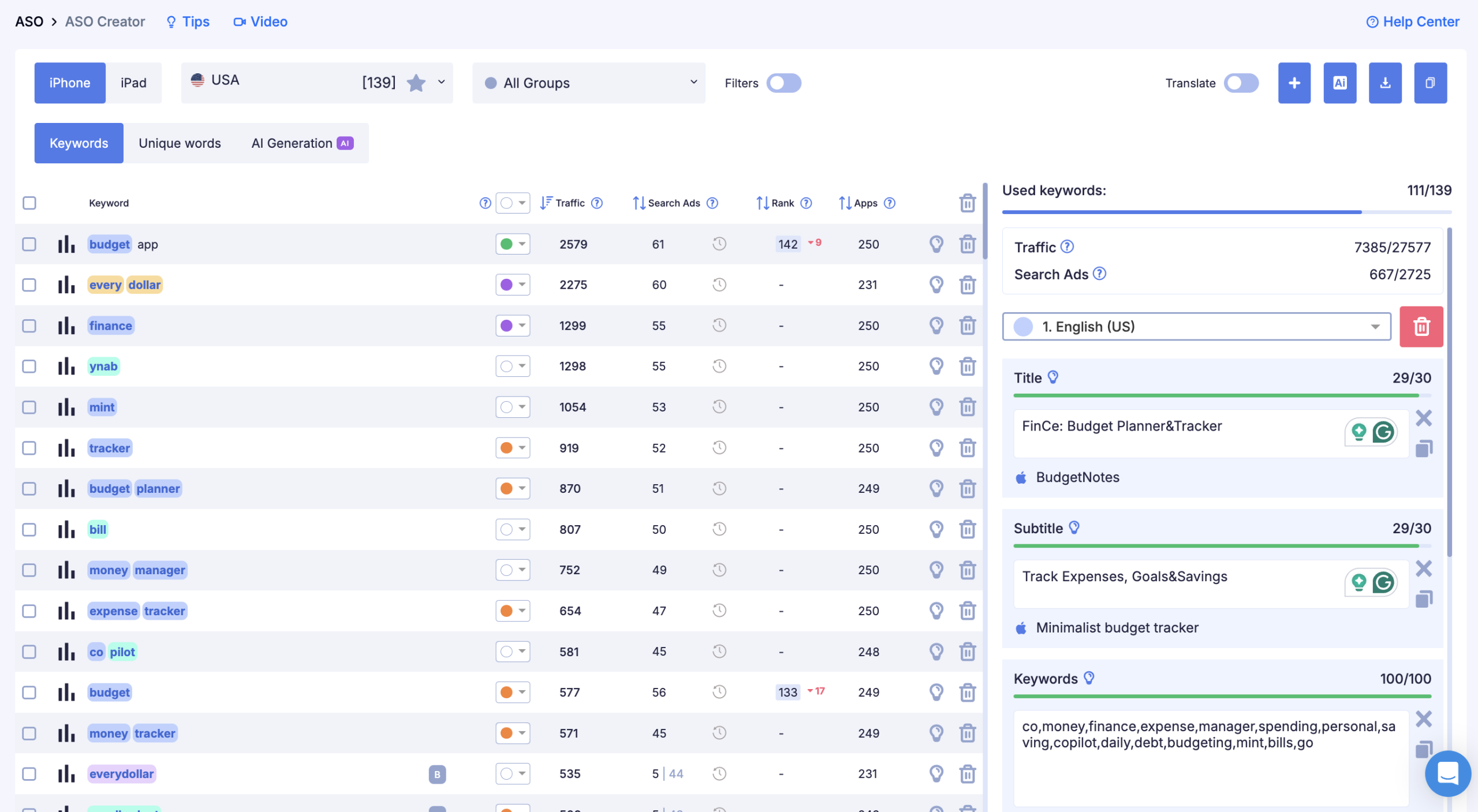
Result of the first version: keyword coverage grew from 34 to 111 out of 139, with coverage traffic roughly three times higher than at the start.
One important restriction specific to Finance: you can't promise returns, guarantee results, or use phrases like guaranteed savings or earn more money. It breaks store guidelines and immediately undermines trust with a financially savvy audience. Instead of promises, give concrete facts about features.
Step 6. Screenshot and conversion optimization
In Finance, the first screenshot matters more than in any other category. It either removes the trust barrier or it doesn't. Most users decide whether to install before scrolling to the third screen.
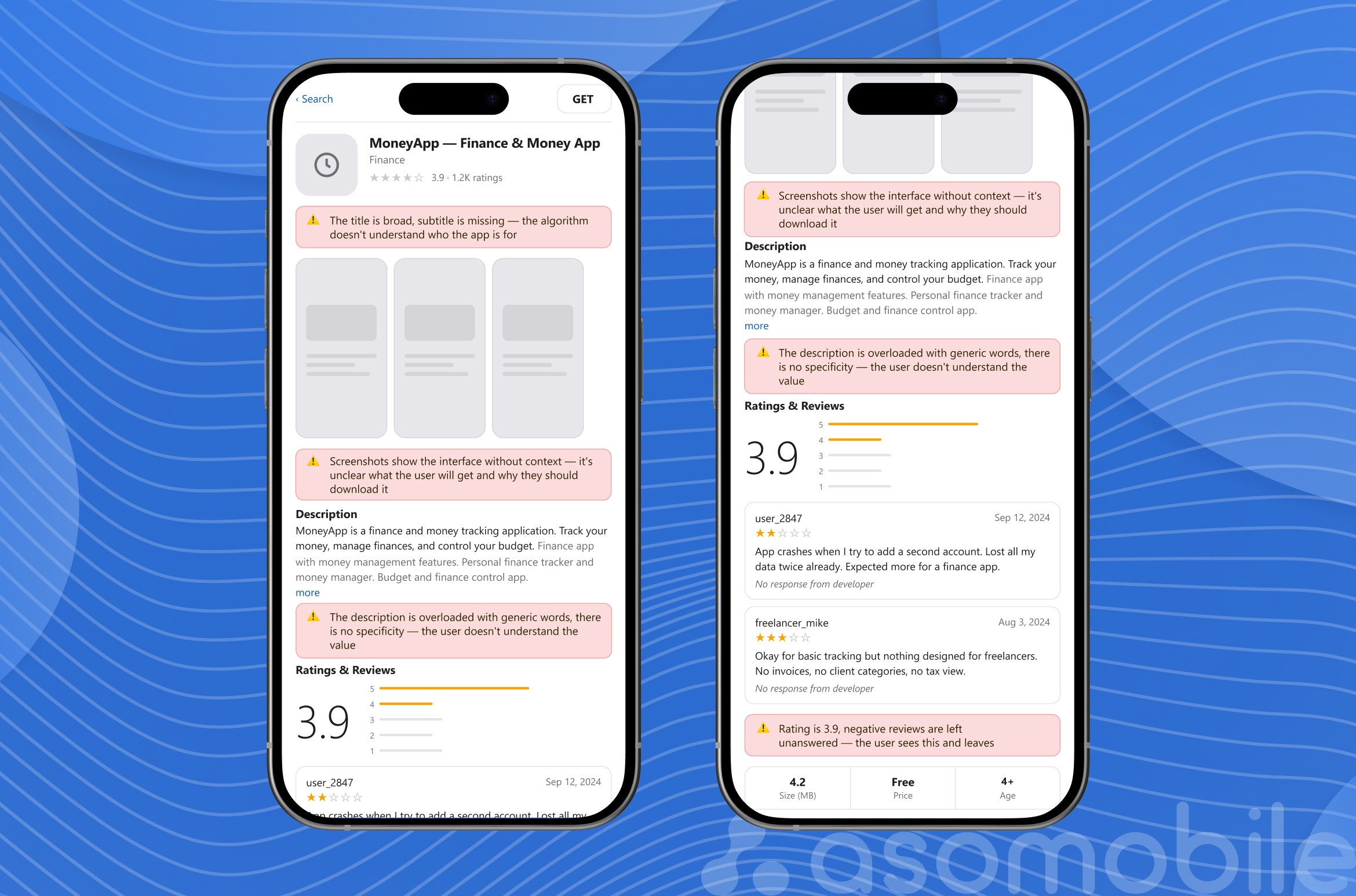
The original screenshots showed the interface. Clean and neat, but none of them answered the key questions a Finance user has: can I trust this app, what exactly will I get, how easy is it?
We built the new sequence around one principle: each screenshot answers one question from a skeptical user.
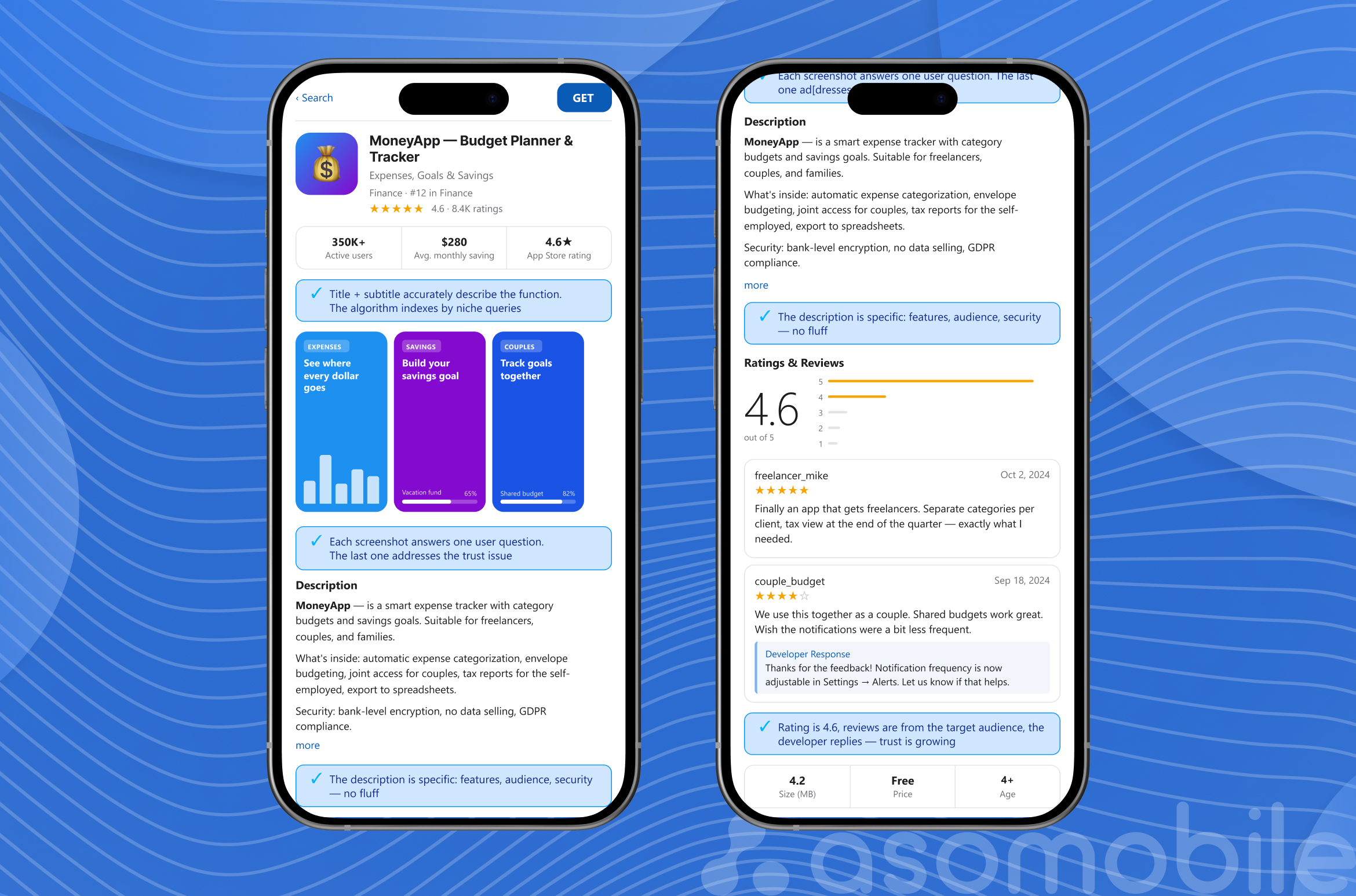
The first shows what the user gets: real spending analytics by category with actual numbers, not an empty interface. The second explains how it works: setting up a budget in three steps. The third reveals additional functionality: savings goals with a progress bar. The fourth shows a shared budget for couples. The fifth closes the trust question with a privacy marker and a security statement.
The security signal in the fifth screenshot isn't random. Finance users scroll past the first two screenshots more often than users in other categories because the stakes are higher. Bank-level encryption. We never sell your data. A simple line like that removes the main objection before install.
On the first screenshot, we added social proof: the number of active users and average savings. For a financially savvy audience, that's more convincing than any slogan.
Step 7. Localization and country strategy
Three target markets, three different keyword realities. That's not a metaphor.
US: budget app, expense tracker, spending tracker, savings app. Plus strong demand for debt payoff and no-spend challenge. Competition is high, but audience-specific queries are relatively open.
UK: local terminology shifts priorities. Money management app, budgeting app UK, and open banking app are queries with local specifics that simply don't exist in US search. The currency in screenshots was switched to £, and the description now mentions compatibility with UK banks.
Germany: German-language metadata focused on Haushaltsplaner, Ausgaben tracker, and Sparziel App. German users are privacy-sensitive, so the metadata security statement is more detailed than in other markets. Screenshots use €.
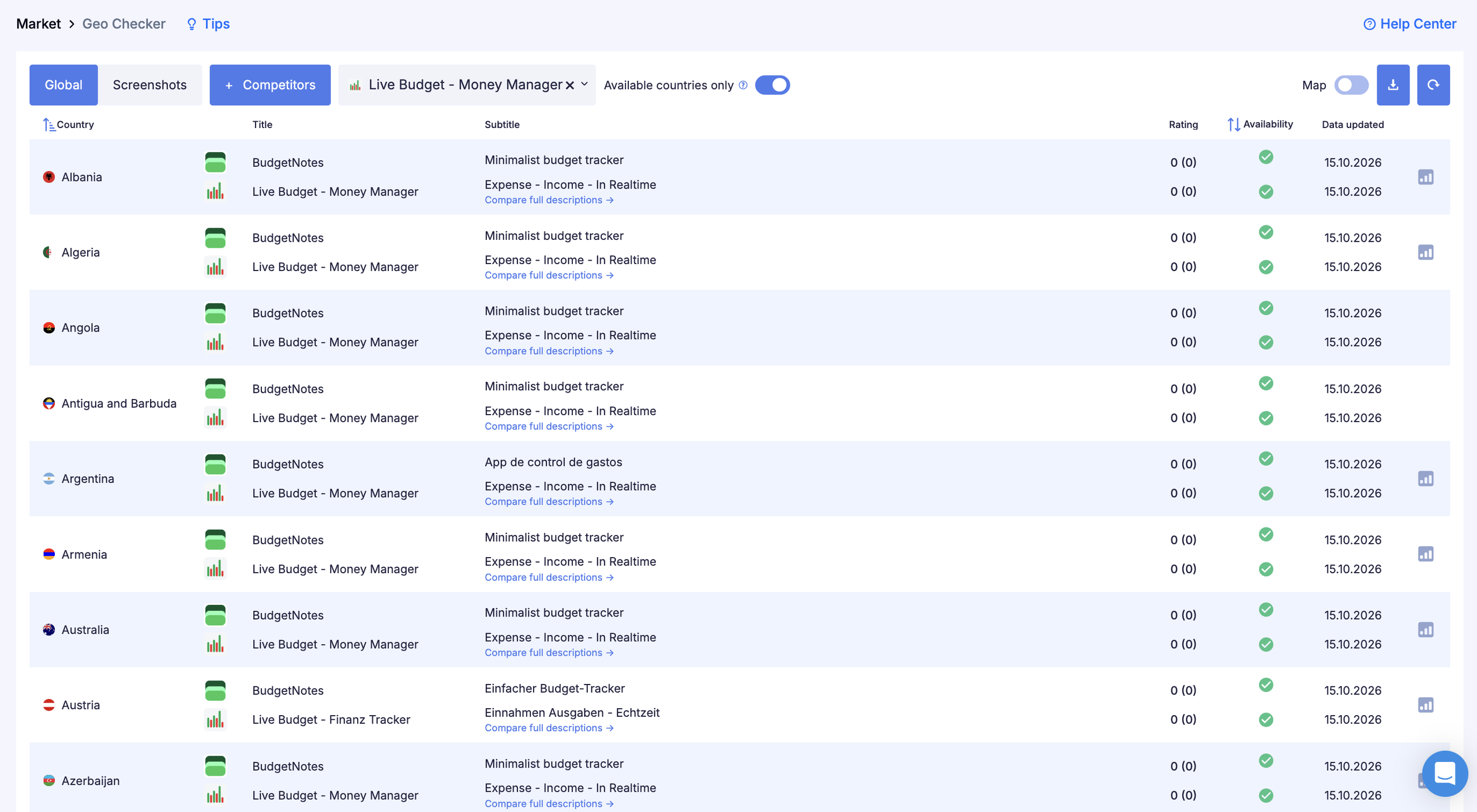
Localization in Finance isn't translation. Local payment systems, regulators and money habits create different search patterns. An app with the same copy for every market loses visibility in each of them.
Step 8. Ratings, reviews and monitoring
The 3.9 rating at launch was one of the main problems. In Finance, dropping below 4.3 noticeably hurts conversion because users read reviews here more carefully than in any other category. One unanswered negative review about lost data or a blocked account does more damage than a dozen positive ones.
Our approach to ratings came down to two concrete decisions.
Timing the review prompt. Asking at a random moment or in the middle of a complex flow works poorly. Asking after the user reaches their first savings goal or after a week of consistent use is a different story: in a moment of success, people rate higher and more willingly.
Replies to reviews should be specific and to the point. Users considering an install read both the reviews and the developer's replies. A developer who responds professionally sends exactly the reliability signal a Finance audience is looking for.
Monitoring after the first iteration: ranks for each keyword group weekly, Visibility Score weekly, page conversion every two weeks, rating and new review dynamics daily, competitor visibility every two weeks.
A Finance-specific point: conversion can differ several times over between countries. The same app may convert at 2% in one country and 7% in another. Without a separate report for each market, you can't make the right call on where to strengthen localization.
Step 9. Data-driven iteration
Data four weeks after the first iteration:
| Metric | Before optimization | After first iteration (4 weeks) |
| Indexed keywords | ~87 | 241 |
| New keywords in search | — | 156 |
| Keywords in top 11–20 | 3 | 31 |
| Keyword coverage | 34 of 139 | 111 of 139 |
| Average rating | 3.9 | 4.2 |
156 new keywords in search means the app started appearing where it hadn't before. Growth from 3 to 31 keywords in the top 11–20 means the first positions that bring real traffic. The rating rose to 4.2. It's not the 4.5+ target yet, but the trend is positive.
Audience-specific queries (expense tracker for freelancers, budget app for couples) showed the fastest rank growth. The hypothesis held up: niche entry points deliver results faster than competing for broad queries.
What shaped the second iteration: the savings goals group moved less than expected, so we revised priorities within it. Audience-specific queries were expanded with new modifiers. For the German market, we launched an A/B test of an alternative screenshot with a different security statement.
Which KPIs a finance app should track
| Case stage | Problem | Action | KPI to track |
| Audit | Low non-branded visibility | Analysis of current ranks, metadata and competitors | Visibility Score, number of indexed keywords |
| Competitor analysis | Unclear entry points | Comparing competitors' keywords, ranks and ratings | Competitive keyword gaps |
| Keyword groups | Broad metadata with no focus | Grouping 139 keywords, prioritization | Keyword coverage |
| Metadata optimization | Weak indexing | New name, subtitle, Keywords field, description | Growth in indexed keywords, ranks in priority groups |
| Screenshots and conversion | Low page conversion | New screenshots with trust signals and concrete numbers | Page View to Install CR, A/B test |
| Localization | Lost visibility in country markets | Adapting metadata and screenshots for US, UK, DE | Ranks and conversion by country |
| Ratings and reviews | A 3.9 rating hurts conversion | Timing the review prompt, replying to reviews | Average rating, review volume, reply rate |
| Monitoring and iteration | Unclear what worked | Weekly tracking of ranks and competitor visibility | Dynamics by group, Impression to Install |
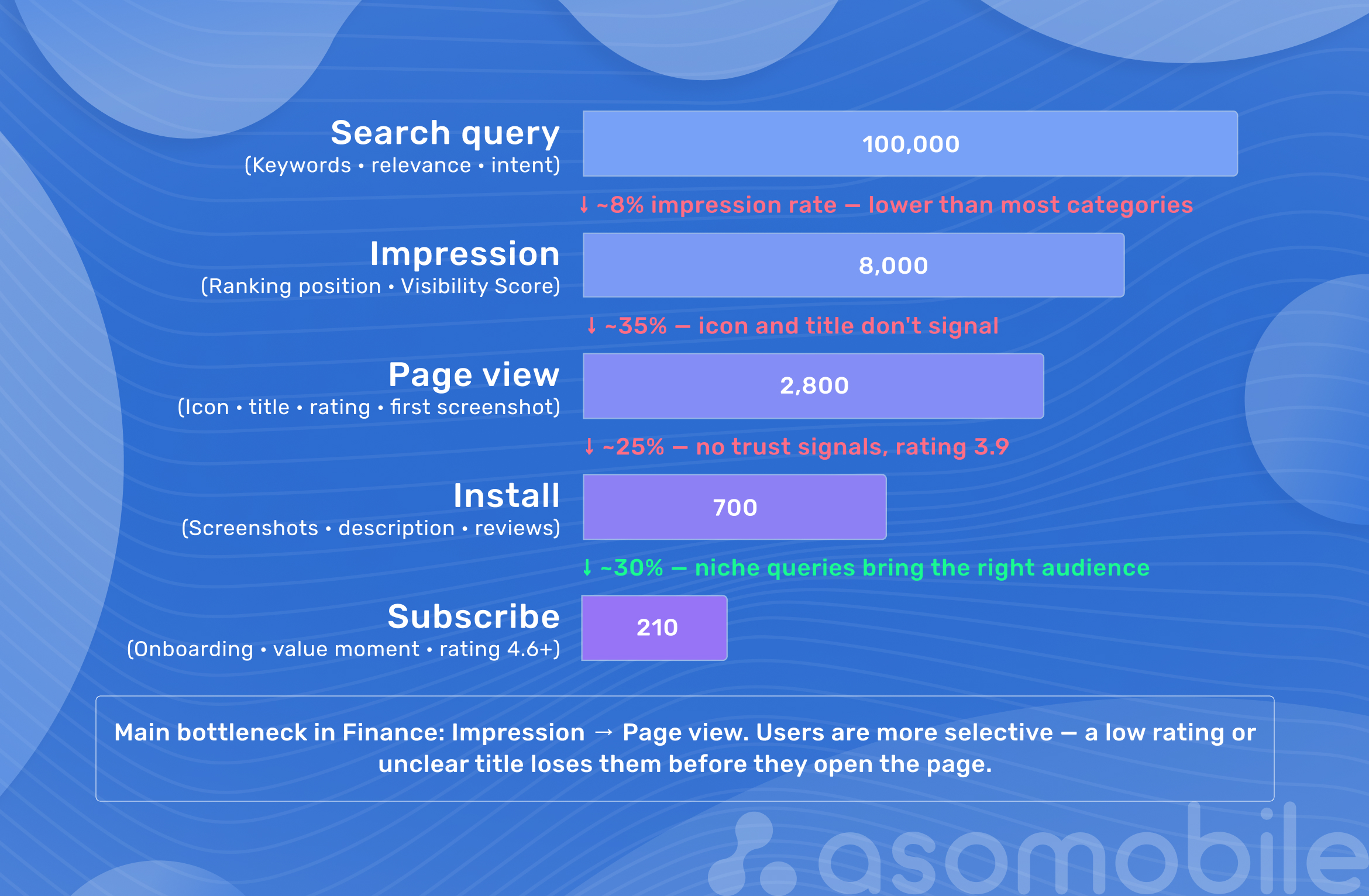
Some metrics behave differently in Finance than in other categories.
Impression to Page View shows how well the icon and name turn impressions into visits. In Finance, this rate is below average because users are more selective. A low value signals that the icon or name doesn't inspire enough trust to tap through.
Page View to Install shows how convincing the page is. If it's below the niche average, look for the problem in screenshots or rating, not in keywords.
Rating by version works as a leading indicator. A drop after a specific update shows up in new review dynamics before it hits the average score. We track both.
If Impression to Install varies widely between countries, it's a signal about localization rather than product quality: the metadata or screenshots aren't working in a specific market. We check conversion by country in App Store Connect and Google Play Console. Geo Checker in ASOMobile shows how competitors adapt their name and description for each market, and we compare our page against that.
How ASOMobile supports the ASO workflow for finance apps
Iterative work in Finance requires constant monitoring. Doing it manually doesn't keep up with this pace of change.
Keyword Monitor tracks ranks for each keyword group by country and platform. When tax season opens and competitors start climbing for tax calculator app, that's your signal to adjust your own metadata while the window is open.
Spy Keywords shows competitors' keywords: which queries they're visible for and what changed after their latest update. This is how you find keyword gaps, queries where a competitor has weakened or never optimized at all.
Spy Competitors gives a full picture of changes on a competitor's page: new screenshots, an updated description, rating shifts. A competitor's rating dropping below 4.3 is a direct opening for apps ranking next to it for a relevant query.
ASO Dashboard brings key metrics together in one place. In Finance, where conversion can vary widely by country, a separate view for each market is a must.
Ratings & Reviews tracks rating dynamics after updates and lets you reply to reviews right from the interface. Linking a specific release to a spike in negative reviews lets you react in days, not weeks.
For more on building keyword strategy and handling competition in Finance, read our article on ASO for finance apps in 2026.
Conclusion
In Finance, organic growth is slower than in entertainment categories, but search users convert noticeably better because they know what they want when they type the query. The first iteration is never the final one. It produces the data the second one is built on. That's how growth works in this niche.
ASO in Finance is simple and affordable when you know where to look 💙
FAQ: Frequently Asked Questions
An ASO case study is a step-by-step breakdown of a real or illustrative app store optimization scenario. It covers the starting point with metrics, each stage with the reasoning behind decisions, data before and after the first iteration, and conclusions about what worked. Unlike a theoretical article, a case study shows the actual decision-making process rather than general recommendations.
ASO improves non-branded search visibility: users find the app through functional and niche queries, not just by name. This matters especially in Finance because paid acquisition costs in the category rank among the top 3 in the market, and organic traffic from the App Store and Google Play is one of the few channels with an acceptable CAC. Users who arrive through a precise search query convert to paying customers more often.
Start from functionality, not volume. Broad queries like finance app or money manager are owned by category leaders. For a new app, the queries that work are functional (expense tracker, budget planner), audience-specific (budget app for couples, expense tracker for freelancers) and problem-driven (stop overspending app, debt payoff tracker). No big brand dominates these groups, so reaching the top within a reasonable time is realistic.
The core metrics are the number of indexed keywords and how it changes, rank distribution by group, Visibility Score, Impression to Page View, Page View to Install, average rating and review volume. In Finance, add country-level conversion, because differences between countries can be several-fold. Looking at any single metric in isolation makes little sense, since they work as a system.
Competitor analysis shows not only what the leaders do but where they have gaps: queries they haven’t optimized for and audiences they aren’t reaching. User complaints in competitors’ reviews are a ready-made list of topics for your own screenshots and metadata. A competitor’s rating drop is a direct opportunity for apps ranking next to it for relevant queries.
One cycle from release to conclusions takes at least 4–6 weeks: the algorithm needs time to index, and behavioral signals need time to accumulate. Changing things too often makes it impossible to evaluate the previous version. Plan updates every 4–8 weeks or when something significant happens: a new feature launch, a seasonal search peak, or a sharp move by a competitor.
Yes. ASOMobile covers the full workflow: keyword research with Keyword Finder, competitor analysis with Spy Keywords and Spy Competitors, rank tracking with Keyword Monitor, rating and review tracking, analysis of competitors’ localization by country with Geo Checker, and conversion benchmarks with Store Benchmarks. For Finance teams working iteratively, this keeps all the data in one place and makes it possible to react to market changes quickly.