The App Store listing is the first thing a user sees and the only thing the algorithm reads. Between 59% and 65% of App Store downloads come from search, according to Apple and independent research. Most teams optimize their listings once at launch and only return when rankings have already dropped. By then, the algorithm has changed how it reads the page several times over.
In 2026, the App Store processes listings differently than two years ago: Custom Product Pages appear in organic search, user retention influences rankings more than most ASO specialists account for, and the algorithm has gotten better at understanding intent without exact keyword matches. This guide covers what actually moves rankings, what only improves conversion, and where the two overlap.
What Is an App Store Product Page in 2026?
An App Store listing is the full page for your app: title, icon, subtitle, screenshots, description, ratings, and reviews. All of it together. On the surface — a set of fields to fill in. In practice, a model of your app that the algorithm builds and continuously updates.
The store doesn't evaluate elements separately. It cross-references signals: do the keywords in your metadata match what users write in reviews, does the page's promise hold up against high post-install retention, does conversion align with what the algorithm expected for a given query?
Two concepts are constantly mixed up, even among professionals.
Ranking factors — signals that determine which queries your app appears for and at what position. Metadata, user behavior, ratings, and install velocity.
Conversion factors — elements that influence a user's decision to install after they've already landed on the page. Screenshots, icon, description, video.
Confusing the two leads to wrong priorities. A team spends hours polishing the icon while keyword coverage is at half capacity. Or they keep adding keywords without understanding why conversion isn't moving.
Which Elements Affect Rankings vs Conversion?
| Element | Affects Rankings | Affects Conversion | Notes |
|---|---|---|---|
| Title | Yes, directly | Yes | Highest keyword weight of any field |
| Subtitle | Yes, directly | Yes | Visible in search; truncated on small screens |
| Keywords field | Yes, directly | No | Hidden from users; duplicates from title/subtitle add no weight |
| Description | No | Yes | Not indexed for search on iOS |
| Icon | No | Yes, strongly | Drives CTR from search results |
| Screenshots | No | Yes, strongly | First 1–3 visible in search |
| Video | No | Yes | Especially useful for complex products |
| Ratings | Indirectly | Yes, strongly | Via conversion and user behavior signals |
| Reviews | Indirectly | Yes | App Store indexes review text |
| Retention (D1, D7) | Yes, strongly | No | Quality signal for the algorithm |
| Install velocity | Yes | No | Download velocity signals relevance |
| In-App Events | Yes (title, description) | Yes | The event card appears in the search |
| In-App Purchases | Yes (title, description) | Yes | Expand keyword coverage |
| Custom Product Pages | Yes (organic since July 2025) | Yes | Up to 70 pages per app |
| Update frequency | Yes, indirectly | No | Signals an active, maintained product |
Conversion elements influence rankings indirectly — through user behavior. A weak icon lowers CTR, lower CTR reduces conversions, and lower conversions pull rankings down. The distinction is real but not absolute. Knowing where you have a direct lever and where you're working through a chain matters for setting priorities.
Key Terms
Download velocity — the rate at which installs accumulate over time. A sudden spike signals to the algorithm that the app is gaining traction.
CTR (click-through rate) — the share of users who tapped on the app after seeing the icon and title in search results. Primarily driven by the icon and the first words of the title.
Conversion rate (CR) — the share of users who installed after visiting the listing page. All visual elements work toward this: screenshots, video, and ratings.
D1 / D7 retention — the share of users who returned to the app 1 and 7 days after installing. One of the strongest behavioral signals the algorithm uses.
Keyword field — a 100-character field in App Store Connect, hidden from users but indexed by the algorithm.
App Store vs Google Play: Core Differences in Ranking Logic
Both platforms use similar signals, but their optimization strategies differ.
On iOS, only three text fields are indexed: title, subtitle, and the keyword field. The description is not read by the algorithm — it's written only for the user. Keywords should not be repeated across fields: duplication adds no extra weight.
On Google Play, the full description — up to 4,000 characters — is indexed. Keywords need to be integrated naturally into the text, roughly one exact match per 250 characters. The description here is a content task, not just conversion copy. There is no separate keyword field.
Behavioral signals matter on both platforms, but the emphasis differs. Google Play explicitly shifted weight from install volume to retention in 2025 — apps with high retention rise, apps with install spikes followed by fast churn fall. On iOS, this relationship is less formalized, but it plays out the same way in practice.
Metadata Fields That Matter Most
Title — 30 characters
The title is the primary ranking element. The algorithm gives more weight to keywords in the title than to the same keywords anywhere else. Standard formula: brand + 1–2 high-volume keywords. Example: "Notion: Notes, Tasks, Wikis" — brand and three keywords in 28 characters.
Practical notes: a colon instead of a dash saves one character, an ampersand instead of "and" saves two. Every character here is worth more than in any other field.
Subtitle — 30 characters
The subtitle affects both rankings and CTR. Users see it directly in search results — before they visit the page. The best subtitle explains value rather than listing features.
Put the important keywords first: on small screens, the subtitle gets cut off. If your key term is third in the subtitle, a large share of users will never see it.
Keywords — 100 characters
The field is hidden from users but read by the algorithm. The most commonly broken rule: don't repeat keywords from the title or subtitle — repetition adds no weight on iOS. This is 100 characters for new semantic coverage, not for reinforcing what's already indexed.
The App Store now understands semantics better than it did two or three years ago. The priority is intent coverage, not mechanical keyword stacking. No spaces between words saves characters: "yoga,meditation,sleep" takes up less space than "yoga, meditation, sleep".
Custom Product Pages — up to 70 pages
Since July 2025, Custom Product Pages are indexed organically — not only in Apple Search Ads campaigns. Each CPP can be tied to specific keywords and appear in organic search results. Apple also raised the limit from 35 to 70 pages per app.
This allows targeting semantic clusters that can't fit in a single listing. A meditation app can have one page for "meditation for beginners" and another for "sleep breathing techniques" — different audiences, different intent, different screenshots, all within a single app.
The logic: a fitness app with one default listing can't simultaneously speak convincingly to "weight loss workouts", "prenatal yoga", and "home strength training". CPPs remove that constraint — each segment gets a page built around its query.
How Screenshots, Icons, and Social Proof Influence Performance
Screenshots: conversion that affects rankings
Screenshots aren't directly indexed for text, but they influence rankings indirectly through conversion. The first 1–3 screenshots are visible in iOS search results before a user visits the page. If they don't communicate value immediately, most users won't tap through. Lower CTR reduces conversions; lower conversions pull rankings down.
Screenshots need to work on their own — communicating value without context. Specific captions outperform descriptive ones across every metric. Calm uses "sleep meditation", "anxiety relief", "breathing exercises" on its first screenshots — users understand the product in a second. "Feel better every day" tells neither the user nor the algorithm anything useful.
Technically: large, high-contrast text, dark mode adaptation, screenshots connected visually for storytelling.
Icon: the fastest decision point
The icon doesn't factor into text indexing, but it directly drives CTR from search. Users see the icon before they read the title — and make the first decision in fractions of a second.
A working icon is simple, reads instantly, stands out from competitors in results, and reflects what the product does. Icons overloaded with text and complex graphics lose to simple ones, even with better metadata.
Ratings and reviews: social proof as a ranking signal
Based on ASO practitioners' observations, apps with fewer than 3.5 stars see noticeably lower visibility. Above 4.0 — rankings start to improve. Above 4.5 — the algorithm treats it as a consistent quality signal. Apple doesn't publish the exact formula, but the correlation between high ratings and visibility is well-documented in practice.
One nuance that often gets missed: the algorithm looks at the rating trajectory, not just the average. Recent reviews carry more weight than historical ratings. An app that sat at 3.8 a year ago but now consistently earns 4.7 will outrank one that's held at 4.5 without change.
The App Store indexes review text. If users frequently mention specific features or terms in reviews, it can influence relevance for those queries. Managing reviews is not just reputation — it's part of your keyword footprint.
Common ASO Mistakes
Duplicating keywords across fields. The title, subtitle, and keyword fields are three independent indexing slots. A word already in your title adds no weight in the keyword field. That's 100 characters spent reinforcing what already works.
Optimizing for keywords without checking intent. An app can rank first for a query and get zero installs if the query doesn't match what the target audience actually needs. High volume doesn't mean right. This is one of the most painful mistakes because everything looks fine in the tracker — rankings are there, installs aren't.
Ignoring the first three screenshots. These are the ones visible in search before a user taps through. If they don't explain value in a second, most users won't click, CTR drops, and rankings follow.
Not testing creatives. The App Store provides a built-in A/B test for icon, screenshots, and video. Teams running tests quarterly accumulate 4 iterations per year. Teams testing every two weeks accumulate 25. The gap in audience understanding compounds fast.
Not responding to reviews. On iOS, developer responses aren't a direct ranking signal (unlike Google Play), but they influence conversion: prospective users read responses before installing and use them to judge product quality.
Not updating the app. According to 42matters data, 74% of the top 1,000 apps on the App Store update at least once a month. A product that goes months without updates loses rankings — the algorithm treats it as abandoned.
Translating instead of localizing. One of the most expensive mistakes. Translating copy and leaving screenshots in English is not localization. In markets with low English proficiency, this measurably hurts conversion. Localization means adapting intent, keywords, and visuals to each specific market.
How to Measure App Store Listing Performance with ASO Tools
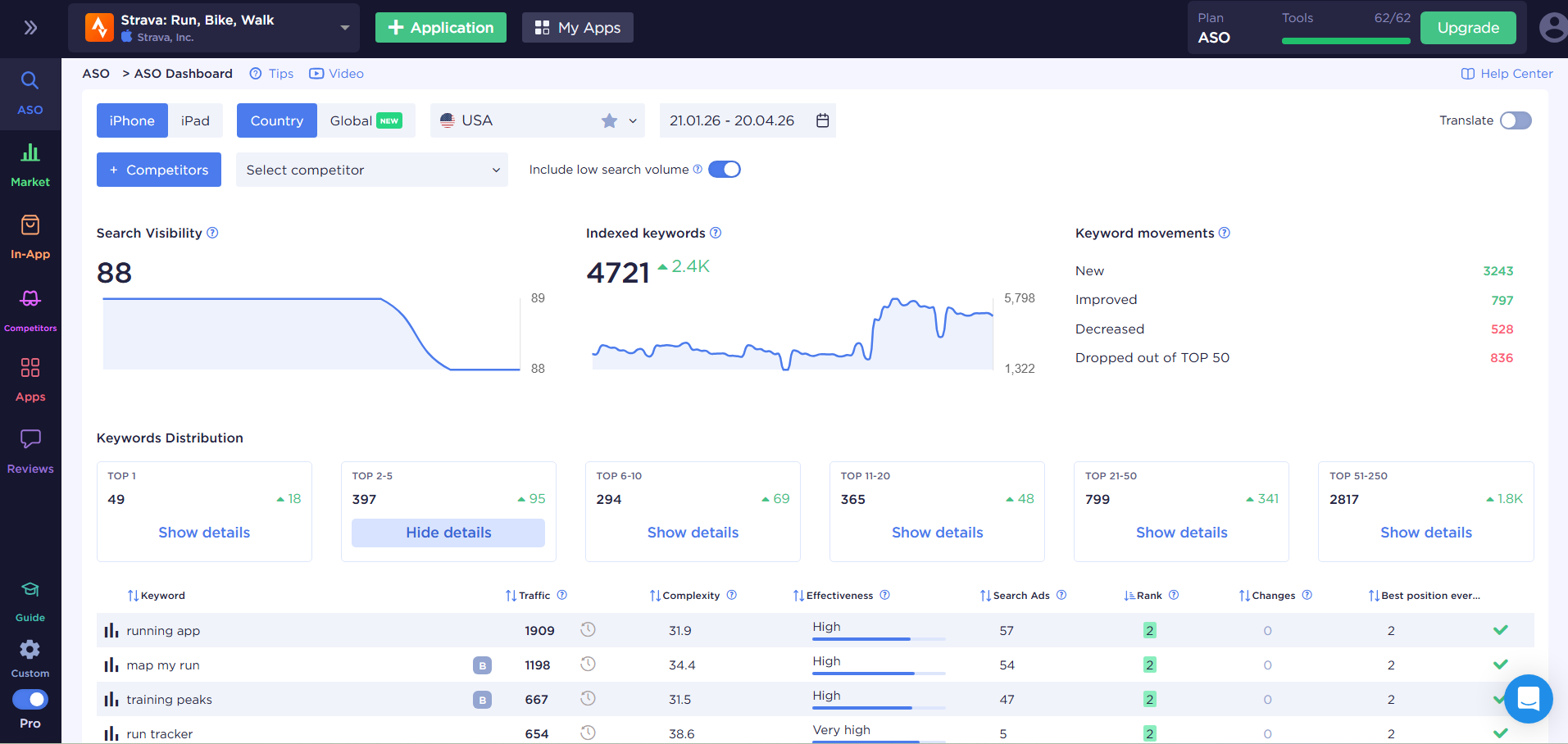
Keyword rankings — the baseline. Which positions your app holds for target queries, how they shift after metadata updates, and which keywords competitors are gaining on.
Conversion rate from search — shows how well the listing matches expectations for a specific query. If CTR is good but CR is low, the problem is on the page, not in the metadata.
Competitor analysis — without knowing what competitors are doing with their metadata, it's hard to find uncovered queries and growth opportunities. A competitor rising on a keyword where you used to rank is the first signal to reassess priorities.
Visibility score — an aggregated metric across all tracked keywords. Useful for monitoring overall momentum without drilling down into each keyword.
Quick Listing Audit: 5 Steps
When there's no time for a full review, this sequence takes 20–30 minutes:
- Open App Store Connect and check for keyword duplicates across title, subtitle, and the keyword field. Every duplicate is a wasted character.
- Search for your app using 3–5 target queries. Check which screenshots are visible before clicking through — and whether the value is clear without a tap.
- Go to App Store Connect → App Analytics → Acquisition and review CR by source. If search drives high traffic but low conversion, your visuals don't match the query.
- Check the date of your last metadata update. If it's been more than two months, the competitive landscape may have shifted in the meantime.
- Open the listings of two or three closest competitors and compare their title and subtitle to yours. Keywords they use that you don't — that's a coverage gap.
ASOMobile covers all of this in one interface: keyword tracking with ranking history, competitor monitoring, metadata analysis, and organic download estimates. For teams working across multiple apps or markets, having all data in one place removes the need to switch between tools.
Final Thought
Most teams lose rankings, not because they picked the wrong keywords. They lose them because the listing promises one thing and the app delivers another — and the algorithm catches it through user behavior before the team realizes what happened.
Metadata can be fixed in a day. The gap between promise and product can't.
Optimize smart and easy💙
FAQ: Frequently Asked Questions
Yes, but not every element equally. Title, subtitle, and keyword field are direct ranking factors. Icon, screenshots, description, and video are conversion elements that influence rankings indirectly through user behavior: CTR, conversion rate, retention.
The title carries the most weight — keywords in the title get the highest priority. The subtitle reinforces relevance and is visible in search results. The keyword field covers additional semantic territory that didn’t fit in the first two fields.
Not directly through indexing. Screenshots indirectly influence rankings: the first 1–3 are visible in search results and drive CTR. Lower CTR means lower conversions, which can pull rankings down over time.
Metadata — at minimum every 4–6 weeks, based on ranking movement and competitor activity. Creatives — based on A/B test results, ideally with a 2–4 week testing cycle. Waiting for a quarterly review means missing opportunities competitors aren’t missing.
Ranking factors determine which queries your app appears for and at what position. Conversion factors influence whether a user installs after landing on the page. Ranking factors work before the user ever sees your app. Conversion factors work after.