The most popular mobile games don't dominate the charts on gameplay alone. Their store pages get more attention than most studios realize — built and rebuilt continuously by people who understand the indexing math of both stores, the algorithm quirks of both platforms, and the psychology of the player they want to convert. That work is what separates a chart-topping game from a mid-tier one with the same production budget.
What follows is a breakdown of the ASO tactics those teams actually use: how they structure metadata, how they design icons and screenshots for conversion, how they manage ratings, and how they keep the store page working as a growth channel rather than a launch checklist. The lessons translate to any scale, and most of them don't require an enterprise team to apply them.
Why the Most Popular Mobile Games Are Worth Studying for Game ASO
Sensor Tower's State of Gaming 2026 report puts global mobile game downloads at 52 billion for 2025, with 42 billion on Google Play. But the headline hides a more important shift: install volume has flattened. The year's growth came from in-app revenue and engagement time, not from a bigger pool of new users.
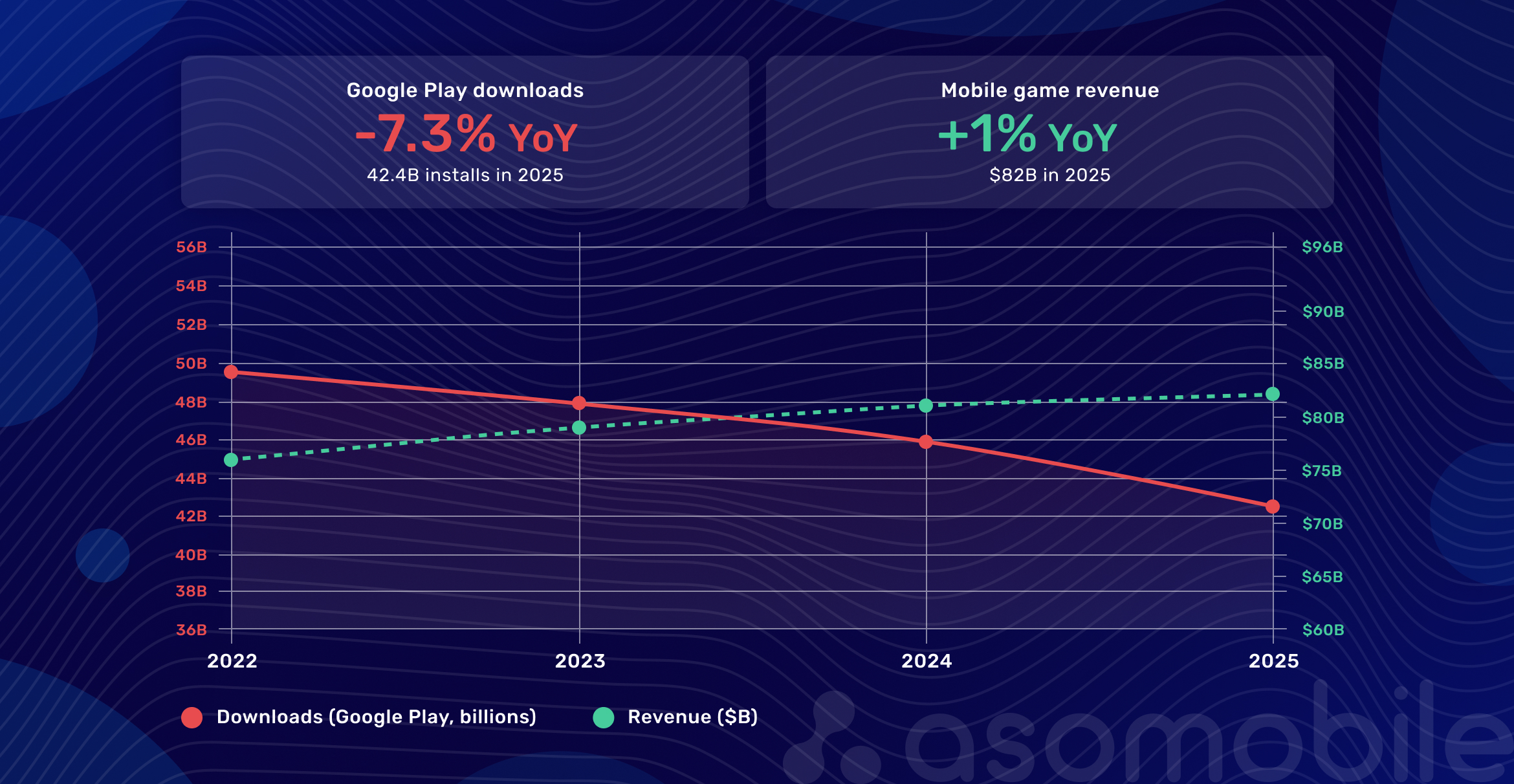
That changes what ASO is for. When cheap new installs aren't a given, converting the store traffic you already have matters more. In gaming — the most competitive category on either store — that's the lever with the least slack.
Competition here works differently from other verticals. Gaming sees more new releases per day than any other industry, and ranking positions erode quickly as a result. A game ranking for a relevant term in January can be off the first page by March if nobody is maintaining the listing. The games that hold position have teams continuously testing icons, screenshots, and keyword lists, refreshing metadata around seasonal events and competitor moves.
You don't need their budget to drive organic app installs. You need to understand what they're doing and why.
What to do this week: pull up your game's store page and ask whether anyone has touched the metadata or creatives in the last 60 days. If not, that's where your visibility is leaking.
What Top Mobile Games Have in Common on Their Store Pages
Across genres and budgets, top-charting games share the same structural discipline. Titles are short and built around terms players actually search. Descriptions front-load the emotional hook. Game app metadata reads as if it were written for both the algorithm and the person who might download the game — because it was.
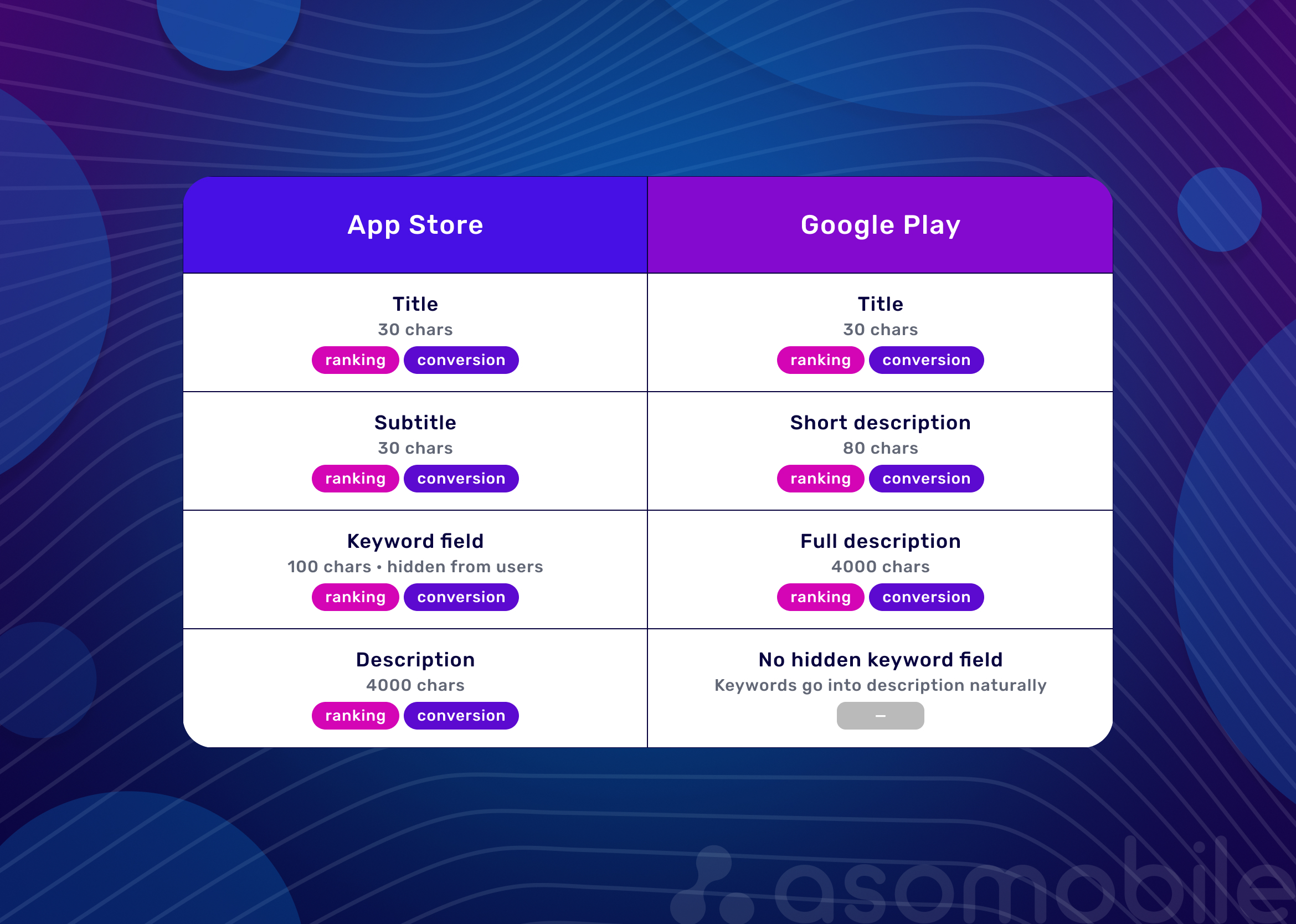
The App Store and Google Play index content differently, and publishers at the top account for the gap. On the App Store, only the title, subtitle, and keyword fields affect search rankings — the description shapes conversion once someone lands on the page, but it doesn't affect rankings. On Google Play, the title, short description, and full description are all indexed, so keywords are distributed naturally throughout rather than stacked in one field.
Where each metric matters most also depends on genre. Casual and hyper-casual games live on conversion rate — broad search terms mean broad competition, so creative beats keywords. Mid-core and strategy games live on keyword ranking, because players search with specific intent. RPG and narrative games live on ratings — search filters can exclude anything under 4.0 stars, and the gap between 3.9 and 4.3 decides whether a page visit converts.
Sort that out first, before you've looked at a single competitor listing.
How Game Publishers Use Icons, Screenshots, and Videos to Increase Conversion
In utility apps, function does most of the selling. In mobile game ASO, players decide based on how the game makes them feel, and that decision happens fast. Each creative element performs a distinct role in that response.
The icon works at thumbnail size in a crowded search result. Its job is to signal genre and tone before the player reads anything. Branding is secondary. Abstract logos consistently lose to character-led designs. Google Play's built-in store listing experiments make icon testing accessible without external tooling — two variants, three to four weeks, real conversion data.
Screenshots do the narrative work. A good sequence doesn't lead with UI. It communicates the experience, with each screenshot answering a different player question: what kind of game is this, how deep does it go, what does winning feel like.
Video previews autoplay on many placements, and a large share of those views happen with audio off. The first three to five seconds have to land visually before anything else.
How each plays out across the three biggest game categories:
| Creative Element | Casual (Subway Surfers, Candy Crush) | Strategy (Clash of Clans, Clash Royale) | RPG (Genshin Impact, Honkai: Star Rail) |
| Icon | Bold character, high contrast, clean background | Character in action, conveys energy and conflict | Cinematic character portrait, premium quality |
| Screenshot logic | Environmental variety, signals replayability | Scale and depth first, then systems and progression | Cinematic stills and character art, world atmosphere |
| Video approach | Fast-paced gameplay, instant action, no preamble | Base building and combat sequence, establishes depth | Cinematic opener, character reveals, world scope |
| Primary conversion goal | Communicate immediate fun | Signal long-term depth and competitive play | Create emotional investment before the install |
What to do this week: open your store listing on a phone, not a laptop, and look at your first screenshot at the size players actually see it. If the gameplay isn't legible at that size, that's the next test to run.
What Keyword and Category Strategies Popular Games Often Follow
Top games rarely compete on the most obvious single keyword. "Game," "puzzle," "RPG" — too broad, too crowded. A working game keyword strategy builds clusters across three intents: discovery searches from players who don't know your game exists ("offline RPG," "strategy game no wifi"), genre searches from players who know what they want ("base building strategy," "match 3 puzzle"), and branded searches for your game or a competitor's. Most teams cover one layer well and the other two by accident.
Genshin Impact covers all three. It targets "open world RPG," "anime RPG," and "gacha RPG," and drives additional traffic through character names and collaboration events. Tracking those clusters as they shift is where most teams lose time — ASOMobile's Keyword Monitor tracks weekly position changes across your cluster and flags when competitors move onto your terms, so you find out before your install volume does.
Category selection is another lever most studios overlook. On the App Store, the primary category name is automatically indexed: a game in "Strategy" ranks for "strategy" searches without that word appearing in the metadata at all. Some publishers choose a less competitive category to rank higher relative to others, even when the more obvious one fits better. It's a visibility decision worth modeling before launch, not after.
This matters more now because paid acquisition has become more expensive, pushing studios to design store pages where paid and organic channels reinforce each other. When a paid campaign drives an early install spike, store algorithms read it as relevance and lift the game's category and keyword rankings — which then feeds organic installs the team didn't pay for.
What to do this week: pull your current keyword field on App Store Connect (or your full description on Google Play) and tag each keyword by intent layer. If two of the three layers are empty, that's your next gap to close.
How Ratings, Reviews, and Update Frequency Support Visibility
Both stores use rating scores and review volume as ranking signals. A game at 3.8 stars doesn't just look worse — it ranks lower. Google Play lets users filter results by minimum rating, which turns a sub-4-star average into a direct ranking problem, not just a perception one.
Rating prompt timing matters more than most developers account for. Top games ask after a win, a level completion, or a reward — not during a loss or on a loading screen. Games that tie prompts to positive moments tend to see their scores climb over two to three months — a meaningful shift in both conversion rate and search visibility.
In September 2021, players review-bombed Genshin Impact on Google Play over disappointing anniversary rewards. The rating collapsed from 4.6 to 1.9 in under two weeks. On the App Store, it barely moved from 4.7 throughout the same event. The Google Play rating recovered to 4.2 within a few months — not because HoYoverse ran a public response campaign (they stayed quiet and were criticized for it), but because Google Play's moderation removed coordinated reviews as policy violations, and the current-quality weighting meant fresh positive reviews could repair the score faster than on a lifetime-average system.
The defensive play isn't crisis PR on your store page. Build dynamic in-app review prompts tied to positive milestones so a steady flow of genuine reviews keeps your current-quality average healthy, and monitor for coordinated spikes early.
Regular updates also support app ranking through a freshness signal both stores reward. Each update is a chance to rewrite the "What's New" section — one of the few metadata fields that changes regularly and is almost universally treated as a patch log. That's a conversion touchpoint missed at every release.
ASO Lessons Indie and Mid-Sized Game Studios Can Apply
Most of what top games do doesn't require a large team. It requires treating mobile game marketing as an ongoing discipline rather than something you wrap up at launch.
| ASO Pattern | Why It Works | Lesson for Developers |
| Character-led icon design | Signals genre and tone at thumbnail size | Test character vs. environment icons; don't assume one works without data |
| Screenshot narrative arc | Each screenshot answers a different player question | Lead with the most visually striking gameplay moment, not the tutorial screen |
| Keyword clustering by intent | Covers discovery, genre, and branded searches | Map keywords by search intent, not just relevance — synonyms alone aren't a strategy |
| Milestone-based rating prompts | Catches players at peak satisfaction; protects current-quality average | Trigger prompts on wins and rewards, not load screens |
| Regular updates with What's New copy | Freshness signal plus re-engagement opportunity | Write the What's New section for the player, not the patch notes |
| Category selection as positioning | Lower competition can mean higher relative visibility | Check ranking opportunity against category fit before launch, not after |
For a studio with a limited UA budget, the store page is the cheapest mobile game growth lever available. Games that run regular visual A/B tests see meaningful lift in conversion compared to those with static listings.
Common Mistakes to Avoid When Optimizing a Mobile Game Listing
Keyword stuffing. Fields loaded with repeated terms hurt readability and can trigger store penalties. ASO for mobile games doesn't reward unnatural placement — it loses the player who reads the listing.
Screenshots that open with UI rather than experience. Players want to feel something before they read anything. The first screenshot isn't the place for an inventory screen.
Treating localization as optional. Top publishers localize both language and creative assets by market. Even text-only metadata localization in primary markets opens discoverability in searches an English-only listing will never reach.
Ignoring the "What's New" field. Every update ships with an opportunity to speak directly to the player. Most teams write a patch log. The games at the top write a reason to reinstall.
The Store Page Doesn't Maintain Itself
The most popular mobile games stay visible because someone is actively managing their listings. When new installs cost more, conversion from existing traffic matters more — studios that treat ASO as a continuous discipline build an organic advantage that compounds over time. Ratings hold. Keyword coverage expands. Creatives sharpen with every test.
If you're not sure where your listing stands against what's actually ranking in your category right now, ASOMobile's competitor analysis tools let you see exactly that — without guessing.
FAQ: Frequently Asked Questions
The store page is a product decision, not a one-time deliverable. Top-ranking games treat their listings as a live channel — testing icons, refreshing keyword metadata around seasonal events, updating screenshots as the game evolves.
Search drives most discovery on both stores: Apple reports 70% of App Store visitors use search to find apps, and nearly 65% of downloads happen directly after a search [ПРОВЕРИТЬ: актуальность цифр]. Popular games grow organically by covering multiple keyword intents and actively managing ratings.
The icon and first screenshot carry the most weight — both are visible before a player taps into the listing. Video previews matter most in action, hyper-casual, and RPG categories. Description copy shapes conversion on the page but doesn’t affect search ranking on iOS.
Yes, directly. Both stores use rating score and review volume as ranking signals, and Google Play calculates ratings from current-quality reviews rather than the lifetime average — recent reviews carry outsized weight.
How should indie game studios approach ASO? Start with Google Play’s free store listing experiments for icon and screenshot testing. Audit two or three competitor pages to see what’s working in your category. Then treat every update as a chance to revisit the listing — consistent small improvements compound more than a single overhaul.