An app listing is the part of the Google Play ecosystem that developers can directly control, and it has a direct impact on indexing, visibility, and conversion. In 2026, Google Play treats the listing not just as a set of text fields, but as a unified product context that includes copy, visual assets, and developer metadata. Algorithms use the listing to determine how relevant an app is to search queries and whether it matches user expectations.
It is important to understand that a listing alone does not guarantee top positions. It works together with user behavior and overall app quality. At the same time, the listing remains the starting point for indexing and for getting an app into search results and curated collections.
It is also worth noting that in 2026, Google Play increasingly relies on machine learning that evaluates not only individual fields but also their consistency with each other. Algorithms compare the listing text, visuals, category, and actual user behavior after installation. As a result, integrity and coherence matter more than ever: when the listing clearly and consistently describes the product, and the in-app experience confirms the promised value.
Key listing elements that impact visibility and ranking
Text elements of the listing
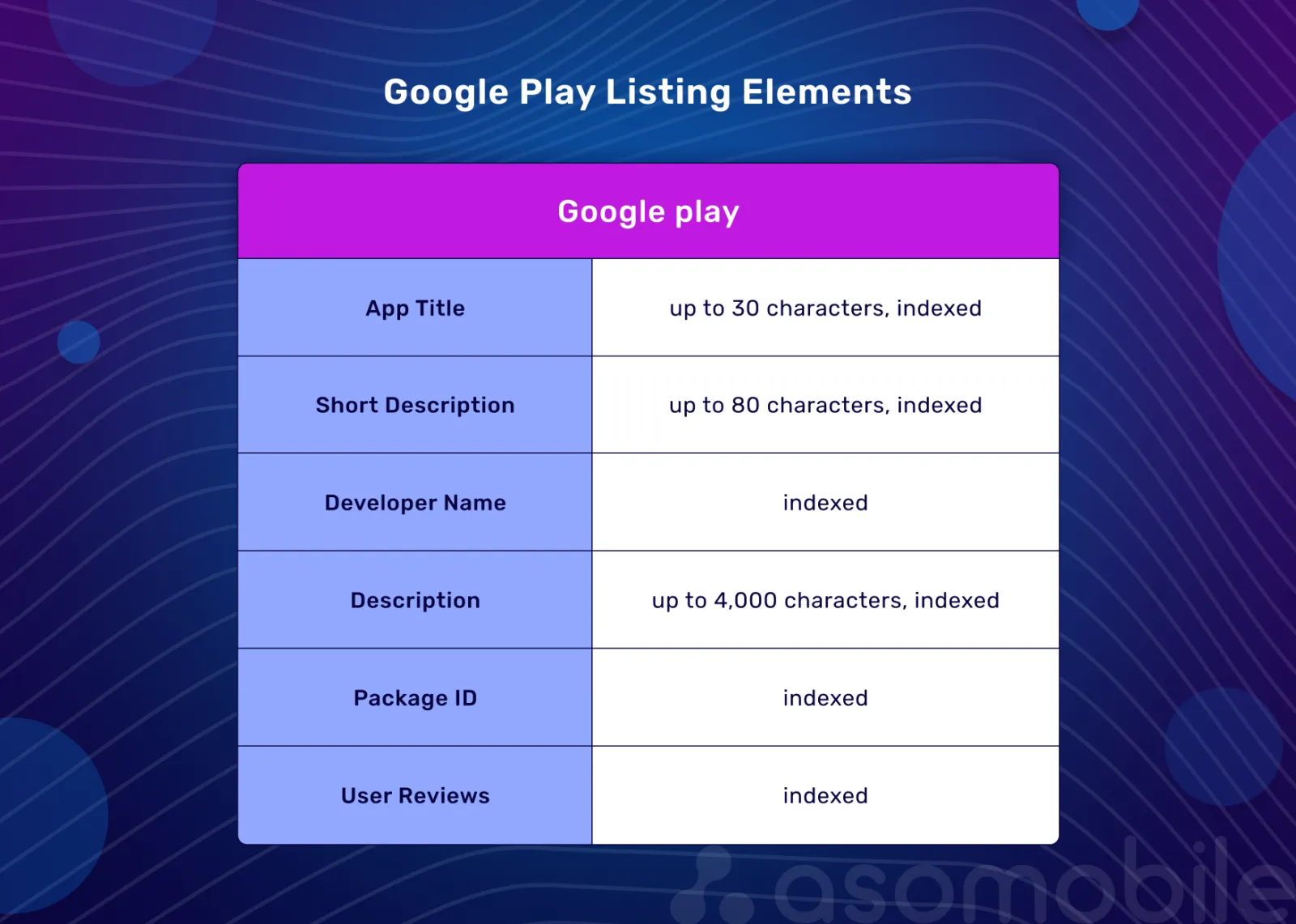
App title (up to 30 characters)
The title remains the strongest text-based factor for indexing in Google Play. In 2026, the priority is not keyword density, but precision and relevance of wording.
The title should:
- reflect the app’s core functionality;
- include the most relevant search query;
- remain readable and clear to the user.
Over-optimization or mechanical keyword stuffing can reduce conversions and negatively affect rankings. In practice, the title should balance search demand with clarity for the user: it should match the query intent while remaining easy to understand in search results.
Short description (up to 80 characters)
The short description continues to contribute to indexing, but its key role is to create a strong first impression. Google Play evaluates this field as part of the listing’s overall semantic context.
Recommendations:
- use 1–2 relevant queries in a natural way;
- focus on user value rather than listing features;
- remember this field directly affects CTR and conversion.
A helpful ASO guideline: the short description should explain why the app is worth installing, not just list capabilities. The clearer the value promise, the more likely conversion for a query will be stable rather than one-off.
Full description (up to 4,000 characters)
The full description remains indexable, but its role shifts toward explaining product value and reinforcing relevance. Google Play’s algorithms understand semantics better, so the following are especially important:
- a logical structure;
- natural keyword usage;
- alignment between the description and the real user experience.
Keywords used at the beginning of the text and in section headings still carry more weight, but the priority is semantic coherence rather than repetition.
In practice, this means that in 2026, text optimization should start not with the question “how can we use the query more often?” but with understanding “what need stands behind this query?” Algorithms compare the listing text with how users interact with the app after installation. If the description promises one use case but the app delivers another, it almost always leads to lower conversion rates, more early uninstalls, and reduced visibility for relevant queries.
Developer name
The developer name is indexed and displayed in search results, making it part of the listing context. This field can strengthen the thematic relevance of a developer’s portfolio, but abusing keywords increases the risk of losing user trust. It is important that the developer name looks natural and does not feel like manipulation.
Package Name (app ID)
The package name is a technical element used for indexing, but its impact is limited. It is especially important at launch, because it cannot be changed after publication. This factor is auxiliary and cannot compensate for weak listing optimization.
Visual elements of the listing
Icon
The icon does not contribute to text indexing, but it directly affects CTR. Through its impact on conversion, visuals indirectly influence visibility. For ASO, the rule is simple: even strong semantics will not deliver results if the visual layer does not support the user’s decision to install.
Screenshots
Screenshots are analyzed not only by users, but also by algorithms. Google Play applies machine learning to recognize text and visual context, so:
- the first screenshots should clearly show the main use case;
- on-image text should reinforce the value proposition;
- the visual style should match the app’s category.
In practical terms, the first 1–3 screenshots should explain what the user will get and why it is better or more convenient, rather than just showing screens. If screenshots do not help users quickly understand the value, conversion drops—and with it, ranking stability.
Video
Video is not a mandatory listing element, but in competitive categories, it can significantly increase conversion. Video is especially effective for demonstrating complex functionality and building trust. It works well when it is hard to explain the user journey or outcome with text alone.
Localization and listing personalization
Localization directly affects relevance and conversion. In 2026, Custom Store Listings play a special role, enabling you to:
- adapt the listing for different countries and languages;
- increase relevance for specific search queries;
- work with different audience segments and traffic sources.
From an ASO perspective, this is not just translation, but a way to better match audience intent: different markets express needs differently, respond differently to value promises, and perceive visual triggers differently.
What Google Play Console says about app discovery, ranking, and listings
In ASO, it is important to rely not only on market practices but also on Google Play’s official position. The primary source of information about search, ranking, and app visibility is the Google Play Console help documentation in the App Discovery and Ranking section.
Google Play’s goal is to help users easily discover apps and games they will enjoy. Users can find apps through search, the homepage, collections, editorial recommendations, and app detail pages, and across different device types.
Google Play aims to show relevant content and ensure a positive user experience. In general, it favors apps that:
- are high quality;
- match the user’s query and context;
- are relevant to a broad audience.
The best way to increase discoverability is to build a product that users enjoy and are willing to recommend to others.
How Google Play understands apps
To show users the right apps at the right time, Google Play needs to understand each product’s content and functionality, including:
- information provided by the developer (title, description, category, graphic assets);
- details about the app’s content and functionality;
- automatically identified characteristics;
- ratings, reviews, and user engagement.
This information informs how apps are organized and presented in search and recommendations.
How Google Play organizes and ranks apps
Google Play has different surfaces for app discovery, and ranking approaches can vary by context. When organizing and displaying apps, several key factors are considered:
User relevance
Google Play considers:
- search queries and user intent;
- metadata and the app category;
- synonyms and related wording;
- user behavior for specific queries.
For specific queries (for example, searching for an exact app title), Google aims to return the precise result. For broader queries (e.g., “photo editing”), ranking also considers factors related to app quality and user experience.
Quality of the user experience
Google Play emphasizes that app quality is one of the key ranking factors. Quality includes not only the in-app experience, but also the pre-install experience, including:
- icon, title, and description;
- screenshots and video;
- alignment between the listing and the real functionality;
- the quality of customer support.
Stability, performance, design, and appropriate ad behavior are also taken into account.
Editorial value and ads
Google Play uses editorial curation and recommendations. Editors and merchandisers select apps for thematic collections, seasonal campaigns, special placements, and labels (for example, Editors’ Choice).
Selection considers app quality, design, novelty, usefulness, and breadth of appeal. Developers can also promote apps through paid placements on Google Play. Such ads are always clearly labeled and shown alongside organic results, not replacing them.
What this means for ASO in practice
For ASO, it is important that ranking factors can be weighted differently depending on where a user is on Google Play. Search, recommendations, and charts solve different problems: in search, query match is primary; in recommendations, user experience and predicted interest matter more; and in charts, popularity plays a larger role. That is why, when analyzing listing performance, it is important to understand which surfaces drive traffic and what may be behind visibility gains or drops.
How the listing and app quality work together
The listing sets user expectations and determines which queries an app can appear for. After an impression, Google Play evaluates whether the actual user experience aligns with the value promised in the listing.
It is also important to consider time. A listing can drive short-term visibility growth, but in the medium and long term, positions depend more on how users interact with the product. That is why listing optimization without improving app quality yields only a limited, unstable effect.
If an app gets installs from relevant queries, runs reliably, and retains users, its visibility tends to strengthen. Otherwise, even a well-optimized listing can lose positions over time.
In practice, this means:
- metadata creates the pool of queries the app can be indexed for;
- visual assets influence CTR and conversion;
- user behavior and app quality adjust positions within that pool.
Behavioral factors and app quality in Google Play 2026
Unlike listing elements, behavioral factors and app quality are not controlled directly. They are the outcome of product decisions, marketing, and user experience. That is why, in 2026, Google Play used them as the primary mechanism for verifying ranking stability.
After indexing, Google Play begins to take real user behavior and app quality into account. These factors largely determine how stable an app’s positions are in search and recommendations.
Installs and their quality. Google Play evaluates the stability of incoming users, their behavior after install, and the share of users who become active.
Conversion from impression to install. Conversion reflects how well the listing matches user expectations for specific queries.
User retention. Special attention is paid to early usage periods, repeat sessions, and consistent interaction with core functionality.
Ratings and reviews. Google Play considers the average rating, its temporal dynamics, and review content. Reviews are indexed and influence app relevance.
Technical health. Google Play evaluates stability and performance using Play Console tools, including Android Vitals.
Meeting user expectations. A mismatch between the listing and the real experience negatively affects app visibility.
Conclusion
In the Google Play ecosystem, the listing sets expectations, while user behavior and app quality confirm or contradict them. Sustainable ranking is achieved only when listing optimization, the product, and the user experience work as one system.
Use the "ASOTIPS40" coupon to get 40% off your first purchase at ASOMobile (the promo code is valid for any plan and any period).
Optimize simply and on a budget 💙
The app listing affects indexing and initial visibility, but it does not guarantee top positions on its own. The listing determines which queries an app can appear for and how relevant it looks to users. Further ranking depends on user behavior and the app's overall quality.
Keywords are still important for indexing, but in 2026, the decisive factor is not their quantity, but how well they match user intent. Over-optimization can reduce conversion and negatively impact an app’s visibility.
User behavior helps Google Play evaluate whether the app meets the expectations set by the listing. Retention, conversion, ratings, and technical stability allow Google Play to promote apps that provide a positive user experience.
In the short term, listing optimization can increase visibility. However, without improving app quality and user experience, this effect will be unstable. In 2026, sustainable growth in Google Play is only possible when listing optimization and product development work together.